
Comprehensive validation and testing framework for Model Context Protocol (MCP) servers.
MCP Probe connects to your MCP server, discovers its tools/resources/prompts, and runs a battery of tests covering protocol conformance, schema validation, execution correctness, error handling, edge cases, and optional AI-powered semantic evaluation. Results are reported as a letter grade (A-F) with detailed per-test breakdowns.
  MCP Probe v0.1.0

  Servers: 1
  Suites:  protocol, schema, execution, error-handling, edge-cases

  my-server: B (86%) — 63/73 passed

  Summary
  Duration: 19057ms
  63 passed, 10 failed, 0 skipped
- Features
- Project Structure
- Quick Start
- CLI Usage
- Dashboard
- Configuration
- Test Suites
- AI Evaluation Suite
- Programmatic API
- Plugin System
- Report Schema
- Architecture
- 8 built-in test suites covering protocol, schema, execution, error handling, edge cases, security, performance, and AI evaluation
- Multiple transports — stdio, HTTP, and SSE
- Authentication — Bearer token, API key, and OAuth 2.0 with PKCE auto-discovery
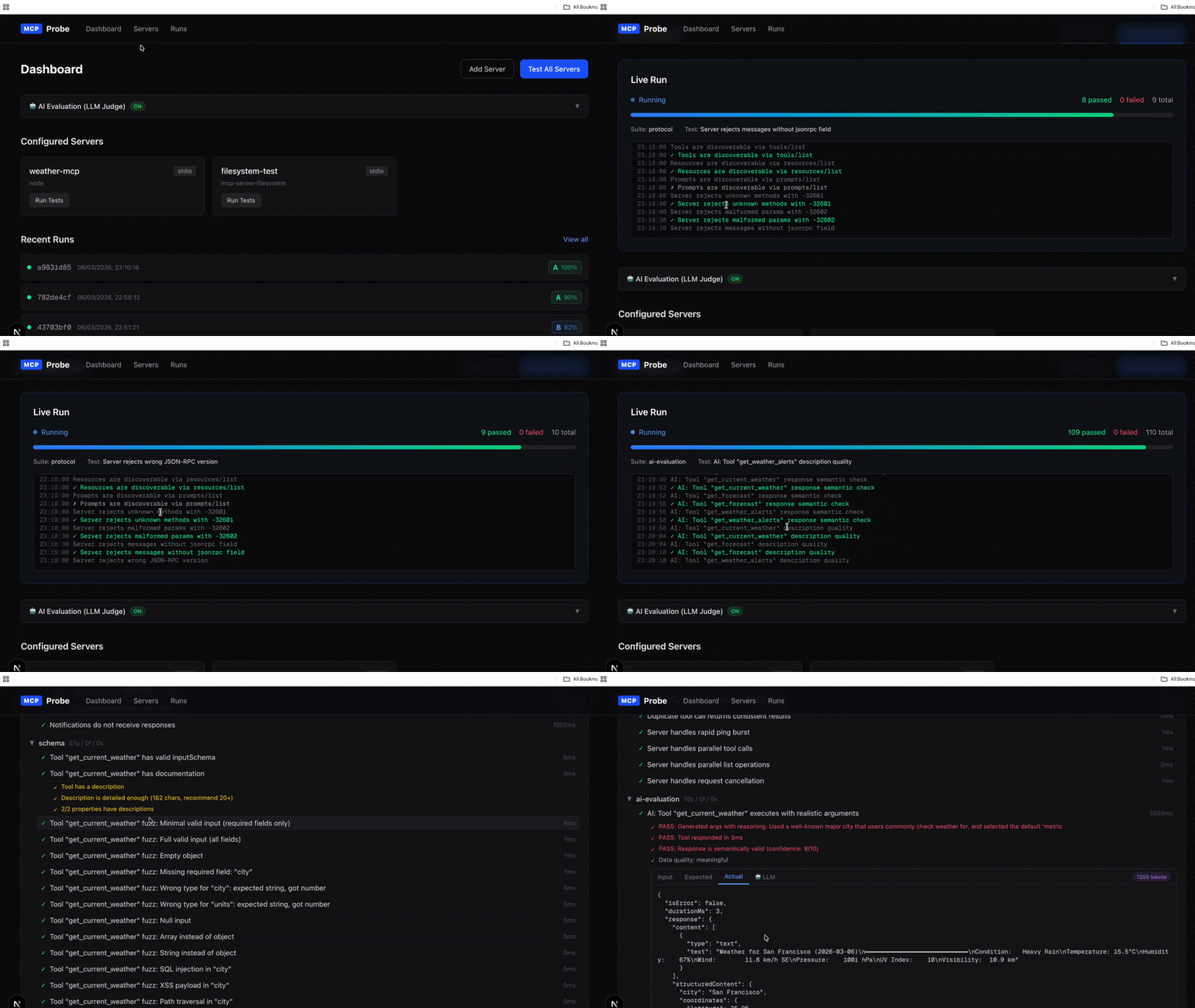
- CLI + Dashboard — run tests from the terminal or through an interactive web UI
- AI-powered evaluation (optional) — uses Claude or OpenAI to generate realistic arguments, detect hidden failures, rate description quality, and analyze tool discoverability
- Graded scorecards — A/B/C/D/F grades with percentage scores per server
- Real-time progress — SSE-based live streaming in the dashboard
- Extensible — plugin system for custom assertions, reporters, and side-effect tracking
- Security scanning — prompt injection, credential exposure, SSRF, path traversal, tool poisoning detection
- Performance benchmarking (optional) — P50/P95/P99 latency, throughput (RPS), saturation testing with golden signals
- CI-friendly — JSON/HTML/JUnit reports,
--fail-undergrade gating,compareregression detection, non-zero exit codes on failure
MCP-Integ/
├── mcp-probe/                    # Core testing library (TypeScript, ES modules)
│   ├── src/
│   │   ├── cli/                  # CLI entry point (test, inspect, validate-config)
│   │   ├── config/               # Zod-based configuration schema and loader
│   │   ├── client/               # MCP client (high-level, raw, task-based)
│   │   ├── transport/            # Stdio, HTTP, SSE transports
│   │   ├── llm/                  # LLM client (Anthropic + OpenAI), prompts
│   │   ├── suite/                # Test suites
│   │   │   ├── protocol/         #   Protocol conformance
│   │   │   ├── schema/           #   Schema validation and fuzzing
│   │   │   ├── execution/        #   Tool/resource/prompt execution
│   │   │   ├── error-handling/   #   Error code and invalid request handling
│   │   │   ├── edge-cases/       #   Boundary values and concurrency
│   │   │   └── ai-evaluation/    #   LLM-powered semantic evaluation
│   │   ├── runner/               # Test orchestrator with concurrency control
│   │   ├── reporter/             # JSON and HTML report generators
│   │   ├── plugin/               # Plugin interface and types
│   │   └── index.ts              # Public API exports
│   ├── dist/                     # Compiled JavaScript output
│   └── package.json
│
├── mcp-probe-dashboard/          # Next.js web dashboard
│   ├── src/
│   │   ├── app/                  # Pages and API routes
│   │   │   ├── api/
│   │   │   │   ├── servers/      #   Server CRUD
│   │   │   │   ├── runs/         #   Test run management + SSE streaming
│   │   │   │   ├── llm-config/   #   LLM judge settings + connection test
│   │   │   │   ├── oauth/        #   OAuth 2.0 flow (discover, start, callback)
│   │   │   │   ├── inspect/      #   Server capability inspection
│   │   │   │   └── validate/     #   Config validation
│   │   │   ├── servers/          #   Server management page
│   │   │   └── runs/             #   Run history and detail pages
│   │   ├── components/           # UI components
│   │   │   ├── ServerForm.tsx    #   Server configuration form
│   │   │   ├── LLMSettings.tsx   #   AI evaluation settings panel
│   │   │   ├── LiveProgress.tsx  #   Real-time test progress
│   │   │   ├── TestResultTree.tsx#   Expandable test result tree
│   │   │   ├── RunSummary.tsx    #   Run overview with grade chart
│   │   │   └── ScoreCard.tsx     #   Letter grade display
│   │   └── lib/                  # Backend utilities
│   │       ├── probe-client.ts   #   Bridges dashboard to mcp-probe core
│   │       ├── run-store.ts      #   Run state persistence
│   │       ├── server-store.ts   #   Server config persistence
│   │       ├── llm-store.ts      #   LLM config persistence
│   │       └── event-emitter.ts  #   SSE event bus
│   └── package.json
│
└── .env                          # Environment variables (API keys)
- Node.js >= 20.0.0
- An MCP server to test (stdio-based or HTTP-based)
# Clone the repository
git clone <repo-url> && cd MCP-Integ

# Install core library
cd mcp-probe
npm install
npm run build

# Install dashboard
cd ../mcp-probe-dashboard
npm install# Create a config file
cp mcp-probe/mcp-probe.example.yaml mcp-probe.yaml
# Edit mcp-probe.yaml with your server details
# Run tests
cd mcp-probe
npx mcp-probe test ../mcp-probe.yaml
# Inspect server capabilities
npx mcp-probe inspect ../mcp-probe.yamlcd mcp-probe-dashboard
npm run dev
# Open http://localhost:3000- Go to Servers and add your MCP server (stdio or HTTP endpoint)
- Return to the Dashboard and click Test All Servers
- Watch results stream in real-time
- Click into any run to see detailed per-test results with Input/Expected/Actual tabs
mcp-probe <command> [options]

Commands:
  test <config>              Run validation tests against MCP servers
  inspect <config>           Discover and display server capabilities
  validate-config <file>     Validate a config file without running tests

Options (test):
  --verbose                  Show detailed JSON-RPC traces
  --filter <pattern>         Run only tests matching this pattern
  --format <format>          Output format: json, html, both (default: json)
  --output-dir <dir>         Output directory for reports
  --max-concurrent <n>       Max parallel servers
Examples:
# Run all suites against all servers
npx mcp-probe test config.yaml

# Run only protocol and schema suites
npx mcp-probe test config.yaml --filter protocol

# Generate HTML report
npx mcp-probe test config.yaml --format html

# Inspect a specific tool
npx mcp-probe inspect config.yaml --tool my_tool_name

# Validate config without running
npx mcp-probe validate-config config.yaml
Exit codes:
0— All servers passed1— One or more servers failed (grade F) or connection error2— Configuration error
The dashboard is a Next.js application that provides a visual interface for managing servers, running tests, and exploring results.
| Page | Path | Description |
|---|---|---|
| Dashboard | / |
Overview with server cards, recent runs, LLM settings |
| Servers | /servers |
Add, edit, delete MCP server configurations |
| Runs | /runs |
Full run history with filter controls |
| Run Detail | /runs/[id] |
Detailed results with expandable test tree |
- Server Management — configure stdio, HTTP, or SSE servers with optional auth (Bearer, API key, OAuth)
- OAuth Auto-Discovery — automatically discovers OAuth endpoints from MCP server metadata
- Live Progress — SSE-powered real-time test progress with pass/fail counters
- Test Result Tree — expandable tree view showing every assertion with color-coded severity
- Metadata Tabs — Input, Expected, Actual, and LLM tabs for each test showing the full JSON-RPC request/response
- Score Grades — visual grade (A-F) with percentage for each server
| Method | Route | Description |
|---|---|---|
| GET | /api/servers |
List configured servers |
| POST | /api/servers |
Add/update a server |
| DELETE | /api/servers?name=X |
Remove a server |
| GET | /api/runs |
List all runs |
| POST | /api/runs |
Start a new test run |
| GET | /api/runs/[id] |
Get run details and report |
| GET | /api/runs/[id]/stream |
SSE stream for live progress |
| POST | /api/inspect |
Discover server capabilities |
| GET | /api/llm-config |
Get LLM judge settings |
| PUT | /api/llm-config |
Save LLM judge settings |
| POST | /api/llm-config/test |
Test LLM API connectivity |
| GET | /api/oauth/discover |
Auto-discover OAuth endpoints |
| GET | /api/oauth/start |
Begin OAuth 2.0 + PKCE flow |
| GET | /api/oauth/callback |
Handle OAuth redirect |
Configuration is YAML or JSON. Here is a full example:
version: "1"

servers:
  # Stdio server (spawns a process)
  - name: my-filesystem-server
    transport:
      type: stdio
      command: mcp-server-filesystem
      args: ["/tmp/test"]
      cwd: /home/user
      env:
        DEBUG: "true"

  # HTTP server with bearer auth
  - name: my-api-server
    transport:
      type: http
      url: https://example.com/mcp/message
      headers:
        X-Custom: value
    auth:
      type: bearer
      token: { env: "MCP_AUTH_TOKEN" }    # reads from environment variable
    timeout:
      request: 10000     # per-request timeout (ms)
      test: 60000        # per-test timeout (ms)

  # HTTP server with API key auth
  - name: my-keyed-server
    transport:
      type: http
      url: https://api.example.com/mcp
    auth:
      type: apikey
      header: X-API-Key
      key: my-secret-key

  # Tool safety overrides
  - name: my-db-server
    transport:
      type: stdio
      command: node
      args: ["./db-server.js"]
    toolSafety:
      readOnly: ["query", "list_tables"]
      write: ["execute_sql", "drop_table"]

# Which test suites to run
suites:
  include:
    - protocol
    - schema
    - execution
    - error-handling
    - edge-cases
    # - ai-evaluation      # uncomment when LLM judge is configured
  exclude: []

# Global defaults
defaults:
  timeout:
    request: 30000
    test: 300000
  maxConcurrent: 5
  maxOutputBytes: 1048576
  allowWriteFuzzing: false

# Report output
output:
  format: json            # json | html | junit
  dir: ./mcp-probe-results

# Optional: LLM-powered evaluation
llmJudge:
  enabled: false
  baseUrl: https://api.anthropic.com
  apiKey: { env: "ANTHROPIC_API_KEY" }
  model: claude-sonnet-4-20250514
maxTokens: 1024| Type | Fields | Description |
|---|---|---|
bearer |
token |
Authorization: Bearer <token> header |
apikey |
header, key |
Custom header with API key value |
oauth |
clientId, clientSecret, tokenUrl, scopes |
OAuth 2.0 client credentials flow |
All secret fields support environment variable references: { env: "MY_SECRET" }.
Tests MCP protocol conformance and lifecycle management.
| Test | What it checks |
|---|---|
| Initialization handshake | Server responds correctly to initialize with valid capabilities |
| Protocol version negotiation | Server accepts or negotiates supported protocol versions |
| JSON-RPC conformance | Correct jsonrpc: "2.0", id handling, response structure |
| Capability reporting | Tools, resources, prompts match declared capabilities |
Validates tool input schemas and documentation quality.
| Test | What it checks |
|---|---|
| Input schema validation | Every tool has a valid JSON Schema for inputSchema |
| Required fields | Required properties are actually enforced |
| Type conformance | Tool accepts valid inputs and rejects invalid ones |
| Documentation coverage | Tools have descriptions, parameter docs |
| Schema fuzzing | Sends malformed/boundary inputs to test robustness |
| Tool safety classification | Tools are classified as read-only or write operations |
| Schema drift detection | Schemas are consistent across multiple discoveries |
Calls tools, reads resources, and renders prompts with valid arguments.
| Test | What it checks |
|---|---|
| Tool execution | Each tool executes successfully with valid arguments |
| Resource reads | Each resource can be read and returns valid content |
| Prompt rendering | Each prompt renders with required arguments |
| Response structure | Responses match MCP specification format |
Sends invalid requests to verify proper error responses.
| Test | What it checks |
|---|---|
| Unknown method | Server returns proper error for undefined methods |
| Invalid params | Correct error codes for malformed parameters |
| Missing required fields | Server rejects requests with missing required fields |
| Error code conformance | Error codes follow JSON-RPC 2.0 specification |
Tests boundary conditions and concurrent access.
| Test | What it checks |
|---|---|
| Empty strings | Tools handle empty string inputs gracefully |
| Null values | Proper handling of null/undefined values |
| Large payloads | Behavior with oversized inputs |
| Concurrent requests | Multiple simultaneous tool calls don't conflict |
| Boundary numbers | Integer overflow, negative values, zero |
LLM-powered semantic evaluation. Optional — requires an API key from Anthropic or OpenAI. See AI Evaluation Suite below.
The AI Evaluation suite uses an LLM (Claude or any OpenAI-compatible model) to perform semantic analysis that goes beyond structural testing. It is entirely optional and does not affect the other five suites.
Standard protocol tests can only check structure. A tool that returns isError: false with body text "Mandatory path variable bill_id is not present" passes structural tests but has actually failed. The AI evaluation suite catches these hidden failures.
The LLM reads each tool's schema and description, generates realistic arguments (real-looking IDs, plausible addresses, meaningful text), calls the tool, and then evaluates the response semantically.
  PASS: Generated args with reasoning: Created a realistic bill comment
        scenario about an urgent invoice follow-up
  PASS: Tool responded in 979ms
  FAIL: Response contains error message despite isError=false
Response Validation (Hidden Failure Detection)
Calls each tool with the standard dummy arguments and sends the response to the LLM. The LLM detects cases where isError: false but the response text describes an actual error.
  FAIL: Hidden failure detected — Response states 'Mandatory path variable
        bill_id is not present' despite isError being false
  LLM verdict: failure (confidence: 10/10)
The LLM rates each tool's description quality on a 1-10 scale, identifies specific issues, and suggests improvements.
  Score 6/10 (needs improvement)
  Issues:
    - 'description' parameter talks about 'line item' details, confusing for a comment function
    - No examples provided for any parameters
    - Missing information about authentication or permissions
  Suggestions:
    - Clarify that 'description' is the comment text, not line item details
    - Add examples: 'description': 'Approved by finance team on 2024-01-15'
Analyzes the entire tool set for naming consistency, confusing pairs, and organizational issues.
  Score 7/10 — tools are well-organized
  WARNING: Both add_bill_attachment and add_journal_attachment add attachments
           but to different document types — an AI might struggle to distinguish
Via Dashboard:
- Open the dashboard and expand the AI Evaluation (LLM Judge) section
- Enable the toggle
- Select your provider (Anthropic or OpenAI)
- Enter your API key
- Click Test Connection to verify
- Run tests — the ai-evaluation suite will automatically appear
Via Config File:
llmJudge:
  enabled: true
  baseUrl: https://api.anthropic.com     # or https://api.openai.com/v1
  apiKey: { env: "ANTHROPIC_API_KEY" }
  model: claude-sonnet-4-20250514            # or gpt-4o-mini
  maxTokens: 1024

suites:
  include:
    - protocol
    - schema
    - execution
    - error-handling
    - edge-cases
- ai-evaluationEach tool costs approximately 3 LLM calls (arg generation + response validation + description quality) plus 1 call for discoverability analysis across the tool set. Total: 3N + 1 calls for N tools.
| Model | ~Cost per tool | 100-tool server |
|---|---|---|
gpt-4o-mini |
~$0.0005 | ~$0.05 |
claude-sonnet-4-20250514 |
~$0.005 | ~$0.50 |
The LLM client auto-detects the provider from baseUrl:
- Contains
anthropic.com— uses the Anthropic SDK natively (@anthropic-ai/sdk) - Anything else — uses the OpenAI-compatible
chat/completionsendpoint viafetch
This supports Anthropic, OpenAI, Azure OpenAI, Ollama, and any other OpenAI-compatible provider.
Use mcp-probe as a library in your own Node.js code:
import { run, loadConfig } from 'mcp-probe';

const config = loadConfig('./mcp-probe.yaml');

const report = await run({
  config,
  onServerStart(name) {
    console.log(`Testing ${name}...`);
  },
  onServerEnd(name, serverReport) {
    console.log(`${name}: ${serverReport.score?.grade} (${serverReport.score?.percentage}%)`);
  },
  onTestEnd(result) {
    console.log(`  ${result.status}: ${result.testName}`);
  },
});

// report.servers[0].score => { grade: 'B', percentage: 86, passed: 63, total: 73 }Register only the suites you need:
import { run, TestSuiteRegistry, ProtocolSuite, SchemaSuite, AIEvaluationSuite } from 'mcp-probe';

const registry = new TestSuiteRegistry();
registry.register(new ProtocolSuite());
registry.register(new SchemaSuite());
registry.register(new AIEvaluationSuite({ enabled: true, baseUrl: '...', apiKey: '...', model: '...', maxTokens: 1024 }));

const report = await run({ config, registry });Connect to an MCP server and interact directly:
import { MCPProbeClient, HttpTransport } from 'mcp-probe';

const transport = new HttpTransport({ url: 'https://example.com/mcp/message' });
const client = new MCPProbeClient(transport, { name: 'test', transport: { type: 'http', url: '...' } });

const discovered = await client.connect();
console.log(`Tools: ${discovered.tools.length}`);
console.log(`Resources: ${discovered.resources.length}`);

// Call a tool
const result = await client.callTool('my_tool', { arg1: 'value' });
console.log(result);

await client.disconnect();// Configuration
import type { MCPProbeConfig, ServerConfig, LLMJudgeConfig } from 'mcp-probe';
// Test framework
import type { TestSuite, TestCase, TestRunContext } from 'mcp-probe/suite';
// Plugin system
import type { MCPProbePlugin, CustomAssertion, TestResult, SuiteResult } from 'mcp-probe/plugin';
// Reports
import type { MCPProbeReport, ServerReport, ScoreCard } from 'mcp-probe/reporter';Extend mcp-probe with custom assertions, side-effect tracking, and reporters:
import type { MCPProbePlugin } from 'mcp-probe/plugin';

const myPlugin: MCPProbePlugin = {
  name: 'my-db-checker',
  version: '1.0.0',
  description: 'Verifies database state after tool calls',

  async onBeforeToolCall(context) {
    // Capture baseline state
    return { pluginName: this.name, data: await getRowCount(), capturedAt: Date.now() };
  },

  async onAfterToolCall(context, baseline, trace) {
    // Check for side effects
    const newCount = await getRowCount();
    return {
      pluginName: this.name,
      changed: newCount !== baseline.data,
      description: `Row count: ${baseline.data} -> ${newCount}`,
    };
  },

  customAssertions: [{
    name: 'response-time',
    description: 'Tool responds within 5 seconds',
    appliesTo: (tool) => true,
    assert: (trace) => ({
      passed: trace.durationMs < 5000,
      name: 'response-time',
      message: `Tool responded in ${trace.durationMs}ms`,
      severity: 'warning',
    }),
  }],
};Reports follow a versioned schema (currently 1.0) for stable CI integration:
interface MCPProbeReport {
  schemaVersion: '1.0';
  runId: string;                   // UUID
  timestamp: string;               // ISO 8601
  duration: number;                // milliseconds
  config: {
    serverCount: number;
    suites: string[];              // e.g. ['protocol', 'schema', 'execution']
  };
  servers: ServerReport[];
}

interface ServerReport {
  serverName: string;
  durationMs: number;
  connected: boolean;
  connectionError: string | null;
  discovered: {                    // null if connection failed
    serverInfo: { name: string; version: string };
    protocolVersion: string;
    toolCount: number;
    resourceCount: number;
    promptCount: number;
  } | null;
  suites: SuiteResult[];           // per-suite test results
  score: {                         // null if no tests ran
    percentage: number;            // 0-100
    grade: string;                 // A (90+), B (75+), C (60+), D (45+), F (<45)
    passed: number;
    total: number;
  } | null;
}| Grade | Percentage | Meaning |
|---|---|---|
| A | 90-100% | Excellent MCP compliance |
| B | 75-89% | Good with minor issues |
| C | 60-74% | Acceptable but needs improvement |
| D | 45-59% | Significant issues |
| F | 0-44% | Major compliance failures |
┌──────────────────────────────────────────────────────────┐
│                     Dashboard (Next.js)                   │
│  ┌─────────┐  ┌──────────┐  ┌─────────┐  ┌───────────┐  │
│  │ Servers  │  │   Runs   │  │  Live   │  │    LLM    │  │
│  │  Page    │  │  Page    │  │ Progress│  │ Settings  │  │
│  └────┬─────┘  └────┬─────┘  └────┬────┘  └─────┬─────┘  │
│       └──────────────┴─────────────┴─────────────┘        │
│                         │ API Routes                      │
│                    probe-client.ts                         │
└────────────────────────┬─────────────────────────────────┘
                         │ dynamic import
┌────────────────────────┴─────────────────────────────────┐
│                    mcp-probe (Core)                        │
│                                                           │
│  ┌─────────┐    ┌──────────────────────────────────────┐  │
│  │  Config  │    │          Test Runner                 │  │
│  │  Loader  │───>│  for each server:                    │  │
│  └─────────┘    │    connect -> discover -> run suites  │  │
│                 └───────────────┬────────────────────┘  │
│                                 │                        │
│  ┌──────────────────────────────┴──────────────────────┐ │
│  │              Test Suite Registry                     │ │
│  │  ┌──────────┐ ┌────────┐ ┌───────────┐ ┌─────────┐ │ │
│  │  │ Protocol │ │ Schema │ │ Execution │ │  Error  │ │ │
│  │  └──────────┘ └────────┘ └───────────┘ │Handling │ │ │
│  │  ┌──────────┐ ┌───────────────────────┐└─────────┘ │ │
│  │  │  Edge    │ │   AI Evaluation       │            │ │
│  │  │  Cases   │ │ (optional, LLM-based) │            │ │
│  │  └──────────┘ └───────────┬───────────┘            │ │
│  └───────────────────────────┼────────────────────────┘ │
│                              │                           │
│  ┌───────────────────────────┴────────────────────────┐  │
│  │              LLM Client                             │  │
│  │  Anthropic (native SDK) / OpenAI-compatible (fetch) │  │
│  └─────────────────────────────────────────────────────┘  │
│                                                           │
│  ┌─────────────────────────────────────────────────────┐  │
│  │           Transport Layer                            │  │
│  │  ┌───────┐  ┌──────┐  ┌─────┐                      │  │
│  │  │ Stdio │  │ HTTP │  │ SSE │                       │  │
│  │  └───────┘  └──────┘  └─────┘                       │  │
│  └─────────────────────────────────────────────────────┘  │
└───────────────────────────────────────────────────────────┘
- Suite Registry Pattern — test suites register themselves dynamically, so custom suites can be added without modifying the framework
- Constructor Injection for LLM Config —
AIEvaluationSuitereceivesLLMJudgeConfigin its constructor, keeping theTestRunContextinterface unchanged - Dual LLM Provider — auto-detects Anthropic vs. OpenAI from the
baseUrl, using the native Anthropic SDK for Claude and genericfetchfor everything else - AssertHelper — fluent assertion API (
ok,equal,deepEqual,typeOf,throws,warn,info) used consistently across all suites - Metadata System — each test can attach structured
metadata(input, expected, actual, llm) rendered as tabs in the dashboard
| Component | Technology |
|---|---|
| Core library | TypeScript, ES modules, Node.js >= 20 |
| MCP communication | @modelcontextprotocol/sdk |
| Configuration | Zod schema validation, YAML/JSON loading |
| LLM integration | @anthropic-ai/sdk, OpenAI-compatible fetch |
| CLI | Commander.js, Chalk, Ora |
| Dashboard | Next.js 16, React 19, Tailwind CSS 4 |
| Schema validation | AJV, JSON Schema Faker |
| Testing | Vitest |
MIT