
Your coding agent for controlled development in the workspace you lead.




Website · Quickstart · Docs · Wiki
Your terminal can run an agent. Your workspace should help you lead it.
gentle-shell is your coding agent, bringing your changes, tasks, and engineering workflow together—built for Pi.
One workspace. A coding agent you direct. A workflow you can inspect.
BUILT FOR PI · Coding-agent workspace · Focused agents · ODD
Built for Pi. Shaped by Gentle-AI.


A bare terminal answers "what is the agent doing?" only with scrollback. gentle-shell turns your Pi session into a workspace: agent orchestration, live changes and runtime status, usage monitoring for supported provider accounts, and built-in diff views — so you lead the work instead of chasing it.
gentle-shell in action. Screenshot from Gentle-AI.
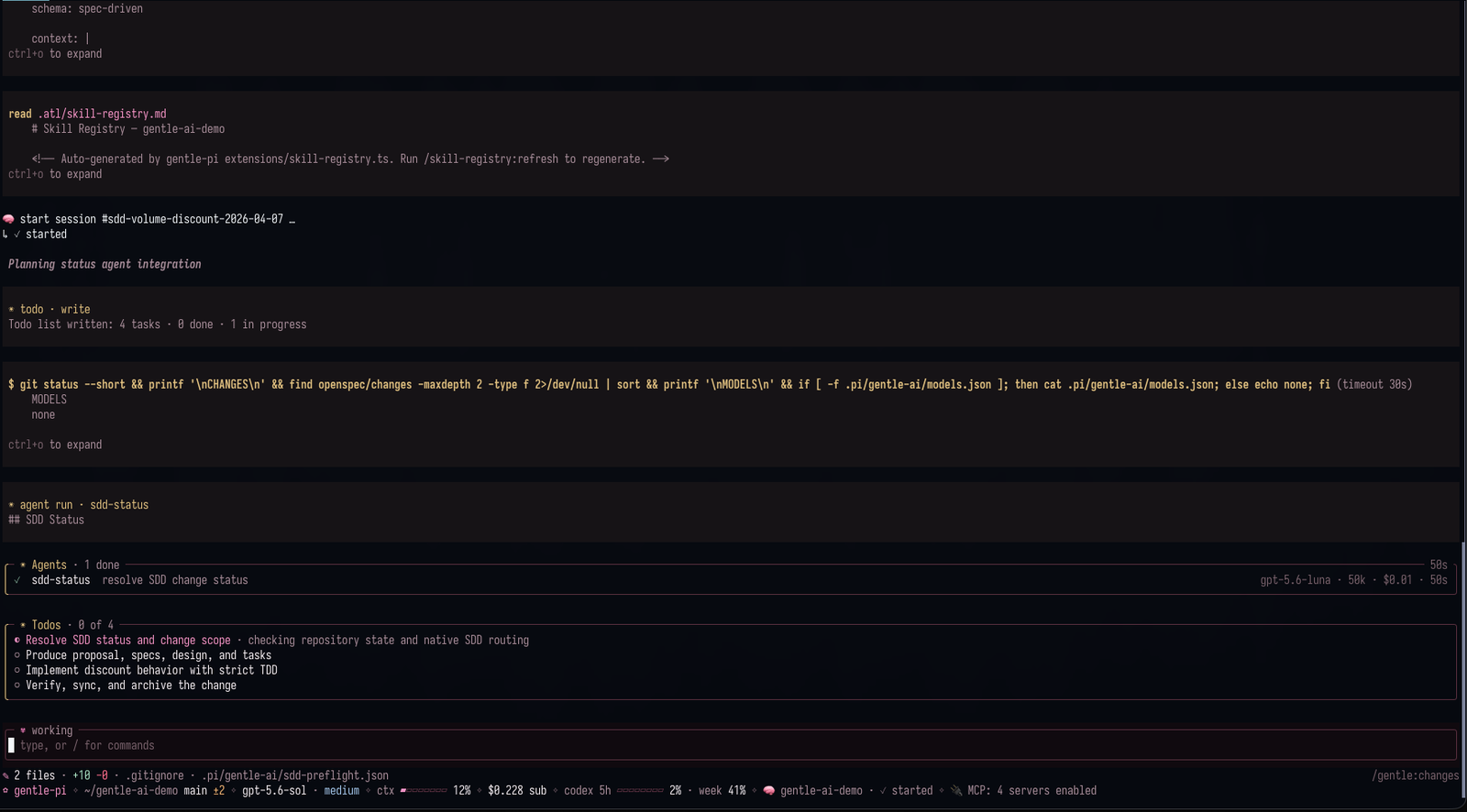

Say what you need once, then keep moving. el Gentleman helps turn intent into clear scope, a sensible next step, and evidence people can review — without making every task feel like a process meeting.

Bring in help without losing the thread. Focused package-owned Pi agents can map a codebase, implement a bounded change, or verify it, while one parent stays accountable for the scope, the decisions, and the final summary.

Organic Driven Development (ODD) is the everyday path: the agent explores before changing anything, clarifies only real decisions, and keeps small understood work small. Substantial, authorized work gets one recoverable feature document — mirrored in memory when available — so progress, evidence, and the next step survive an interruption; checks follow the configured TDD mode.

Review the exact change, not a moving target. Native review keeps one candidate in view, returns risk-scoped evidence, and can surface a bounded correction path. You still decide what happens next in your repository.

You should not have to run git status to find out what your agent did. Gentle Changes captures the successful write and edit tool calls from the current session and its owned subagents — no repository scans, no background polling — and shows them in a two-pane viewer with per-file line counts and an honest diff unavailable when an external edit breaks continuity. Coverage stops at those tools, so shell commands and failed runs leave no row, and a missing entry never proves a clean tree. alt+g opens it; o drops the real file into your editor.

Delegating work should not mean losing it. Every subagent runs as its own process with a live card above the editor — model, tokens, cost, elapsed — and alt+a opens the full view with retained threads, stop controls, and history restored on resume. A child can ask you a question as an ordinary dialog, and background results come back as cards that start a new turn — nothing polls.

Model, effort, and who does what should be choices, not accidents. Named profiles route the orchestrator atomically and independently from packaged and review roles; a repository can pin its profile so its subagents stop following the globally active one, and the panel always shows the routing the runtime actually uses.

Extension commands are only useful if you can find them. alt+k opens a curated, grouped palette — Configuration, Session, Diagnostics, SDD, and Skills — searchable by label, command name, or description, showing entries only when they are actually registered.
| Component | What it does |
|---|---|
| Startup and runtime panel | A configurable gentle-shell entry point and visible runtime state for Pi. |
| Skills and delivery guidance | Package skills for documentation, issue work, PRs, reviews, and reviewable work units. |
| Model, effort, persona, and profile controls | Explicit knobs for how Pi routes and presents work. |
| Safety boundaries | Guards around destructive operations and sensitive-path handling. |
| Optional companion packages | Extra capabilities you may choose to add; persistent memory is not bundled with gentle-pi. |
| Fullscreen workspace layout | Header row plus a scrolling Status → Changes → TODO rail on wide terminals. |
| Live status bar and prompt petal | One-line gauge, cost, and statuses; the petal shows working and queued. |
| Parent ↔ subagent communication | Delegate, steer, reply, and cross-session notification within your local profile. |
| Native interactive tools | Built-in questions, choices, and review captures — no third-party dependency. |
| Gentle Todo | A plan card that turns amber when the model lets it go stale. |
| Subscription usage | Per-window meters and resets for supported provider accounts. |
| Gentle notices | Gentle AI calls and review reminders as cards in the transcript. |
Every component, skill and preset: Full breakdown →
The v3.5.1 release makes Gentle Shell runnable on its own:
- Standalone launcher:
npm i -g gentle-piinstallsgentle-shell, which opens Pi with the Gentle Shell package loaded from its own home (~/.gentle-shell/agent) or, with--link, from your existing~/.pi/agent;gentle-shell install npm:<pkg>and the other pi subcommands run against the selected home. A bundled orPATHpi is used, never a modified one. - Link mode take-over: when
~/.pi/agentalready declares gentle-pi as a path package, the launcher takes over extension loading (--no-extensionsplus explicit-efor every other declared package and loose extension) so tools never register twice. - Interactive RPC hosts: with
GENTLE_SHELL_INTERACTIVE_HOST=1and--mode rpc, ask-user tools use pi's RPC dialogs and gentle-agents publishes live subagent activity for the desktop app. See the reference.
Naming transition: The product is called
gentle-shell; the current npm package and repository remaingentle-piuntil migration.
gentle-shell opens Pi with the Gentle Shell package loaded, without installing it into your pi agent or editing its settings.json.
npm i -g gentle-pi

# Own home, never touches your pi install
gentle-shell

# Reuse your pi sign-ins, models and chats instead
gentle-shell --link
gentle-shell alone starts in its own home, ~/.gentle-shell/agent, and sets that home up on first run — no separate step. Gentle Shell keeps its own home with the Gentle AI companion packages and no conflicting plugins; gentle-pi itself always stays this launcher's own copy, never one installed into the home; your pi install is untouched. That home also defaults to the Gentleman-Cute theme unless you set your own. gentle-shell --link reuses ~/.pi/agent as-is, is never auto-provisioned, and never has its theme touched.
# Re-run provisioning by hand, e.g. to see the full install output
gentle-shell setup
gentle-shell setup installs the same companion packages gentle-ai provisions into a regular Pi, into this home only, then removes the one package that conflicts with gentle-pi's own ask_user_question tool (gentle-ai #4820). The first gentle-shell launch in a home already runs this automatically; setup is for re-running it by hand. See First run for the opt-out (GENTLE_SHELL_NO_AUTO_SETUP=1) and failure behavior.
# Make --link the default
gentle-shell home link
Every other argument is forwarded to pi unchanged, for example gentle-shell --mode rpc or gentle-shell -p "...". Full flags, env vars, and modes: launcher reference.
Install the stable release into an existing pi agent, restart Pi, then synchronize the installed assets.
# Published stable release: v3.5.1
pi install npm:gentle-pi@3.5.1

# Restart Pi, then run:
gentle-ai sync

# Start Pi in your project
pi
See the v3.5.1 release notes for version-specific changes.
/gentle:status
/gentle:doctor
RDD is opt-in: enable native receipt-driven development only through an explicit
/gentle:review-mode enabledecision.
Fullscreen installation note: a recognized global installation persists Pi’s
"tuiMode": "fullscreen"setting. Project-local and other install paths do not receive that change.
Interactive RPC hosts: the desktop app sets
GENTLE_SHELL_INTERACTIVE_HOST=1automatically, without touching your Pi config — see the installation reference.
For prerequisites, source-checkout instructions, full install behavior, and release policy, use the installation reference. For everyday work, describe the outcome and follow ODD.
Start with the product-facing destination, then move into the operational reference only when you need the details.
| Destination | Purpose |
|---|---|
| gentle-shell reference | Workspace layout, changes, usage, agents, and todo interactions. |
| ODD workflow · Technical reference | Everyday work and recovery, optional SDD/OpenSpec, installation, configuration, commands, and contributor detail. |
| Review integration | The provider/consumer boundary for native review. |
| Native authority architecture | Ownership boundaries and review architecture. |
| Telemetry | Approved fields and source limitations. |
| Delegated verification | Practical verification guidance. |
| Skill style guide | The package skill contract. |
This project is built in public. Bring a real workflow, a sharp question, a bug report, or a small improvement that makes the next person’s work clearer.



- Open an issue with the context needed to reproduce or understand the idea.
- See the people shaping the project in the contributors graph.
- Follow Gentleman Programming for the wider ecosystem.
gentle-shell is built by Alan Buscaglia, the maker behind Gentleman Programming. It grew from a practical belief: capable agents are more useful when the human’s intent, review load, and delivery judgment stay visible all the way through the work.
Startup intro collaboration: thanks to @aporcelli and pi-gentle-startup, which inspired the clean-screen startup animation, compact runtime panel, and pink visual treatment.



Built with the workflow it brings to Pi.

Trademark notice: The gentle-shell™ and gentle-pi™ names and associated logos are trademarks of Alan Buscaglia. The MIT License applies to the code; it does not permit implying endorsement or official affiliation. See TRADEMARKS.md.