
The performance of docker is closed to native in various aspects e.g. CPU, Disk and the docker adapted flexibility while building image on huge VM and running on the edges.
https://dominoweb.draco.res.ibm.com/reports/rc25482.pdf
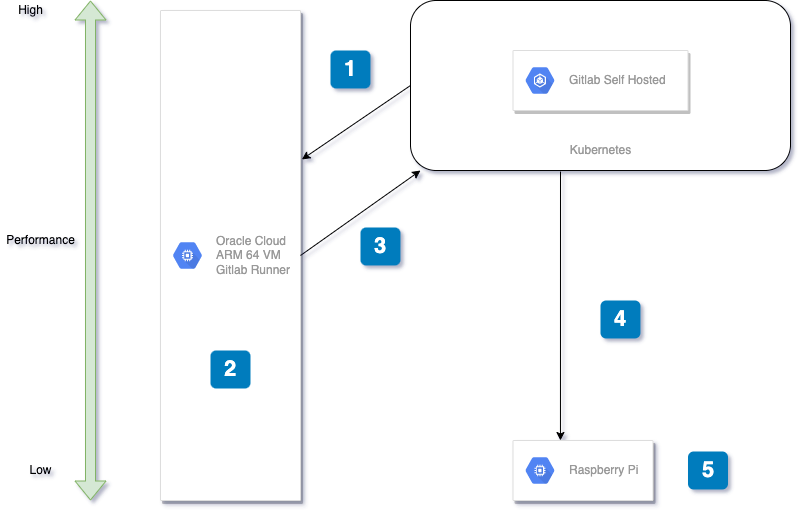
-
Commit the Infrastructure Code to Gitalb Instance in order to build OpenVino on Aarch64. The Dockerfile for build OenVino On Aarch64 is modified and captured from OpenVino Docker-CI official Repository
-
Build OpenVino on Aarch64 Image on Cloud VM, the Oracle Cloud has been used. The VM is leveraged by Oracle Cloud Always Free Tier. The VM have 4 A1 CPU (Arm), 24 GB memory, 200 GB Disk.
https://www.oracle.com/au/cloud/free/
The Runner configures with docker executor and use DIND (docker in docker topology) to build image. https://docs.gitlab.com/runner/executors/docker.html
-
Push the OpenVino on Aarch64 image to the self-hosted gitlab container registry.
-
Pull the image from gitlab container registry on edge device (Raspberry Pi). As the project in state of internal, only authorized user could pull this imnage
-
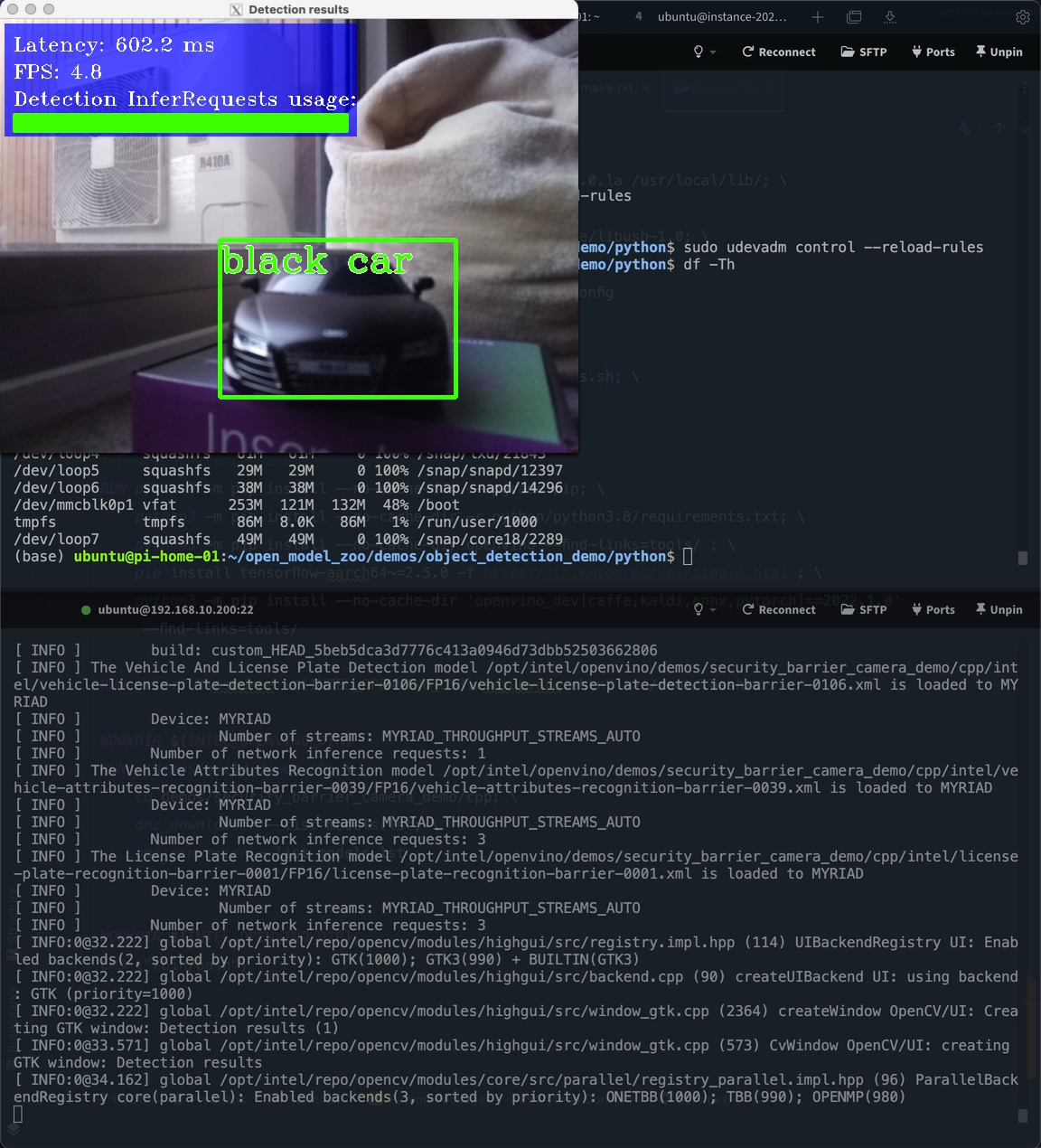
Run the image as a container on edge device (Raspberry Pi) and perform the Openvino object detection operations.
HERE to donwload Ubuntu 20.04.2.0 LTS ISO image ARM64
HERE is a guide for Ubuntu installation.
sudo apt update
sudo apt-get update
sudo apt-get install docker.io
Inorder to run as non-root user, you have to run commands below.
sudo usermod -aG docker $USERIf you still have some problem about permission. Try with
sudo chmod 777 /var/run/docker.sockFor public access
export OpenVino-on-Aarch64-Image=ghcr.io/uaws/openvino-on-aarch64:latestFor Internal access
export OpenVino-on-Aarch64-Image=gitlab-registry.dev.vmv.re/akideliu/openvino-on-aarch64:latestYou need to make sure you have the access to the self-hosted gitlab container registry. Then Login to the registry.
https://gitlab.dev.vmv.re/AkideLiu/openvino-on-aarch64/container_registry
sudo docker login gitlab-registry.dev.vmv.rePull the latest version image
sudo docker pull $OpenVino-on-Aarch64-Imagesudo docker run -it \
--privileged \
-v /dev/video0:/dev/video0 \
-v /tmp/.X11-unix:/tmp/.X11-unix \
-e DISPLAY=$DISPLAY \
--device-cgroup-rule='c 189:* rmw' \
-v /dev/bus/usb:/dev/bus/usb \
-d --net=host $OpenVino-on-Aarch64-Image-it: For interactive processes (like a shell), you must use-i -ttogether in order to allocate a tty for the container process.-i -tis often written-itas you’ll see in later examples--privileged: Give extended privileges to this container, in order to access host devices, camera and NCS2-v /dev/video0:/dev/video0: mapping the hosting video0 camera device to container-v /tmp/.X11-unix:/tmp/.X11-unix -e DISPLAY=$DISPLAY: x11 forwarding application docker support. This setting will allow to display graphic user interface to view the real time object detection.-device-cgroup-rule='c 189:* rmw': NCS2 rules-v /dev/bus/usb:/dev/bus/usbmapping the hosting usb device (NCS2) to container-drun on daemon--net=hostsupport x11 for docker
reference docs:
https://docs.docker.com/engine/reference/run/
https://hub.docker.com/r/openvino/ubuntu20_dev
https://gist.github.com/sorny/969fe55d85c9b0035b0109a31cbcb088
Run sudo docker ps to retrieve the container ID, in following example, the container ID is 8060f370a6cb
(openvino) ubuntu@pi-home-01:~$ sudo docker ps
CONTAINER ID   IMAGE                                                     COMMAND        CREATED       STATUS       PORTS                                                                                          NAMES
8060f370a6cb   gitlab-registry.dev.vmv.re/akideliu/openvino-on-aarch64   "/bin/bash"    6 hours ago   Up 6 hours                                                                                                    crazy_satoshi
Step into the OpenVino container
docker exec -it CONTAINER_ID /bin/bashRun the pre-build Open Model Zoo demo
cd ~/omz_demos_build/aarch64/Release/

./security_barrier_camera_demo \
   -d MYRIAD -d_va MYRIAD -d_lpr MYRIAD -nc 1 \
   -m /opt/intel/openvino/demos/security_barrier_camera_demo/cpp/intel/vehicle-license-plate-detection-barrier-0106/FP16/vehicle-license-plate-detection-barrier-0106.xml \
   -m_lpr /opt/intel/openvino/demos/security_barrier_camera_demo/cpp/intel/license-plate-recognition-barrier-0001/FP16/license-plate-recognition-barrier-0001.xml  \
   -m_va /opt/intel/openvino/demos/security_barrier_camera_demo/cpp/intel/vehicle-attributes-recognition-barrier-0039/FP16/vehicle-attributes-recognition-barrier-0039.xml
https://github.com/openvinotoolkit/open_model_zoo/tree/master/demos/security_barrier_camera_demo/cpp
- Oracle Cloud Always Free Tier
- Gitlab Self Host Chart Edition
- OpenVino Docker CI