
A native, non-destructive RAW photo editor for macOS — no account, no subscription, and your photos never leave your Mac.
为个人摄影流程打造的原生 macOS 非破坏性 RAW 修图软件 —— 纯本地、无账号、无订阅。
Phos uses the com.zeno.phos application identifier. Existing .rawforge.json sidecars and the legacy
Application Support/RawForge/presets.json directory remain readable so existing edits are preserved.
Older releases may still use the former application and archive names.




🌐 官网 / Official site: zenophos.dpdns.org · Showcase & UI design · 界面设计展示页
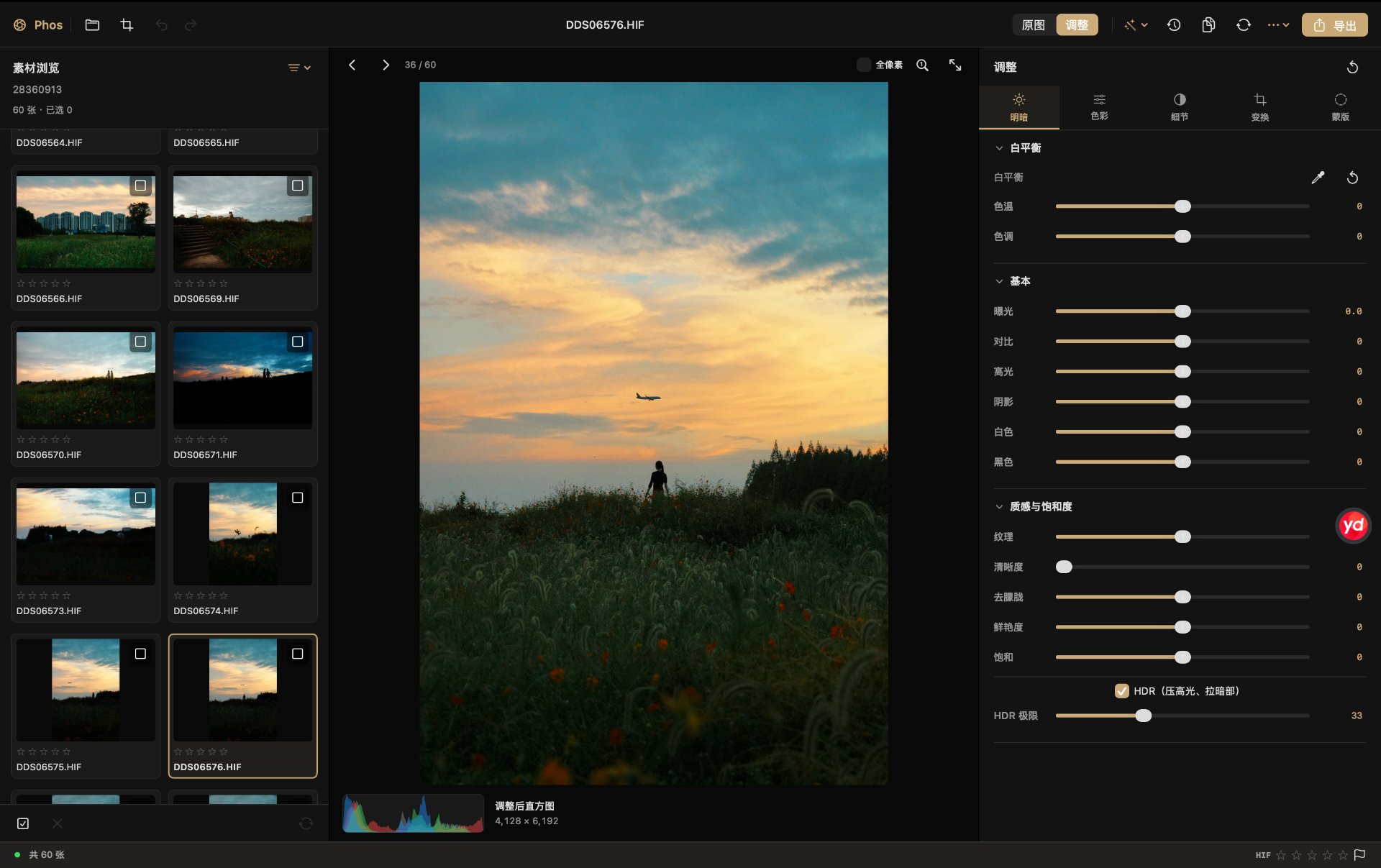
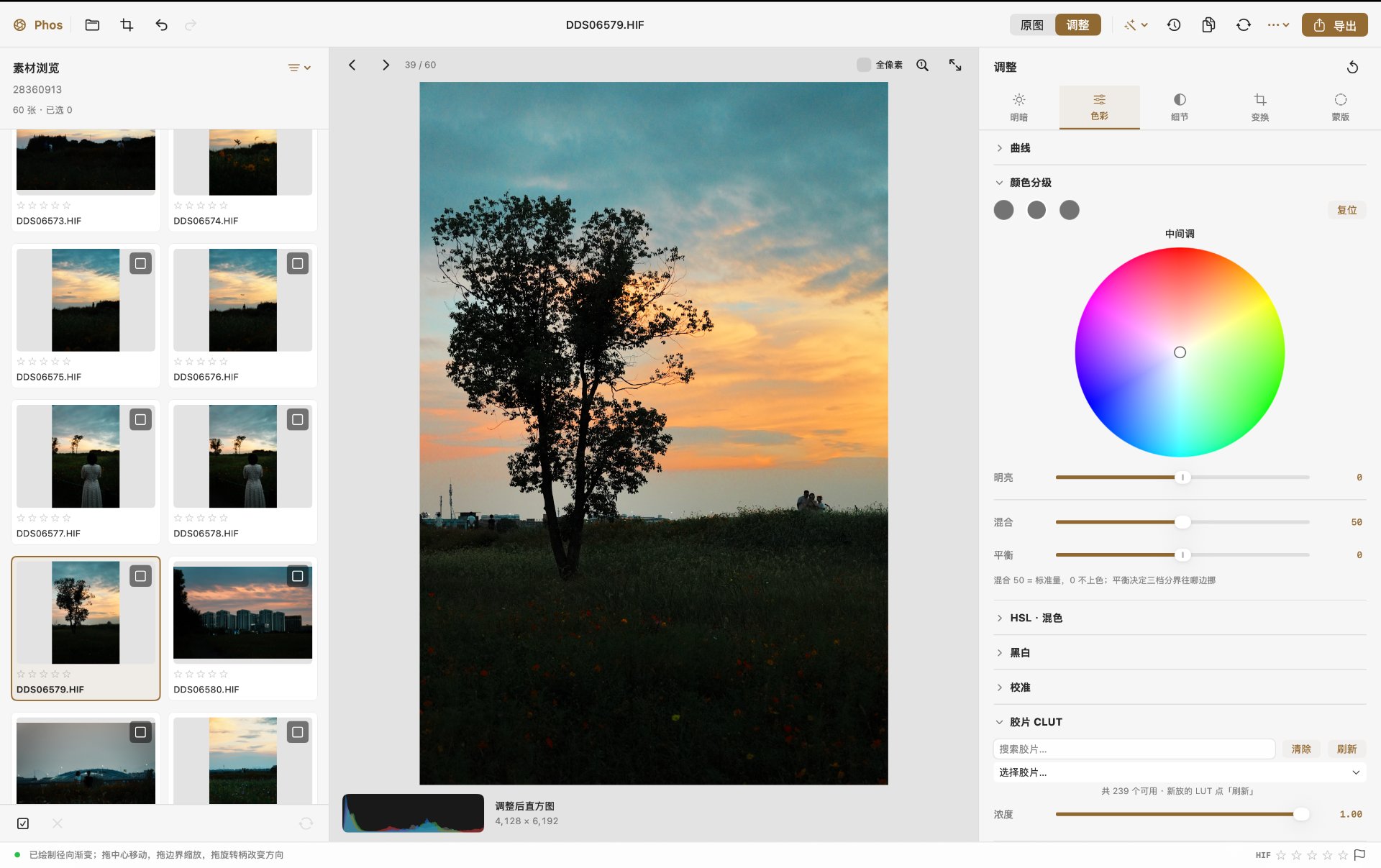
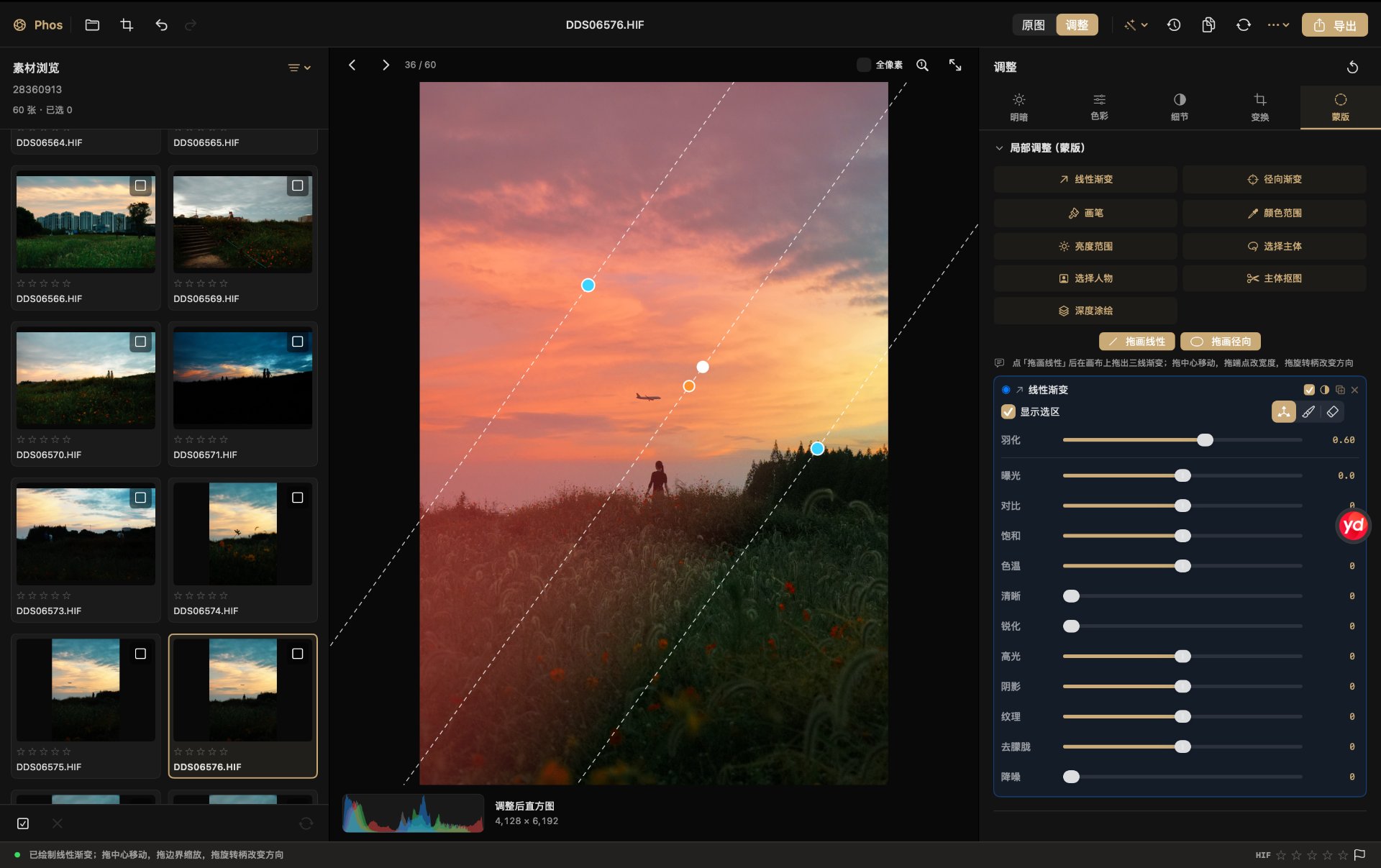
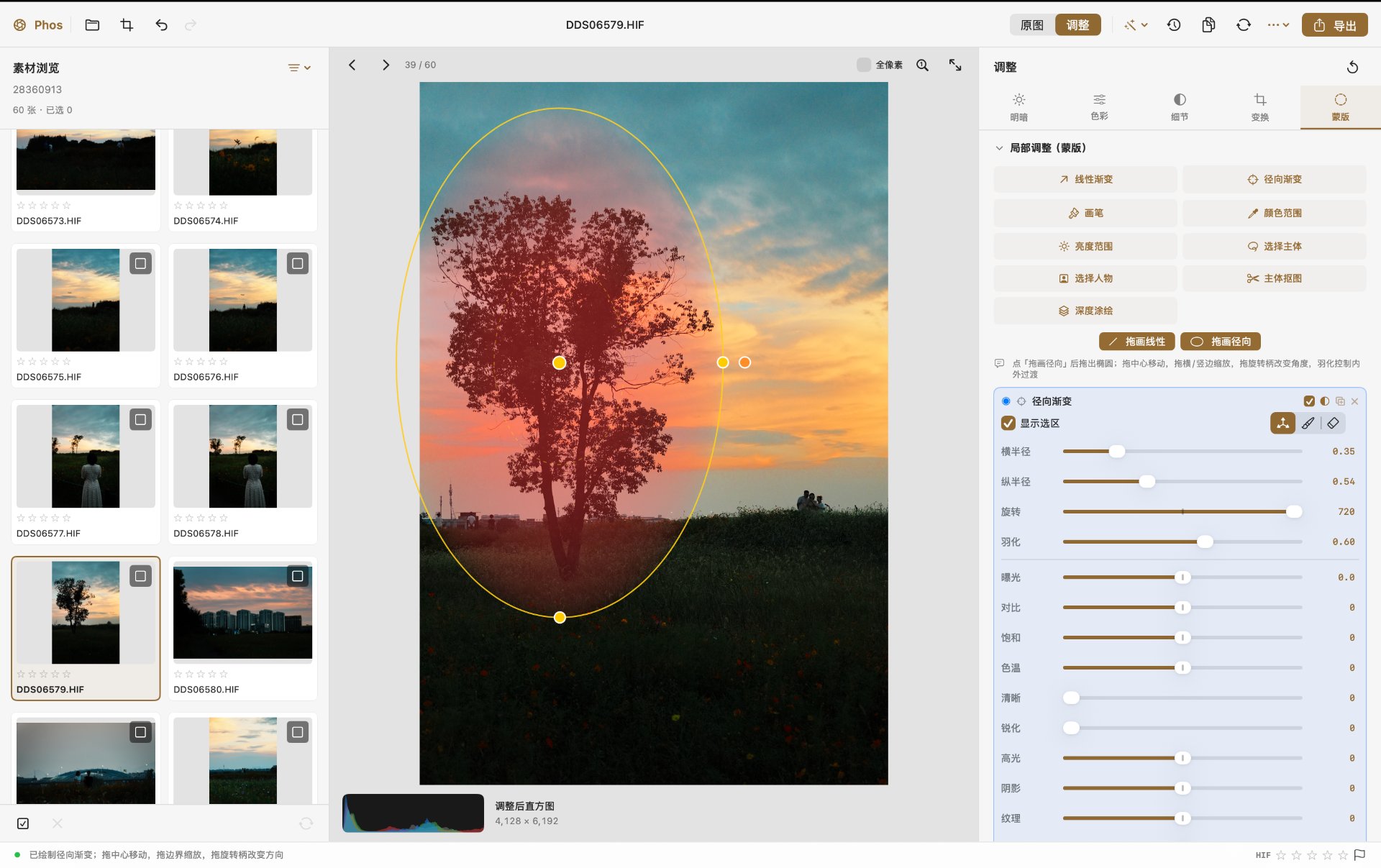
明暗调整 · 色彩分级与胶片 CLUT · 线性 / 径向渐变蒙版。更多界面见设计展示页。 Light adjustments · colour grading and film CLUT · linear and radial gradient masks. See the showcase page for more.
Phos is a non-destructive RAW photo editor written in Swift on top of Core Image, Vision and AppKit. Everything runs on the local machine: no cloud services, no accounts, no subscription, no telemetry. Every pixel operation is executed on the GPU, and there are no third-party dependencies.
The only network request Phos ever makes is a version check against its own website at launch. It sends nothing about you, your photos or your machine, and it is the sole reason the app is not strictly offline. Turn it off with:
defaults write com.zeno.phos updateCheckDisabled -bool trueThe project deliberately favours a small, complete set of high-frequency editing capabilities over breadth of features. All edits are stored in a sidecar file next to the original image, and the original file is never modified.
| Item | Requirement |
|---|---|
| OS | macOS 15.0 or later |
| CPU | Apple silicon (arm64) |
| Supported inputs | RAW (ARW / CR3 / NEF / …), HEIF / HEIC / HIF, JPEG, PNG, TIFF, AVIF |
| Signing | Ad-hoc (free); Apple notarisation is not available yet |
-
Download
Phos-macOS-apple-silicon.dmgfrom Releases. A.zipis published alongside it if you prefer. -
Verify integrity against
SHA256.txt:shasum -a 256 Phos-macOS-apple-silicon.dmg
-
Open the disk image and drag Phos onto the Applications folder. The image also contains a
首次打开必读.txtwith the steps below. -
macOS asks once — here's what to do.
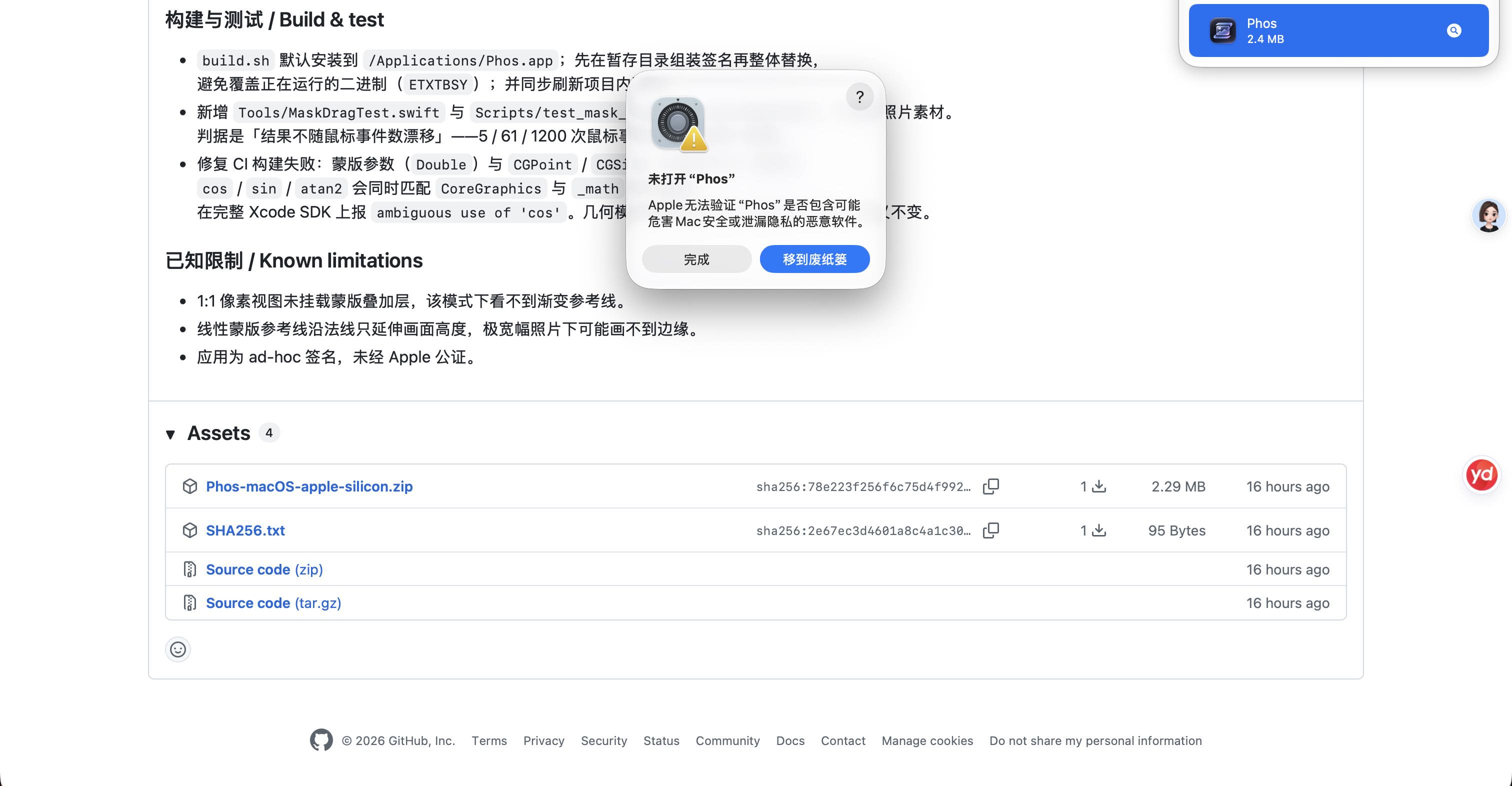
Phos is ad-hoc signed and not notarised, so the first double-click shows a warning. This is expected: the full source is public, and the app's only network request is a version check against its own website.
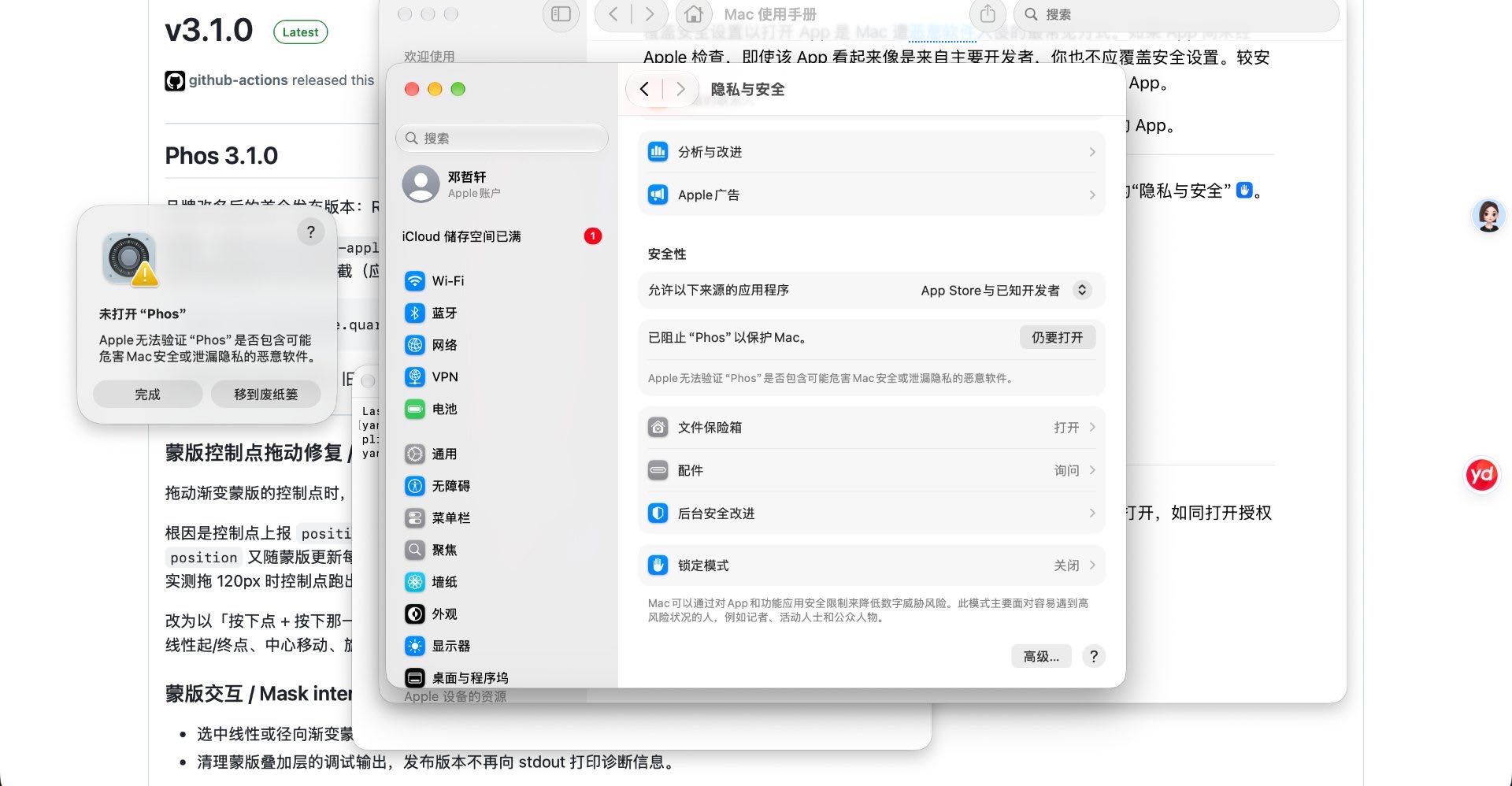
Click 完成 to close it, then immediately open System Settings → Privacy & Security, scroll to the bottom, and click Open Anyway:
The button only stays visible for about an hour after the warning, so do it right away. From then on Phos opens normally.
If you prefer the command line:
xattr -dr com.apple.quarantine /Applications/Phos.appdoes the same thing and skips the GUI steps entirely.
Important
App Sandbox is intentionally not enabled. Under ad-hoc signing, entitlements are not bound correctly; enabling the sandbox would break folder access and sidecar writing. The repository contains no entitlements file, and none should be added.
The inspector is organised into five tabs. Everything below is a local operation.
| Panel | Controls |
|---|---|
| White balance | Temperature, tint, a grey-point picker that samples straight from the canvas, and reset |
| Basic | Exposure, contrast, highlights, shadows, whites, blacks |
| Texture & saturation | Texture, clarity, dehaze, vibrance, saturation, plus an HDR mode (compresses highlights while lifting shadows) with a limit control |
| Panel | Controls |
|---|---|
| Tone curve | Free-form point curves with an arbitrary number of control points, draggable in both axes, across five independent channels: composite, luminance, R, G and B. Monotone cubic interpolation (Fritsch–Carlson) guarantees the curve passes through every control point without overshoot. Refine Sat pulls saturation back after tonal changes. All five curves are baked into a single 64³ LUT. |
| Colour grading | Lightroom-style wheels for shadows, midtones and highlights — hue, saturation and luminance per band, plus blend and balance |
| HSL mixer | Eight hue bands with per-band hue / saturation / luminance, and a clear-all action |
| Black & white | One-click conversion with its own channel mix |
| Calibration | RGB primary adjustment implemented as a row-normalised 3×3 matrix, so the white point stays put |
| Film CLUT | 303 built-in HALD film-emulation LUTs with search, plus scanning of an external HaldCLUT directory (~/Documents/RawTherapee/HaldCLUT) and a refresh action |
| Panel | Controls |
|---|---|
| Detail | Sharpening (amount, radius, detail, masking) and dual-channel luminance + colour noise reduction |
| Effects | Film grain (amount and grain size), vignette, and halation (highlight extraction → wide-radius blur → warm tint → screen blend) |
| Bokeh | Depth-driven defocus. The depth source is either the portrait disparity auxiliary data in the file, or a depth-painting mask you paint yourself |
| Lens correction | Lateral chromatic aberration (counter-scaled R/B channels) and purple-fringe suppression |
Interactive crop overlay with eight handles and aspect-ratio presets, 90° rotation in both directions, horizontal mirroring, auto straightening (Vision horizon detection followed by a maximum-inscribed-rectangle crop), automatic perspective correction from a quadrilateral detected in the frame, manual vertical and horizontal perspective, and a reset action.
Nine mask types, all computed on-device:
| Mask | How it works |
|---|---|
| Linear gradient | Drag on the canvas to lay down a three-line gradient. Drag the centre to move it, the endpoints to change its width, and the rotate handle to change direction. |
| Radial gradient | Drag out an ellipse. Drag the centre to move, the horizontal/vertical edges to scale, and the rotate handle to change the angle; feather controls the inner/outer transition. |
| Brush | Paint or erase directly on the canvas, one stroke per drag. Brush size and edge softness are adjustable. |
| Colour range | Sample a colour with the eyedropper; tolerance controls how wide a colour band is included. |
| Luminance range | Drag on the canvas to sample luminance, or set the upper and lower bounds with sliders. |
| Subject | Vision saliency-based subject detection, run locally and cached per mask and canvas size. |
| Person | System person segmentation, run locally. |
| Foreground cut-out | Foreground-instance matting producing a soft float mask — this is what powers transparent-background export. |
| Depth painting | Paint the background white and keep the subject black to drive the Bokeh panel. |
Each mask carries its own adjustment stack — exposure, contrast, saturation, temperature, clarity, sharpening, highlights, shadows, texture, dehaze and noise reduction — plus feather. Masks can be inverted, duplicated or deleted, and AI masks can be recomputed on demand. Selecting a gradient mask automatically switches the tool back to position mode so the guides and handles are immediately visible.
Frame alignment via Vision registration with a quality gate (frames whose overlap NCC scores below 0.7 are dropped automatically), selectable translation or homography alignment, and three compositing modes: average, exposure fusion, and hand-held denoise (pixel-wise averaging that rejects pixels deviating from the reference frame by more than kσ, removing noise while suppressing ghosting). Results are produced at full resolution as 16-bit TIFF and can be edited further.
- Non-destructive sidecars —
<image>.rawforge.json, with a 200-step undo stack. - Presets — save the current adjustments as a named preset and reapply it later.
- Named snapshots — save, rename and restore per-photo snapshots.
- Copy / sync adjustments — copy adjustments to other photos or sync across a selection; geometry and masks are excluded by default, and every sync target receives a recovery snapshot first.
- Browser — folder scanning with filters (all / selected / flagged), star ratings, colour labels and flags; you can also add individual files from outside the opened folder.
- Preview modes — a 2200px proxy for speed, a full-pixel mode that runs the whole pipeline at the original resolution, and a 1:1 pixel view for checking sharpness.
- Before / after comparison and an output histogram.
- Export — JPEG / PNG / TIFF / HEIC at 8 or 16 bits in sRGB, Display P3 or Adobe RGB, with long-edge sizing, quality control and output sharpening. A watermark can be text or a logo image with 9-grid placement, size, opacity, rotation, margin and a black-text option; it is applied to exported files only and never enters the preview or the sidecar.
- Batch export — applies each photo's own sidecar, or exports only the flagged photos. Destination can be a fixed folder or chosen per run.
- Transparent-background export — exports a cut-out using the foreground mask (format is forced to PNG or TIFF, which support alpha).
- Adaptive light / dark interface that follows the system appearance.
- Update check — on launch Phos asks its own website for the latest version number. If a newer release exists, a small badge appears next to the app name in the toolbar; clicking it opens the download page. Nothing about you or your machine is sent, and the check can be turned off (see Overview). There is also a manual Check for Updates… in the toolbar's more menu.
| Action | Shortcut |
|---|---|
| Open folder | ⌘O |
| Crop and geometry | ⌘R |
| Export current photo | ⌘E |
| Before / after comparison | ⌘B |
| Multi-exposure compositing | ⇧⌘M |
| Copy adjustments | ⇧⌘C |
| Sync adjustments | ⇧⌘V |
| Named snapshots | ⇧⌘S |
| Undo / Redo | ⌘Z / ⇧⌘Z |
git clone https://github.com/Zenodeng/Phos.git
cd Phos
./Scripts/package_app.sh      # builds Phos.app in the repository root
./build.sh                    # compiles and installs to /Applications
./Scripts/make_dmg.sh         # packages Phos.app into the distributable .dmg
make_dmg.sh produces the disk image users download: a background image, an arrow pointing at an
Applications shortcut, and a 首次打开必读.txt explaining the one-time Gatekeeper step. The layout
is written with dmgbuild (pip install dmgbuild) rather than
Finder AppleScript, so it works headless and on CI. Scripts/dmg/background.png and its @2x sibling
are generated by Tools/DMGBackground.swift.
Scripts/package_app.sh compiles the sources with swiftc directly, and retries with an older SDK if the
default SDK is newer than the installed compiler. A Package.swift is provided for use with SwiftPM-aware
editors; the release pipeline does not depend on it.
build.sh installs to /Applications/Phos.app by default (override with APP_PATH=), and stages and
signs the bundle before swapping it in. It deliberately does not keep a second copy inside the
repository — a .app sitting in a project folder is picked up by LaunchServices and shows up as a
duplicate in Launchpad. Set KEEP_LOCAL_APP=1 if you want one anyway.
bash Scripts/test_mask_drag.sh        # mask handle geometry, no photo needed, runs in seconds
bash Scripts/test_update.sh           # version comparison, offline, runs in milliseconds
bash Scripts/test_performance.sh      # rendering, caches, undo/redo, async export
bash Scripts/test_studio.sh <fixture-image> <output-directory> [render-baseline-directory]
bash Scripts/test_real_photos.sh <output-directory> <soak-seconds> <photo> [more-photos...]
bash Scripts/test_workflow.sh <photo> <flat-copy> [more-photos...]
test_mask_drag.sh is a pure-geometry regression suite for the mask control points. Its key invariant is
that the result must not drift with the number of mouse events — 5, 61 and 1200 events must all produce
the same mask.
The render suite checks for nonblank output; pass a baseline pixel directory to require byte-identical rendering and curve LUT data. RAW camera samples and Vision subject/person segmentation still require separate real-photo testing.
| File | Responsibility |
|---|---|
Sources/Phos/Engine.swift |
Decoding, the full adjustment pipeline, LUT construction, masking, Vision-backed analysis |
Sources/Phos/Alignment.swift |
Frame registration, quality gating, canvas normalisation for compositing |
Sources/Phos/Models.swift |
Parameter model and tolerant decoding for forward compatibility |
Sources/Phos/AppMain.swift |
Application state, render scheduling, undo stack, export and batch processing |
Sources/Phos/Performance.swift |
Bounded thread-safe caches and latest-request background scheduling |
Sources/Phos/Workflow.swift |
Batch synchronisation, snapshots, grey-point sampling, sidecar migration, mask geometry |
Sources/Phos/WorkflowViews.swift |
Workflow panels: sync targets, snapshots, bit-depth and colour-space controls |
Sources/Phos/Views.swift |
Browser, canvas, mask overlay, crop overlay, toolbars |
Sources/Phos/Inspector.swift |
Adjustment panels, curve editor, colour wheels, mask panels |
Sources/Phos/Theme.swift |
Adaptive colour palette |
Sources/Phos/CLUT.swift |
Film LUT loading and baking |
Sources/Phos/Update.swift |
The one network call: version check against the project's own website |
The application is non-destructive by design: all parameters are serialised to a sidecar file, and rendering is a pure function of (source image, parameters).
.github/workflows/release.yml builds, packages and publishes on GitHub Actions macOS runners. Pushing
a v* tag produces a release containing the zip and its SHA256, and the workflow can also be dispatched
manually from the Actions tab.
Before the first run, make sure Settings → Actions → General → Workflow permissions is set to Read and write permissions; otherwise uploading release assets returns 403.
Released under the MIT License.
Phos 是一款用 Swift 编写、基于 Core Image、Vision 与 AppKit 的非破坏性 RAW 修图软件。 所有处理都在本机完成:无账号、无订阅、无遥测。全部像素处理在 GPU 上完成,不依赖任何第三方库。
Phos 唯一的联网行为是启动时向自己的官网查一次版本号。请求里不带任何关于你、你的照片或 本机环境的信息 —— 这也是这个应用唯一不是「完全离线」的地方。想关掉:
defaults write com.zeno.phos updateCheckDisabled -bool true项目刻意选择「把高频能力做全做透」而非堆砌功能。所有调整写入原图旁边的副档, 原始文件一个字节都不会被修改。
| 项目 | 要求 |
|---|---|
| 系统 | macOS 15.0 及以上 |
| 芯片 | Apple silicon(arm64) |
| 支持格式 | RAW(ARW / CR3 / NEF 等)、HEIF / HEIC / HIF、JPEG、PNG、TIFF、AVIF |
| 签名 | ad-hoc 本地签名(免费),尚未做 Apple 公证 |
-
从 Releases 下载
Phos-macOS-apple-silicon.dmg。 (同时也发布了一份.zip,习惯解压的可以用那个。) -
校验完整性:
shasum -a 256 Phos-macOS-apple-silicon.dmg
与 Release 中的
SHA256.txt比对。 -
打开磁盘映像,把 Phos 拖到 「应用程序」 文件夹。 映像里还放了一份
首次打开必读.txt,内容和下面一样。 -
macOS 首次启动会弹一次确认,按下面走一次就好。
Phos 是 ad-hoc 本地签名、未做 Apple 公证,所以首次启动会有一次警告。 这是正常的 —— 源码完全公开,应用唯一的联网行为是向自己的官网查一次版本号。
第一次双击会看到这张:
点「完成」关掉它,立刻打开「系统设置 → 隐私与安全性」,滚到底,点「仍要打开」:
「仍要打开」按钮在弹窗出现后大约 一小时内会消失,所以马上点。 之后 Phos 就能正常打开了。
习惯用命令行的可以一行解决:
xattr -dr com.apple.quarantine /Applications/Phos.app
效果完全一样,跳过系统设置里这几步。
Important
本项目不启用 App Sandbox。 免费 ad-hoc 签名下 entitlements 不会正确 bind,一旦 sandbox 生效,读取照片文件夹与写入 .rawforge.json 旁挂会全部失效。仓库中没有任何 entitlements 文件,也请不要添加。
检视器分为五个分类,以下全部为本机运算。
| 面板 | 控件 |
|---|---|
| 白平衡 | 色温、色调,以及可直接在画布上取色的灰点吸管与重置 |
| 基本 | 曝光、对比、高光、阴影、白色、黑色 |
| 质感与饱和度 | 纹理、清晰度、去朦胧、鲜艳度、饱和;另有 HDR 模式(压高光、拉暗部)与「HDR 极限」 |
| 面板 | 控件 |
|---|---|
| 曲线 | 自由控制点曲线,点数任意、横竖均可拖,覆盖五个独立通道:合成、亮度、R、G、B。控制点之间采用单调三次插值(Fritsch–Carlson),严格过点且不过冲。Refine Sat 在改变调子后把饱和度拉回。五条曲线一次烘进 64³ LUT。 |
| 颜色分级 | Lightroom 式色轮,阴影 / 中间调 / 高光各一组色相、饱和、明亮度,另含混合与平衡 |
| HSL · 混色 | 8 个色相分区,逐区调整色相 / 饱和 / 明亮度,可一键清空 |
| 黑白 | 一键转为黑白,带独立通道混合 |
| 校准 | RGB 三原色调整,实现为行归一化 3×3 矩阵,保证白点不变形 |
| 胶片 CLUT | 内置 303 个 HALD 胶片模拟 LUT,支持搜索;可扫描外置 HaldCLUT 目录(~/Documents/RawTherapee/HaldCLUT)并刷新 |
| 面板 | 控件 |
|---|---|
| 细节 | 锐化(数量 / 半径 / 细节 / 蒙版);亮度与颜色双通道降噪 |
| 效果 | 胶片颗粒(浓度 / 颗粒粗)、暗角、Halation 光晕(高光提取 → 大半径模糊 → 暖色染色 → 屏幕混合) |
| 焦外散景 | 按深度虚化。深度来源可选文件里的人像 disparity 辅助数据,或自己涂的深度涂绘蒙版 |
| 镜头校正 | 横向色差(R/B 通道反向微缩放)、紫边抑制 |
画布交互裁剪(八向手柄、画幅预设)、90° 顺 / 逆时针旋转、水平翻转、 自动校直(Vision 检测地平线后按最大内接矩形裁切)、 自动透视(检测画面内四边形后校正)、手动垂直 / 水平透视,以及一键复位。
九种蒙版,全部在本机计算:
| 蒙版 | 用法 |
|---|---|
| 线性渐变 | 在画布上拖出三线渐变。拖中心移动,拖端点改宽度,拖旋转柄改变方向。 |
| 径向渐变 | 拖出椭圆。拖中心移动,拖横 / 竖边缩放,拖旋转柄改变角度;羽化控制内外过渡。 |
| 画笔 | 直接在画布上涂抹或擦除,一次拖动算一笔;可调笔刷大小与边缘软硬。 |
| 颜色范围 | 用吸管取色,「容差」控制收进来的颜色范围。 |
| 亮度范围 | 在画布上拖动取样亮度,或用上下界滑块手动框定。 |
| 选择主体 | 系统视觉模型算显著性主体,全部在本机算,结果按「蒙版 + 画幅尺寸」缓存。 |
| 选择人物 | 系统人物分割,本地跑,自动圈出画面里的人。 |
| 主体抠图 | 前景实例抠图,输出软边 float 蒙版 —— 导出「透明背景抠图」用的就是它。 |
| 深度涂绘 | 把想虚化的背景涂白、主体留黑,配合「焦外散景」使用。 |
每个蒙版都有独立的调整栈 —— 曝光、对比、饱和、色温、清晰、锐化、高光、阴影、纹理、去朦胧、降噪 —— 外加羽化。蒙版可反转、复制、删除,AI 蒙版可随时「重算」。选中渐变蒙版时会自动切回位置调整模式, 控制点与参考线立即可见。
Vision 配准的帧对齐与质量门(重叠区 NCC 低于 0.7 的帧自动剔除),对齐方式可选平移或透视 (homography),三种合成模式:平均、曝光融合、手持降噪(逐像素平均,偏离参考帧超过 kσ 的像素 按参考值取,压噪同时去鬼影)。合成结果按全分辨率输出 16 位 TIFF,并可继续调整。
- 副档非破坏编辑 ——
<原图名>.rawforge.json,200 步撤销栈。 - 预设 —— 把当前调整存成命名预设,随时套用。
- 命名快照 —— 每张照片可保存、重命名、恢复多个快照。
- 复制 / 同步调整 —— 复制调整到其他照片,或在选中范围内同步;默认不含裁剪与蒙版,每个同步目标先自动存一份恢复快照。
- 素材浏览 —— 文件夹扫描,支持「全部 / 已选 / 已标记」筛选、星级评分、颜色标签与标记;也可临时加入文件夹外的单张文件。
- 预览模式 —— 2200px 代理图(快)、全像素模式(整条管线按原图分辨率渲染)、1:1 像素视图(检查锐度)。
- 前后对比 与调整后直方图。
- 导出 —— JPEG / PNG / TIFF / HEIC,8 或 16 位,sRGB / Display P3 / Adobe RGB,支持长边尺寸、质量与输出锐化。水印可选文字或 logo 图片,九宫格定位 + 大小 / 不透明度 / 旋转 / 边距,另有黑字模式;水印只叠在导出文件上,不进预览、不进副档。
- 批量导出 —— 套用每张照片各自的副档,也可只导出已标记的照片;输出目录可选固定文件夹或每次指定。
- 透明背景导出 —— 用「主体抠图」蒙版导出抠图(格式自动设为 PNG 或 TIFF,因为需要 alpha)。
- 浅色 / 深色自适应界面,跟随系统外观。
- 更新提示 —— 启动时向官网查一次最新版本号;有新版就在工具栏应用名旁边出现一个小徽标, 点它打开下载页。请求不带任何关于你或本机的信息,也可以关掉(见「概述」)。 工具栏「更多」菜单里另有手动「检查更新…」。
| 操作 | 快捷键 |
|---|---|
| 打开文件夹 | ⌘O |
| 裁剪与几何 | ⌘R |
| 导出当前照片 | ⌘E |
| 前后对比 | ⌘B |
| 多重曝光合成 | ⇧⌘M |
| 复制调整 | ⇧⌘C |
| 同步调整 | ⇧⌘V |
| 命名快照 | ⇧⌘S |
| 撤销 / 重做 | ⌘Z / ⇧⌘Z |
git clone https://github.com/Zenodeng/Phos.git
cd Phos
./Scripts/package_app.sh      # 在仓库根目录打出 Phos.app
./build.sh                    # 编译并安装到 /Applications
./Scripts/make_dmg.sh         # 把 Phos.app 打成可发布的 .dmg
make_dmg.sh 产出用户实际下载的磁盘映像:带背景图、指向「应用程序」的箭头,以及一份说明
Gatekeeper 步骤的 首次打开必读.txt。窗口布局用
dmgbuild(pip install dmgbuild)写 .DS_Store,
不用 Finder AppleScript —— 后者需要图形会话与自动化权限,无头环境和 CI 上不可靠。
背景图(Scripts/dmg/background.png 与 @2x)由 Tools/DMGBackground.swift 生成。
Scripts/package_app.sh 直接用 swiftc 编译,并在默认 SDK 比编译器新时自动回退到较旧 SDK。
仓库同时提供 Package.swift 供支持 SwiftPM 的编辑器使用,但发布流程不依赖它。
build.sh 默认安装到 /Applications/Phos.app(可用 APP_PATH= 覆盖),
先在暂存目录组装并签名再整体替换。它刻意不在仓库里再留一份副本 ——
项目目录里的 .app 会被 LaunchServices 收录,在启动台里显示成一个重复的应用。
确实需要时加 KEEP_LOCAL_APP=1。
bash Scripts/test_mask_drag.sh        # 蒙版控制点几何,不需要照片,秒级
bash Scripts/test_update.sh           # 版本号比较,不联网,毫秒级
bash Scripts/test_performance.sh      # 渲染、缓存、撤销重做、异步导出
bash Scripts/test_studio.sh <fixture-image> <output-directory> [render-baseline-directory]
bash Scripts/test_real_photos.sh <output-directory> <soak-seconds> <photo> [more-photos...]
bash Scripts/test_workflow.sh <实拍照片> <实拍纸面照片> [其他照片...]
test_mask_drag.sh 是蒙版控制点的纯几何回归。关键判据是结果不随鼠标事件数漂移 ——
5 次、61 次、1200 次事件必须给出同一个蒙版。
渲染测试会拒绝空白结果;传入基准像素目录时会逐字节比较渲染结果与曲线 LUT。 真实相机 RAW 和 Vision 主体 / 人物识别还需要单独用实拍照片验证。
| 文件 | 职责 |
|---|---|
Sources/Phos/Engine.swift |
解码、完整调整管线、LUT 构建、蒙版、视觉分析 |
Sources/Phos/Alignment.swift |
帧配准、质量门、合成画幅归一化 |
Sources/Phos/Models.swift |
参数模型与宽容解码(向前兼容旧副档) |
Sources/Phos/AppMain.swift |
应用状态、渲染调度、撤销栈、导出与批处理 |
Sources/Phos/Performance.swift |
有界线程安全缓存、最新请求后台调度 |
Sources/Phos/Workflow.swift |
批量同步、快照、灰点取样、副档迁移、蒙版几何 |
Sources/Phos/WorkflowViews.swift |
工作流面板:同步目标、快照、位深与色彩空间控件 |
Sources/Phos/Views.swift |
浏览器、画布、蒙版叠加层、裁剪叠加层、工具条 |
Sources/Phos/Inspector.swift |
调整面板、曲线编辑器、色轮、蒙版面板 |
Sources/Phos/Theme.swift |
自适应调色板 |
Sources/Phos/CLUT.swift |
胶片 LUT 读取与烘焙 |
Sources/Phos/Update.swift |
唯一的联网行为:向官网查版本号 |
设计上不可变:所有参数序列化到副档,渲染是关于「源图 + 参数」的纯函数。
.github/workflows/release.yml 在 GitHub Actions 的 macOS 运行器上编译、打包并发布。
推送 v* 标签会生成 Release(含 zip 与 SHA256),也可在 Actions 页面手动触发。
首次使用前请确认仓库 Settings → Actions → General → Workflow permissions 已设为 Read and write permissions,否则 Release 上传会返回 403。
各版本改动见 CHANGELOG.md。
以 MIT 许可证 发布。