

Thermodynamic and kinetic analysis of Biogas Dry Reforming
Install / Usage / Equilibrium / Reactor / Contact
pip install -e git+https://github.com/amvro23/biogas/#egg=biogasNote: It might be useful to write "git+https://github.com/amvro23/biogas/#egg=biogas" if installing directly from a Python interpreter as # can be interpreted as a comment.
import matplotlib.pyplot as plt
import numpy as np
from biogas.reactor import SingleBed
from biogas.gibbs_min import Equilibrium
import warnings
warnings.filterwarnings("ignore")Create an instance for the gas mixture of biogas (default values are T = 500K, P = 1atm, P0 = 1atm).
mix = Equilibrium()
Define the temperature range for equilibrium analysis (default is 573.15K to 1213.15K)
mix.T_range = np.linspace(573.15, 1213.15)Define the inlet ratio of biogas mixture which can either be diluted (default values),
mix.set_inlet(ych4=0.3, yco2=0.2, yar=0.5)or pure biogas.
mix.set_inlet(ych4=0.6, yco2=0.4, yar=0.0)You can create a plot regarding the desired gas mixture (e.g., diluted mixture).
mix.plot_molar_ratio()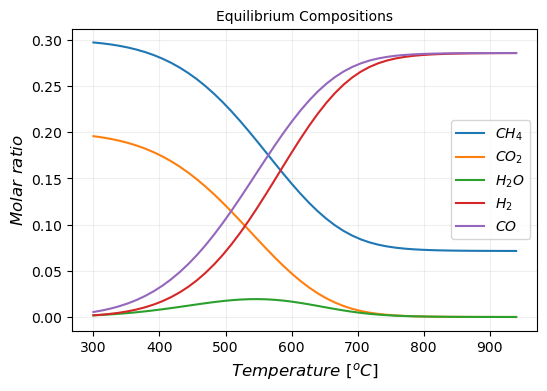
You can also create a plot for the gas mixture conversions, yields and ratios (e.g., diluted mixture).
mix.plot_conversions_yields()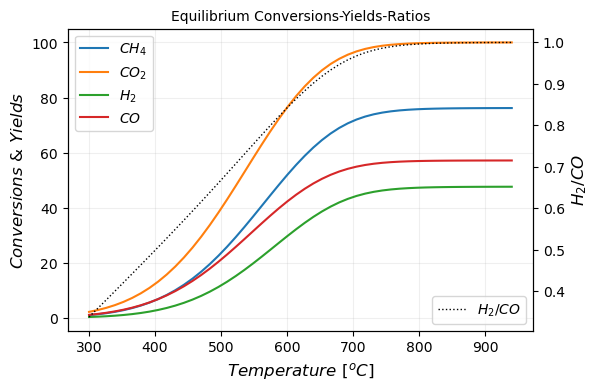
The package allows you to consider carbon during the thermodynamic analysis.
First, you have to add carbon.
mix.add_carbon()Then, by applying that same logic you can have access to molar composition plots,
mix.plot_molar_ratio_carbon()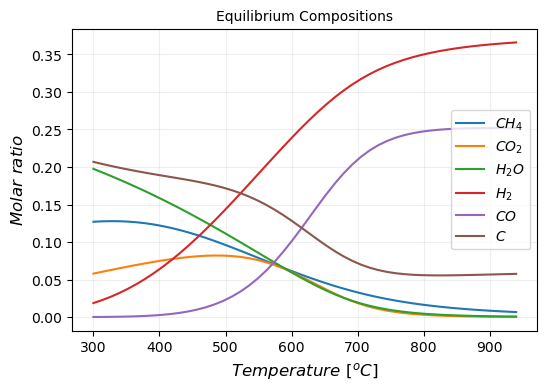
or, you can create a plot for the gas mixture conversions, yields and ratios.
mix.plot_conversions_yields_carbon()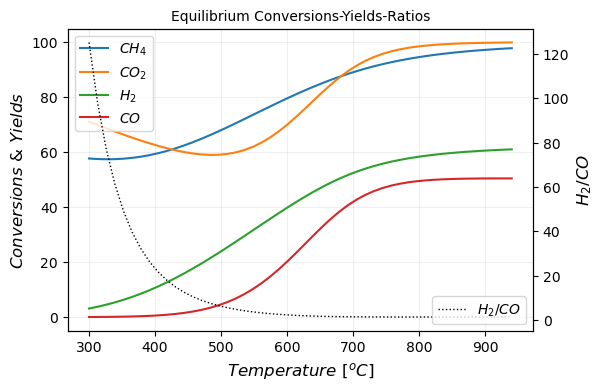
You can also obtain a dataframe of all the obtained numerical values of conversions, yields, molar ratio compositions etc., for both cases (i.e., with and without carbon) by using the following.
mix.get_dataframe()
mix.get_dataframe_carbon()
Finally, you can get the excel files with the dataframes to create your own plots or manipulate data, if necessary.
mix.to_excel('GasEquilibrium')
mix.to_excel_carbon('GasEquilibriumCarbon')First you have to create an instance for the test reactor.
test_reac = SingleBed()Next you have to add the single bed reactor with one required parameter z (i.e., length of the reactor). Other optional parameters are (rhos=950.0, rhob=570.0, es=0.4, dp=0.425e-3, tao=3.0, inner_R=4.6e-3, Pmin=0.5) which are described in greater detail within the package.
You can either choose a single axial bed reactor,
test_reac.add_axial_bed(5.1e-3)or you can take advantage of the flexibility of the package and incorporate an external cooling fluid of variable temperature. Default value of cooling temperature is the ambient temperature (T=298K)
test_reac.add_cooler(5.1e-3)
test_reac.beds[1].Tcool = 298
Then you have to set inlet conditions (50% biogas & 50% inert gas). Default values are (Fch4=30, Fco2=20, Fh2o=1e-1, Fh2=1e-5, Fco=0.0, Far=50, T=773, P=1.0) with molar rates (Fi) in [ml/min], temperature (T) in K, and pressure (P) in bar. Note that small amounts of hydrogen and water should be inserted too in order to avoid division with zero and maintain numerical stability.
test_reac.set_inlet()After that, you have to solve the system of differential equations,
test_reac.solve()and save the results obtained in a variable.
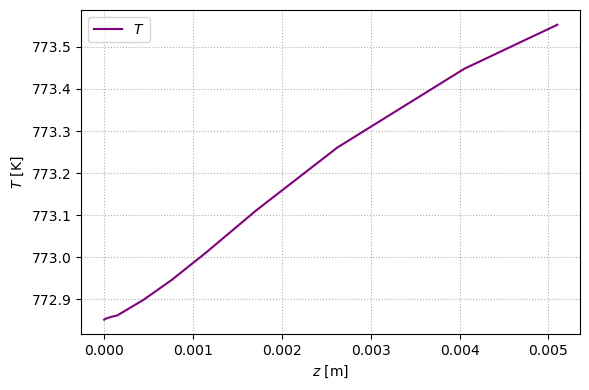
profiles = test_reac.get_dataframe()From the created profiles your can obtain the plots of molar rates and temperature profiles. For example, for the axial bed reactor at default values:
fig, ax = plt.subplots(figsize=[6, 4], dpi=100, sharex=True)
ax.plot(profiles.index, profiles["Fch4"], color="darkgreen", label="$CH_4$")
ax.plot(profiles.index, profiles["Fco2"], color="black", label="$CO_2$")
ax.plot(profiles.index, profiles["Fh2"], color="red", label="$H_2$")
ax.plot(profiles.index, profiles["Fco"], color="orange", label="$CO$")
ax.set_ylabel("$F$ [mol/s]")
ax.set_xlabel("$z$ [m]")
ax.legend()
ax.grid(ls=":")
fig.tight_layout()
plt.show()

fig, ax = plt.subplots(figsize=[6, 4], dpi=100, sharex=True)
ax.plot(profiles.index[1:], profiles["T"].iloc[1:], color="purple", label="$T$")
ax.set_ylabel("$T$ [K]")
ax.set_xlabel("$z$ [m]")
ax.legend()
ax.grid(ls=":")
fig.tight_layout()
plt.show()
or for the axial bed reactor at T=950K,
test_reac.add_axial_bed(5.1e-3)
test_reac.set_inlet(T=950)
test_reac.solve()
profiles = test_reac.get_dataframe()

fig, ax = plt.subplots(figsize=[6, 4], dpi=100, sharex=True)
ax.plot(profiles.index, profiles["Fch4"], color="darkgreen", label="$CH_4$")
ax.plot(profiles.index, profiles["Fco2"], color="black", label="$CO_2$")
ax.plot(profiles.index, profiles["Fh2"], color="red", label="$H_2$")
ax.plot(profiles.index, profiles["Fco"], color="orange", label="$CO$")
ax.set_ylabel("$F$ [mol/s]")
ax.set_xlabel("$z$ [m]")
ax.legend()
ax.grid(ls=":")
fig.tight_layout()
plt.show()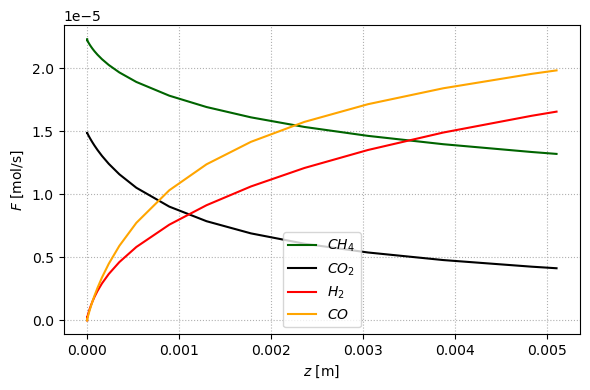
or for the cooler using the default values.
test_reac = SingleBed()
test_reac.add_cooler(5.1e-3)

test_reac.set_inlet()
test_reac.solve()
profiles = test_reac.get_dataframe()

fig, ax = plt.subplots(figsize=[6, 4], dpi=100, sharex=True)
ax.plot(profiles.index[1:], profiles["T"].iloc[1:], color="purple", label="$T$")
ax.set_ylabel("$T$ [K]")
ax.set_xlabel("$z$ [m]")
ax.legend()
ax.grid(ls=":")
fig.tight_layout()
plt.show()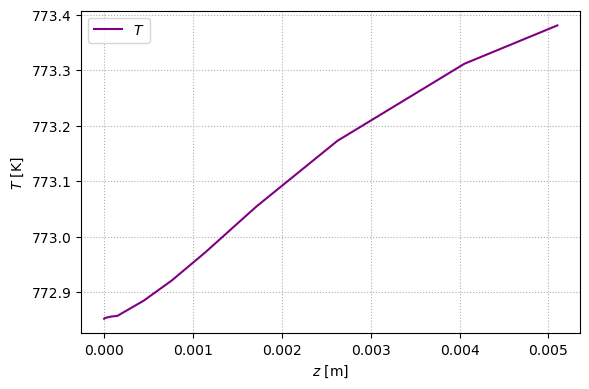
The effectiveness factors can also be adjusted accordingly.
test_reac = SingleBed()

test_reac.add_axial_bed(5.1e-3)
test_reac.set_inlet(T=1000)

test_reac.beds[1].eff1 = 0
test_reac.beds[1].eff2 = 0
test_reac.beds[1].eff3 = 1
test_reac.beds[1].eff4 = 1

test_reac.solve()
profiles = test_reac.get_dataframe()


fig, ax = plt.subplots(figsize=[6, 4], dpi=100, sharex=True)
ax.plot(profiles.index, profiles["Fch4"], color="darkgreen", label="$CH_4$")
ax.plot(profiles.index, profiles["Fco2"], color="black", label="$CO_2$")
ax.plot(profiles.index, profiles["Fh2"], color="red", label="$H_2$")
ax.plot(profiles.index, profiles["Fco"], color="orange", label="$CO$")
ax.set_ylabel("$F$ [mol/s]")
ax.set_xlabel("$z$ [m]")
ax.legend()
ax.grid(ls=":")
fig.tight_layout()
plt.show()

fig, ax = plt.subplots(figsize=[6, 4], dpi=100, sharex=True)
ax.plot(profiles.index, profiles["T"], color="purple", label="$T$")
ax.set_ylabel("$T$ [K]")
ax.set_xlabel("$z$ [m]")
ax.legend()
ax.grid(ls=":")
fig.tight_layout()
plt.show()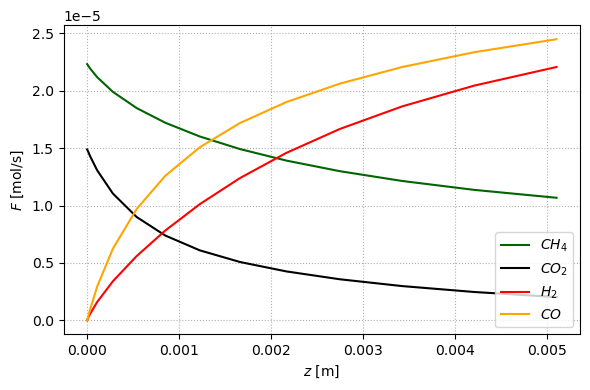
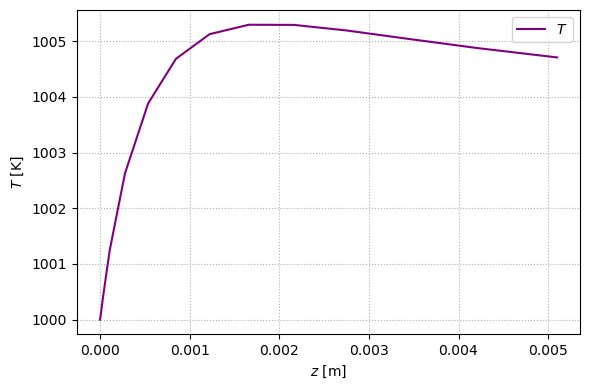
The user can also have access to the values of conversions (e.g., T=1000K)
conversions = test_reac.conversion
conversions
Out:
{'Xch4': 52.15113752011564,
'Xco2': 86.35640511938523,
'Xh2': 49.441254573711674,
'Xco': 65.83324455982348}
The package also returns the heat consumption in kW with default value of (initial_T=781K) to give an indicative overview of the εnergy requirements.
test_reac.get_heat_consumed(initial_T=781.00)Out
1.0057557884893267
Finally, you can get an excell file of the molar rates, temperature, and pressure profiles to create your own plots.
test_reac.to_excel("SingleBed")The kinetic model, effectiveness factors, reactor characteristics and particle properties were reproduced based on the Charisiou et al. work, while other equations and parameters used herein were adopted from the Leite et al. articles.