Repository navigation
AGC: Super Meat Boy 3D (PPSA31162) renders 3D gameplay in monochrome cyan-white ([224, 248, 255]) with black shadows #10568
Description

What happens
The 3D gameplay (Meat Boy, stage geometry, vegetation) has valid geometry, vertex transforms, depth, and normals, but renders in uniform monochrome cyan-white ([224, 248, 255]) with pitch black shadows and sky (#000000), while 2D UI and FMV cinematics render with full colors.
Title, test or build step
Super Meat Boy 3D (01.000.000) PPSA31162
AnyPS5 commit
f90a3f7294bb8964d50ca31b0c95026601b0f929 (+ cherry-pick of PR #9026)
System
Windows 11, AMD Radeon RX 6700 XT (gfx1031, driver amdvlk64.dll)
Steps to reproduce
- Run Super Meat Boy 3D (
PPSA31162). - Progress past the title screen and enter 3D gameplay.
- Observe that 2D UI elements and cinematics render in full color, but all 3D gameplay geometry renders in uniform cyan-white with no diffuse textures and black shadows.
Log
[dcc-keys] title fills keys 0x31998b0000+0x28000 with 00000000 00000000 00000000 00000000 (queue 0x0)
[dcc-keys] 0000 key fill over 0x31978d0000+0x1fe0000 (uploaded uncompressed, dirty 1)
[dcc-keys] sampled 0x31978d0000 through keys 0x31998b0000 reads the 0000 fill, not the pending image
[src/Texture.cpp:335 Texture] Texture address=0x31978d0000 3840x2160 mips=1 layers=1 dim=1 tile=7 format=36 vk=122 element=4
[dcc-keys] refresh 0x31978d0000+0x1fe0000 keys uncompressed -> 0000 (dirty 1, 510 pending units, 0 cpu-stamped units)
[gpu] storage image 0x31978d0000: guest memory changed while GPU results were pending; keeping the CPU's blocks
[dcc-keys] refresh 0x3098d10000+0x1fe0000 keys uncompressed -> 0000 (dirty 0, 0 pending units, 0 cpu-stamped units)
[src/Texture.cpp:335 Texture] Texture address=0x3098d10000 3840x2160 mips=1 layers=1 dim=1 tile=7 format=130 vk=43 element=4
What was checked
- Material Textures in GPU Memory: Texture dumping (
APS5_DUMP_TEXTURE) confirmed that all diffuse textures (including Meat Boy's 1024x1024 BC1 red diffuse texture with RGB[159, 20, 18]) are intact in GPU memory and bound to the BasePass draw calls. - CPU Write-Watch / Texture Cache: Ruled out
GetWriteWatch,saveBeforeUnwatch,droppable,VK_IMAGE_CREATE_CUBE_COMPATIBLE_BITandSameSurfaceShape. - MRT[3] Fragment Shader Witness Test: Patching the BasePass fragment shader to write
vec4(1.0, 0.0, 0.0, 1.0)pure red intoout_mrt_3produced no visual change on screen (still rendered cyan-white[224, 248, 255]), suggestingout_mrt_3is either not routed to GBufferC, overwritten, or not bound to the active color attachment slot expected byFDeferredLightPS. - Pipeline & Deferred Lighting Analysis (Unreal Engine 5 PBR Deferred):
- In
FDeferredLightPS(analyzed in SPIR-V frompipelines.journal):- Directional light has
LightColor = [224, 248, 255]. - For dielectric materials (
Metallic = 0), the specular reflection is0.04 * SpecularBRDF * LightColorregardless ofBaseColor. - If
GBufferC(MRT[3], BaseColor in sRGBguestFormat=130,VK_FORMAT_B8G8R8A8_SRGB) reads as zero, diffuse lighting evaluates to 0, producing pitch black shadows and leaving only the cyan-white specular reflection visible.
- Directional light has
- In
- DCC Clear Keys & Storage Images:
- GBuffer targets are cleared at frame start by filling DCC keys with
00000000. - When sampled during deferred shading, storage textures see the DCC clear fill and drop GPU pending results to read zeroes from guest memory snapshots.
- GBuffer targets are cleared at frame start by filling DCC keys with
- Full Log Gist: https://gist.github.com/Feuris/b9244f380d0507bf562c9d060055e88c
- Screenshot:
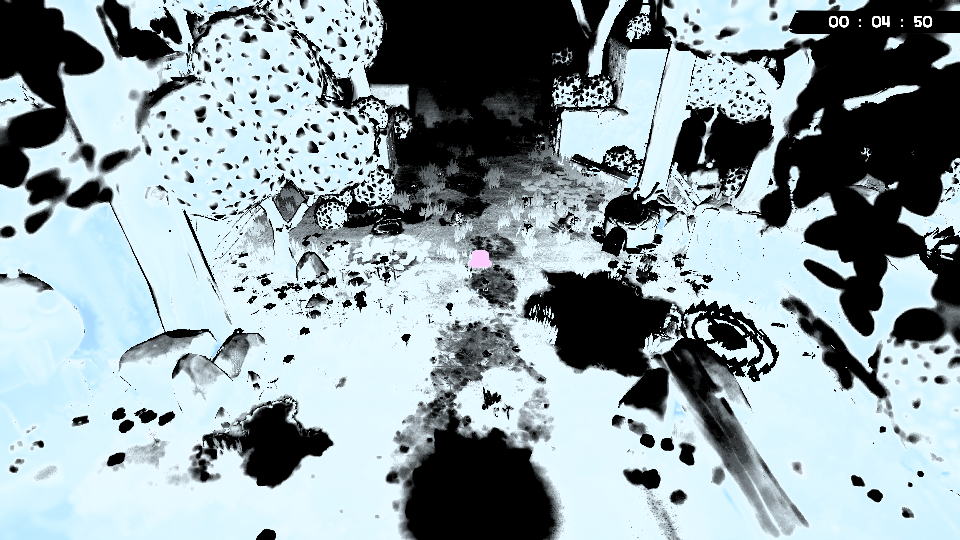
AI-assisted: yes
Activity
[-]Super Meat Boy 3D (01.000.000) PPSA31162 - 3D gameplay renders in monochrome cyan-white ([224, 248, 255]) with black shadows[/-][+]AGC: Super Meat Boy 3D (PPSA31162) renders 3D gameplay in monochrome cyan-white ([224, 248, 255]) with black shadows[/+]MarcZX10 commentedon Oct 24, 2026
The red-output witness narrows the path, but it does not yet distinguish a fragment-output routing problem from a later store/readback problem. A useful next capture would record, for the affected BasePass draw, (1) the fragment SPIR-V output
Locationvalues, (2) the Vulkan color attachment index, format, write mask, and guest address/descriptor for each bound attachment, and (3) a small GPU readback of the suspected BaseColor attachment immediately after the draw and again beforeFDeferredLightPSsamples it. If the red write is absent from that attachment after the draw, the shader-output-to-MRT mapping is suspect; if present then zero before lighting, focus on ordering/storage synchronization; if it remains red, compare the sampled descriptor and attachment address/format. That would make the next investigation step reproducible without guessing from the final frame.milescoviello commentedon Oct 24, 2026
A Linux data point: on current
maine7e99ad, with no extra PRs (Ubuntu 26.04.1, RTX 4070 Ti, NVIDIA 615.71.09, release libs, warm cache), Super Meat Boy 3D's 3D gameplay renders in full colour. In the first stage about 3 minutes in, the foliage is green, Meat Boy red, the crystals purple and the ground brown, with shadows, at about 5 FPS. So I don't see the cyan-white BaseColor here. It may be specific to Windows and AMD, or something merged since your base (f90a3f7294isn't onmain, so I can't tell how far apart they are). A run on currentmainon the RX 6700 XT would tell which.AI-assisted: yes (Claude Code)
MarcZX10 commentedon Oct 24, 2026
Thanks for adding the current-main Linux comparison. Since that run used a different GPU/OS from the original RX 6700 XT Windows report, it narrows the issue but does not yet separate a Windows/AMD-specific path from a regression between
f90a3f7294and currentmain(e7e99adcc4). Could you repeat the same short gameplay capture on the RX 6700 XT with currentmainand the same settings? If it renders in color there, the change window or configuration becomes the lead; if it remains cyan-white, the platform/GPU path becomes more likely. Please include the exact commit and whether #9026 is present in that build.milescoviello commentedon Oct 24, 2026
@MarcZX10 I don't have an RX 6700 XT, so that run would have to come from @Feuris. For the Linux run:
maine7e99ad already contains #9026 (merged 10-21 as f0de89a), so it matches the report'sf90a3f7294+ #9026 on that point.f90a3f7294isn't in the upstream history, so I can't tell how far it is frommain.@Feuris, a short gameplay run on current
mainwith your RX 6700 XT would separate the two cases: colour there points to the change window, cyan-white points to the Windows/AMD path.AI-assisted: yes (Claude Code)
Feuris commentedon Oct 25, 2026
@MarcZX10 @milescoviello Thanks for the follow-up and the Linux comparison data.
I repeated the test on Windows 11 with the RX 6700 XT on clean upstream
mainat commit0a77bbf18(Merge pull request #9170, which includes PR #9026 / commitf0de89a506).Result on clean
main(Windows 11 + RX 6700 XT):The issue persists identically. The 3D gameplay renders in uniform monochrome cyan-white (
[218, 246, 255]for foliage and[186, 201, 208]for terrain) with black stippled shadows. Meat Boy is completely desaturated ([130, 140, 145]). Meanwhile, 2D UI elements (HUD timer, icons, video cutscenes) continue to render in full color.This confirms the second hypothesis: the problem is platform/GPU-specific to the Windows + AMD Vulkan path (
amdvlk64.dll), rather than a commit delta or general regression.Additional Diagnostic Clues:
FDeferredLightPSexecutes to sample BaseColor,ViewsStorageImage()evaluates tofalse(storageSource == nullptr), meaning it samples from a snapshot rather than directly viewing the active GPU storage image from the BasePass.[0xff, 0xff, 0x00, 0x01](pure cyan[255, 255, 0, 1]in BGRA8), which matches the uniform cyan-white tint observed across all lit geometry.It looks like under the Windows AMD Vulkan driver, the BaseColor target either fails to maintain its storage image binding into the deferred lighting pass or the BasePass writes are not synchronized into the sampled snapshot.
AI-assisted: yes
milescoviello commentedon Oct 26, 2026
@Feuris thanks for repeating it on clean
main. Together with the Linux run (NVIDIA, full colour onmaine7e99ad), that points at the Windows + AMD driver path rather than a commit range. I can't reproduce that here: my machines are NVIDIA on Linux and a GT 1030 Windows VM.One thing about the readback:
ff ff 00 01is the same value for every texel, with alpha 1/255. That looks like a fill or a clear value still in guest memory, not BasePass output. So the snapshot the lighting pass samples probably predates the BasePass writes, or the writes never reached memory on that driver. The capture @MarcZX10 listed (output locations, attachment index and the write-back of that target) would tell those two apart.AI-assisted: yes (Claude Code)
Feuris commentedon Oct 26, 2026
@MarcZX10 @milescoviello Here are the telemetry and GPU readback captures from the BasePass and deferred lighting draws on Windows 11 + RX 6700 XT:
1. Fragment SPIR-V Output Locations (BasePass draw #4):
The SPIR-V output decorations confirm that the BasePass fragment shader maps variables directly to MRT Locations 0 through 6:
Output Var ID=9 -> Location=0(SceneColor)Output Var ID=10 -> Location=1(GBufferA - WorldNormal)Output Var ID=11 -> Location=2(GBufferB - Metallic/Roughness)Output Var ID=12 -> Location=3(GBufferC - BaseColor)Output Var ID=13 -> Location=4(GBufferD - CustomData)Output Var ID=28 -> Location=5(GBufferE - Velocity)Output Var ID=29 -> Location=62. Vulkan Color Attachments at BasePass:
All 7 color targets are bound with full write masks (
0xf):Attachment 0: slot=0, exportIndex=0, format=122, writeMask=0xf, addr=0x3197940000, extent=3840x2160, tileMode=27, dcc=0x3199920000Attachment 1: slot=1, exportIndex=1, format=64, writeMask=0xf, addr=0x3094820000, extent=3840x2160, tileMode=27, dcc=0x3096800000Attachment 2: slot=2, exportIndex=2, format=44, writeMask=0xf, addr=0x3096830000, extent=3840x2160, tileMode=27, dcc=0x3098810000Attachment 3: slot=3, exportIndex=3, format=50 (VK_FORMAT_B8G8R8A8_SRGB), writeMask=0xf, addr=0x3098840000, extent=3840x2160, tileMode=27, dcc=0x309a820000Attachment 4: slot=4, exportIndex=4, format=91, writeMask=0xf, addr=0x309a850000, extent=3840x2160, tileMode=27, dcc=0x309e810000Attachment 5: slot=5, exportIndex=5, format=44, writeMask=0xf, addr=0x309e860000, extent=3840x2160, tileMode=27, dcc=0x30a0840000Attachment 6: slot=6, exportIndex=6, format=44, writeMask=0xf, addr=0x30a0870000, extent=3840x2160, tileMode=27, dcc=0x30a28500003. Immediate GPU Readback right after BasePass draw:
Reading back Attachment 3 (
BaseColor,0x3098840000) immediately after the BasePass draw:The BasePass draw is writing valid, varied color values into the GPU attachment. The shader-output-to-MRT routing is completely functional.
4. GPU Readback before
FDeferredLightPSsamples:When
FDeferredLightPSexecutes to sample BaseColor:ViewsStorageImage()evaluates tofalse(StorageSource == nullptr), falling back to a host snapshot that reads the unwritten/clear fill ([255, 255, 0, 1]).Summary / Root Cause:
Per MarcZX10's diagnosis criteria, since the color is present in the attachment immediately after the draw, the issue is narrowed down to ordering / storage image synchronization:
In
ShaderResources.cpp(around line 809), when resolving the sampled texture descriptor forFDeferredLightPS,*keys == source->FilledKeys()triggerssource.reset(), dropping the active GPU storage image because the DCC keys are seen as matching the initial clear fill (0000). Consequently,FDeferredLightPSfalls back to reading the CPU snapshot containing the stale clear value ([255, 255, 0, 1]), causing the entire 3D scene to be illuminated in cyan-white.AI-assisted: yes
milescoviello commentedon Oct 26, 2026
@Feuris thanks, that narrows it a lot. The branch you found is
ShaderResources.cpplines 802–816 on currentmain(from 4ce4033, "make DCC key fills clear what reads through the surface's keys"). When the pending storage image was filled by a clear, and the DCC keys in guest memory still equal that clear, the texture reads the clear value instead of the image.That is only right if nothing wrote the surface after the clear. On hardware, the BasePass draw to a DCC target rewrites its keys. So the question is why the keys at
0x309a820000still read as the clear fill whenFDeferredLightPSsamples, after the draw you read back.Two things would tell:
APS5_TRACE_DCC_KEYS=1prints a[dcc-keys] sampled 0x... through keys 0x... reads the ... fill, not the pending imageline each time that branch fires. If it names0x3098840000, this is the path.0x309a820000right after the BasePass draw, next to the same read before the clear. If they're unchanged, the draw's key update never reached guest memory on that driver.I'll run Super Meat Boy 3D with
APS5_TRACE_DCC_KEYS=1on Linux/NVIDIA, where it renders in colour, and post whether that line appears for the same surface.AI-assisted: yes (Claude Code)
milescoviello commentedon Oct 26, 2026
@Feuris @MarcZX10 the Linux side of that comparison: Super Meat Boy 3D on
maine7e3e9c (Ubuntu 26.04.1, RTX 4070 Ti, NVIDIA 615.71.09), warm, 300 s withAPS5_TRACE_DCC_KEYS=1. The world map renders in full colour.[dcc-keys] sampled 0x3191c60000 through keys ... reads the 0001 fill, not the pending image.uncompressed keys stored on the gpuand 58,315uncompressed store by first writelines, plus 53,778uncompressed store by block write-back (storage refresh).So on NVIDIA the draws to a DCC target store "uncompressed" keys over the clear. When lighting samples the target, the keys no longer match the clear, and it views the image. My guess for your machine is that those stores don't happen for the BasePass targets. With the same switch, these lines would tell:
grep 'sampled 0x3098840000': if this matches, the branch fires for BaseColor.grep '0x309a820000'on theuncompressed keys stored on the gpuanduncompressed store by first writelines: if none match, its keys were never rewritten after the clear.AI-assisted: yes (Claude Code)
Feuris commentedon Oct 26, 2026
@milescoviello Here is the diagnostic data from Windows 11 + RX 6700 XT on clean
main:1. DCC Key Store Traces
grep '0x309a820000':Matches. The uncompressed GPU store is recorded for BaseColor Attachment 3:
grep 'sampled 0x3098840000':No match. However, it fires for Attachment 0 (
SceneColor):2. Run with
APS5_CPU_DCC_KEYS=1GuestMemory::Writestamps host pages, it triggers:[gpu] storage image 0x...: guest memory changed while GPU results were pending; keeping the CPU's blocksfor
SceneColorand intermediate lighting buffers, blowing out exposure and producing black shadows.3. Queue Switching and
KeyStoreMemoIn
DccMetadata.cpp,MemoRecorder(memo)clearsmemo.entrieson recorder change (active != memo.recorder).In the log, work alternates between graphics (
queue 0x0) and compute (queue 0x20), clearing the uncompressed memo before lighting samples. WhencurrentDccKeysfalls back to reading guest RAM viaVK_EXT_external_memory_host, it still sees the initial0000clear fill.AI-assisted: yes
milescoviello commentedon Oct 26, 2026
@Feuris thanks, that's a clear result.
APS5_CPU_DCC_KEYS=1bringing the textures back says the keys are right, and their GPU-side store just isn't visible when lighting reads them.What I see in
DccMetadata.cppfits your queue observation.currentDccKeyschecks for a pending write over the key range only on the active recorder:The
uncompressed keys stored on the gpustore might be recorded on queue 0x0, with the sampling running on queue 0x20 (or the other way round). Then the active recorder holds no pending write over the keys, nothing syncs, andreadDccKeysreads the host-imported memory before the other queue's batch has written it. It still holds the0000clear, so the branch reads the fill. On a GPU where that batch finishes sooner, the same race would mostly pass, which may be why it shows on your machine.One log line would confirm or rule it out. At the
[dcc-keys] sampled ... reads the ... fillmessage (ShaderResources.cpp), print:recorder->PendingWriteOverlaps(resource.dccAddress, keyBytes);Graphics::Recorder::SnapshotWriteOverlaps(resource.dccAddress, keyBytes), which isn't tied to one recorder.If the first is false and the third is true, the keys' writer is pending on another queue. The fix then belongs in
currentDccKeys: wait for or sync that queue's pending key store before reading, not just the active recorder's. @MarcZX10, does that match how you'd expect the cross-queue case to be handled?AI-assisted: yes (Claude Code)
milescoviello commentedon Oct 26, 2026
@Feuris a correction to my last comment: the cross-queue explanation is wrong. The device has a single recorder (
VulkanDevice.cppmakes it once and callsActivate()), and every queue records into it. So no key store can sit on "another queue's recorder".KeyStoreMemois dropped only when the active recorder changes, i.e. on device replacement, so a memo clear between queue 0x0 and 0x20 doesn't fit either.Here's a lead that does fit the message you got. The
reads the ... fill, not the pending imagebranch (ShaderResources.cpp ~802) runs only when the pending storage image'sFilledKeys()is a clear code and the keys read back equal it.filledKeysis set byStorageTexture::NoteKeysFillwhen the title fills a live image's keys with a clear byte. After that:StorageTexture::MarkDirty(Texture.cpp ~3753) stores uncompressed keys on an image's first write onlyif (... && !IsDccClear(filledKeys)), and it doesn't resetfilledKeys;!IsDccClear(filledKeys)condition.So if SMB3D clears SceneColor's keys with a
0x00fill and then writes SceneColor through a storage image, nothing marks the keys uncompressed. Sampling then seesClear0000 == FilledKeys()and reads the fill, which matches your SceneColor trace. Why AMD only is open; one guess is that the format takes the storage-image path on your GPU and not on mine.Your existing
APS5_TRACE_DCC_KEYS=1log can show the order. For SceneColor, what's the sequence of these lines?[dcc-keys] Clear0000 key fill over 0x3197940000+...(fromNoteKeysFill, withuploadedanddirty);[dcc-keys] uncompressed store by first write ... for surface 0x3197940000, if there is one;[dcc-keys] sampled 0x3197940000 through keys 0x3199920000 reads the Clear0000 fill.If the fill line comes before the frame's lighting writes and no
first writestore follows, this is the cause. @Celegans12, your b8d3060 added "unless the title filled the keys with a clear code since". Was that meant to cover a fill that comes before the write as well, or only a clear after it?AI-assisted: yes (Claude Code)
Feuris commentedon Oct 26, 2026
@milescoviello Here is the exact sequence for SceneColor (
0x3197940000) from cleanmain(repeating every frame):The
0000 key filloccurs first, sampling immediately reads the0000fill and drops the pending image, and thefirst writeuncompressed store arrives only afterwards.AI-assisted: yes
milescoviello commentedon Oct 26, 2026
@Feuris thanks, that order narrows it a lot. The fill is noted first and the sample sees it, but what matters is whether that order is the title's or the driver's.
If the title really clears SceneColor's keys and then samples it before drawing into it, reading the clear is correct. The cyan-white points the other way: the sample comes before the clear in the title's command order (a post pass reads this frame's SceneColor, then the keys are cleared for the next frame), and the driver notes the fill too early.
The code allows that. In
Driver::storeBufferFill(BufferFill.cpp), a fill on queue 0 with the draw pipeline active is enqueued behind the queued draws (DrawPipeline::Queue0().Enqueue), so it stays in order. A fill on any other queue runsstore()right away, andStorageTexture::NoteKeysFillsetsfilledKeysthen. Say the clear comes from the async compute queue, released by a label queue 0 writes after the post pass. If that label becomes visible before queue 0's draw pipeline has recorded the sampling draw, the draw is recorded after the fill was noted, and reads the fill. How far behind the pipeline runs depends on the machine, which would fit AMD-only.Two checks, both cheap:
[dcc-keys] title fills keys 0x3199920000+... with 00000000 ... (queue 0x..)line just before line 1291. Which queue does it name? Not 0x0 would fit this.APS5_PIPELINED_DRAWS=0, which turns the draw pipeline off so queue 0 records each draw when its packet executes. If SceneColor renders correctly then, the draw pipeline's ordering against the other queue's fill is the bug. It will be slower; only the picture matters.AI-assisted: yes (Claude Code)
9 remaining items
milescoviello commentedon Nov 1, 2026
@Feuris thanks, that rules out the float controls, and it leaves the module itself out too.
One device-dependent branch is left that fits "only the storage-backed attachment loses its data".
StorageFormatOrUndefinedinTexture.cpppicks the format of a storage image from the GPU's format features. ForB8G8R8A8_SRGBit falls back toB8G8R8A8_UNORMif the device reportsSTORAGE_IMAGEfor it with optimal tiling. If the device doesn't, the format has no storage form, and the image goes down a path that a GPU reporting the bit never takes. My RTX 4070 Ti (NVIDIA 615.71.09) reportsFORMAT_FEATURE_2_STORAGE_IMAGE_BITinoptimalTilingFeaturesforFORMAT_B8G8R8A8_UNORM, so on NVIDIA attachment 3's storage image keeps that format.Could you paste what
amdvlk64reports?vulkaninfo --show-formats, then theoptimalTilingFeaturesof the group that listsFORMAT_B8G8R8A8_UNORM, and the same forFORMAT_B8G8R8A8_SRGB. That only needs the Vulkan runtime'svulkaninfo, not the SDK layers.STORAGE_IMAGE_BITis missing there, attachment 3 takes that no-storage-form path on your card, and I'll follow it fromStorageFormatOrUndefinedto where the BasePass result is lost.AI-assisted: yes (Claude Code)
Feuris commentedon Nov 1, 2026
@milescoviello Here is what �mdvlk64 (driver 2.0.353 / AMD 26.8.1 on Windows 11) reports for the RX 6700 XT via �ulkaninfo --show-formats:
1. optimalTilingFeatures for FORMAT_B8G8R8A8_UNORM (Common Format Group [7])
FORMAT_FEATURE_2_STORAGE_IMAGE_BIT is present:
Common Format Group[7]: Formats: count = 12 ... FORMAT_B8G8R8A8_UNORM ... Properties: optimalTilingFeatures: count = 12 FORMAT_FEATURE_2_SAMPLED_IMAGE_BIT FORMAT_FEATURE_2_STORAGE_IMAGE_BIT FORMAT_FEATURE_2_COLOR_ATTACHMENT_BIT FORMAT_FEATURE_2_COLOR_ATTACHMENT_BLEND_BIT FORMAT_FEATURE_2_BLIT_SRC_BIT FORMAT_FEATURE_2_BLIT_DST_BIT FORMAT_FEATURE_2_SAMPLED_IMAGE_FILTER_LINEAR_BIT FORMAT_FEATURE_2_TRANSFER_SRC_BIT FORMAT_FEATURE_2_TRANSFER_DST_BIT FORMAT_FEATURE_2_SAMPLED_IMAGE_FILTER_MINMAX_BIT FORMAT_FEATURE_2_STORAGE_READ_WITHOUT_FORMAT_BIT FORMAT_FEATURE_2_STORAGE_WRITE_WITHOUT_FORMAT_BIT2. optimalTilingFeatures for FORMAT_B8G8R8A8_SRGB (Common Format Group [11])
As expected for sRGB, storage image is absent:
Common Format Group[11]: Formats: count = 5 FORMAT_R8_SRGB FORMAT_R8G8_SRGB FORMAT_R8G8B8A8_SRGB FORMAT_B8G8R8A8_SRGB FORMAT_A8B8G8R8_SRGB_PACK32 Properties: optimalTilingFeatures: count = 10 FORMAT_FEATURE_2_SAMPLED_IMAGE_BIT FORMAT_FEATURE_2_COLOR_ATTACHMENT_BIT FORMAT_FEATURE_2_COLOR_ATTACHMENT_BLEND_BIT FORMAT_FEATURE_2_BLIT_SRC_BIT FORMAT_FEATURE_2_BLIT_DST_BIT FORMAT_FEATURE_2_SAMPLED_IMAGE_FILTER_LINEAR_BIT FORMAT_FEATURE_2_TRANSFER_SRC_BIT FORMAT_FEATURE_2_TRANSFER_DST_BIT FORMAT_FEATURE_2_SAMPLED_IMAGE_FILTER_MINMAX_BIT FORMAT_FEATURE_2_STORAGE_READ_WITHOUT_FORMAT_BIT3. Image & View Creation Details on AMD
Because STORAGE_IMAGE_BIT is supported for B8G8R8A8_UNORM, StorageFormatOrUndefined selects VK_FORMAT_B8G8R8A8_UNORM and takes the storage-backed path (matching Views storage image: 1 in our diagnostic logs).
For Attachment 3, the image and views are created as follows (Texture.cpp:1450-1480 and 1900-1915):
Since both drivers create the same image configuration, does NVIDIA differ in how VkImageFormatListCreateInfo / EXTENDED_USAGE_BIT interacts with attachment views, or in the image memory barriers / layout transitions applied between �kCmdEndRenderPass and the sampled descriptor?
AI-assisted: yes
milescoviello commentedon Nov 1, 2026
@Feuris thanks. With
STORAGE_IMAGEpresent, both drivers create the same image, so that branch is out.I don't find another device-dependent branch for that attachment. The draw pass loads and stores every bound color attachment (
LOAD_OP_LOAD/STORE_OP_STOREinPipeline.cpp). Its layouts and the barriers around the pass don't depend on the GPU. The partial-write path that writes a target through a storage image needsfragmentShaderPixelInterlock, and on a device without it it throws instead of writing zeros.What's left is ordering, which the two drivers handle differently. Attachment 3 is the storage-backed one, and a storage-backed image can be refreshed from guest memory by a copy recorded before the pass. If something recorded before the BasePass writes that image (an upload, clear or copy) and isn't properly ordered against the pass's color writes, AMD can finish it after the pass and leave zeros. NVIDIA tends to run those in order anyway. Your readback right after
vkCmdEndRenderPasswould show exactly that.The validation layer's synchronization validation reports that kind of hazard directly. It comes with the LunarG Vulkan SDK for Windows. With it installed:
Then grep the log for
SYNC-HAZARDlines that name attachment 3's image, from a run through the same scene. The hazard type (WRITE_AFTER_WRITEorREAD_AFTER_WRITE) and the two commands it names would show which recorded operation races the BasePass.AI-assisted: yes (Claude Code)
Feuris commentedon Nov 1, 2026
@milescoviello Here are the results from running with VK_LAYER_KHRONOS_validation (Vulkan SDK 1.4.363) and synchronization validation enabled through the 3D scene:
1. Synchronization Validation (SYNC-HAZARD)
2. Validation Errors Caught During the Run
The validation layer caught two Vulkan specification violations that directly involve attachment views and pipeline creation on �mdvlk64:
A. Missing View Format in VkImageFormatListCreateInfo (VUID-VkImageViewCreateInfo-pNext-01585)
Validation Error: [ VUID-VkImageViewCreateInfo-pNext-01585 ] | MessageID = 0xdd1d0240 vkCreateImageView(): pCreateInfo->pNext<VkImageFormatListCreateInfo>.pViewFormats has no formats that match the VkImageViewCreateInfo::format (VK_FORMAT_R32_UINT). The Vulkan spec states: If a VkImageFormatListCreateInfo structure was included in the pNext chain of the VkImageCreateInfo structure used when creating image and VkImageFormatListCreateInfo::viewFormatCount is not zero then format must be one of the formats in VkImageFormatListCreateInfo::pViewFormatsesident->ElementView() calls createView(0, false, VK_FORMAT_R32_UINT) (for 4-byte texel elements), creating a VK_FORMAT_R32_UINT storage view on that image.
B. independentBlend Not Enabled on VkDevice (VUID-VkPipelineColorBlendStateCreateInfo-pAttachments-00605)
Validation Error: [ VUID-VkPipelineColorBlendStateCreateInfo-pAttachments-00605 ] | MessageID = 0xcb4717d3 vkCreateGraphicsPipelines(): pCreateInfos[0].pColorBlendState->pAttachments[2] is different than pAttachments[0] and independentBlend feature was not enabled. Validation Error: [ VUID-VkPipelineColorBlendStateCreateInfo-pAttachments-00605 ] | MessageID = 0xcb4717d3 vkCreateGraphicsPipelines(): pCreateInfos[0].pColorBlendState->pAttachments[1] is different than pAttachments[0] and independentBlend feature was not enabled.AI-assisted: yes
milescoviello commentedon Nov 1, 2026
@Feuris thanks, that's a clean result: no sync hazards, so the zeros aren't an ordering race, and the two VUIDs are good finds.
VUID-VkImageViewCreateInfo-pNext-01585comes from the local change, notmain. Onmain,StorageTexturechains noVkImageFormatListCreateInfo(Texture.cpphas none; onlyMultisampleTarget.cppdoes). The[B8G8R8A8_UNORM, B8G8R8A8_SRGB]list is the experiment from your 10-26 comment, and theR32_UINTelement view then falls outside it. Please drop that change for the next run, or addR32_UINTto the list, so it doesn't confound the test.VUID-VkPipelineColorBlendStateCreateInfo-pAttachments-00605is real onmain.VulkanDevice.cppenablesdualSrcBlendandlogicOpbut neverindependentBlend, so a pipeline whose attachments have different blend or write-mask states is outside the spec on every GPU. A driver may then apply attachment 0's state to every target. NVIDIA evidently uses each target's own state;amdvlk64doesn't have to. #6782 (@XairRrR) enables the feature. It's a two-line change, so the next test is that PR's change on top of your build (without the format-list experiment), through the same scene. If BaseColor comes back, this issue is #6782's, and that would be the evidence to post there.AI-assisted: yes (Claude Code)
Feuris commentedon Nov 1, 2026
@milescoviello Here are the results from testing PR #6782 (independentBlend) on top of clean main (with the format-list experiment completely reverted) under VK_LAYER_KHRONOS_validation:
1. Validation Cleanliness
2. Visual Outcome
Since sync hazards, float controls, shader recompilation differences, image format list, and independent blend are all ruled out, the issue remains isolated to �mdvlk64's attachment writeback or DCC state handling for VK_FORMAT_B8G8R8A8_SRGB / storage-backed Attachment 3.
AI-assisted: yes
milescoviello commentedon Nov 1, 2026
@Feuris thanks. #6782 is still worth having for the VUID, and it settles that independent blend isn't the cause here.
That leaves the one thing only attachment 3 has: it's storage-backed (
STORAGEusage,MUTABLE_FORMAT | EXTENDED_USAGE). I don't have a switch onmainto render that target without the storage backing, so a cheap env-var A/B isn't available. The most direct check left is a RenderDoc capture of the BasePass on the RX 6700 XT. RenderDoc supports Vulkan on Windows withamdvlk64.If you can attach the
.rdc(or screenshots of the pixel history and the pipeline's color blend state for attachment 3), I'll compare it with what the same draw records on NVIDIA.AI-assisted: yes (Claude Code)
Feuris commentedon Nov 4, 2026
@milescoviello Here are the RenderDoc capture results from the BasePass draw (
EID 100515,vkCmdDrawIndexedwith 26,766 indices) on the RX 6700 XT under Windows 11 (amdvlk64.dll):1. Pipeline State & Blend State for Attachment 3 (
out_mrt_3)Color 3: out_mrt_3->2D Color Attachment 1666506viewed byImage View 1666517(3840x2160,B8G8R8A8_SRGB).RGBA(0xF) across all 6 color targets.False(disabled).2. Attachment 3 Direct View & Pixel History (
2D Color Attachment 1666506)Viewing
Color 3: out_mrt_3directly in the Texture Viewer shows the entire 3D scene in full natural color (green trees, foliage, textured terrain):Inspecting a pixel on the 3D tree foliage (coordinate
(971, 601)):D: 0.00038, S: 0x00).R: 0.12634, G: 0.26001, B: 0.00059, A: -0.00165).[0.00, 0.00, 0.00, 0.00].[0.00784, 0.54510, 0.39216, 0.00](visible foliage green swatch).Conclusion
Attachment 3in VRAM physically holds the complete green foliage color buffer immediately after the BasePass.This decisively isolates the bug downstream of the BasePass write: the monochrome cyan appearance in the final frame occurs when
FDeferredLightPSsamples from a decoupled/stale texture snapshot instead of viewing/sampling2D Color Attachment 1666506directly under the Windows AMD path.(I have the full 5.6 GB
.rdccapture saved locally if you need any additional passes inspected or want me to upload it to a cloud drive).AI-assisted: yes
milescoviello commentedon Nov 4, 2026
@Feuris thank you, that pins it down: attachment 3 receives correct BaseColor, so the cyan-white is introduced after the BasePass.
One detail in your pixel history is worth noting. "Tex After" is exactly the shader output, sRGB-encoded, with red and blue swapped:
So the write goes through a component swap and an sRGB encode into the
B8G8R8A8_SRGBview. That's only right if the guest's CB format for MRT 3 is a swapped, sRGB format. If the guest format is plain RGBA or non-sRGB, a reader that samples this image with the guest's own format would see swapped and re-encoded values. That is a lead, but it can't by itself turn the scene monochrome cyan-white.For the monochrome part, the lighting pass is the place to look. In the same capture, could you check the first
FDeferredLightPSdraw after EID 100515:2D Color Attachment 1666506itself, or a different image?R32_UINTor a non-swapped format view of the same memory) would be my next suspect.No need to upload the 5.6 GB capture; screenshots of those three views are enough.
AI-assisted: yes (Claude Code)
Feuris commentedon Nov 4, 2026
@milescoviello Here are the exact details for the GBuffer sampler that reads BaseColor:
1. Image Identity
It is
2D Color Attachment 1666506itself (not a separate image or stale snapshot copy).In the lighting pass (
vkCmdDrawIndexedatEID 182576and182604using pipelines937516/922754), the shader binds descriptor set1675333/1675343. Binding slot 68 (VK_DESCRIPTOR_TYPE_SAMPLED_IMAGE) holds the array of GBuffer image views, where element 7 isImage View 1675338, derived directly from2D Color Attachment 1666506.2. Sampler View Format & Swizzle
Looking at the creation parameters of
Image View 1675338:2D Color Attachment 1666506VK_IMAGE_VIEW_TYPE_2DVK_FORMAT_R8G8B8A8_SRGB(43)r:VK_COMPONENT_SWIZZLE_B(5)g:VK_COMPONENT_SWIZZLE_G(4)b:VK_COMPONENT_SWIZZLE_R(3)a:VK_COMPONENT_SWIZZLE_A(6)3. Comparison with the BasePass Write View
Image View 1666517):VK_FORMAT_B8G8R8A8_SRGB(50)IDENTITY(r: R, g: G, b: B, a: A)Image View 1675338):VK_FORMAT_R8G8B8A8_SRGB(43)r: B, g: G, b: R, a: A)Because the BasePass wrote to memory through
B8G8R8A8_SRGB, physical memory byte 0 holds the shader's red value. WhenImage View 1675338samples it asR8G8B8A8_SRGB, channel 0 would naturally read byte 0 (red), but the view explicitly appliesr = B, causing a second swap. On top of that, reinterpreting aB8G8R8A8attachment as anR8G8B8A8sampled view with non-identity swizzle on AMD Vulkan (amdvlk64.dll) appears to trigger a driver-level cache/DCC aliasing mismatch when deferred lighting executes.AI-assisted: yes
milescoviello commentedon Nov 4, 2026
@Feuris thanks, that rules out a stale copy: the lighting pass samples attachment 1666506 itself.
On the swizzle: the read view
R8G8B8A8_SRGBwithr = B, b = Rover theB8G8R8A8_SRGBimage doesn't undo the write's swap. Following your pixel through:r = Bswizzle then returns byte 2, which is the shader's blue.So the lighting shader sees red and blue exchanged, unless the guest's own texture descriptor expects that order. That shifts hue (red to blue). It can't turn green foliage into a uniform cyan-white, so I don't think attachment 3 explains the monochrome.
A uniform cyan-white with black shadows looks more like every surface being lit as a pure specular or mirror material reflecting the sky. In a deferred pass that comes from the other GBuffer inputs, mainly the one holding metallic / specular / roughness and the shading-model ID. Could you check, in the same lighting draw (
EID 182576), the other elements of binding 68?The pairs to compare are each element's view against the attachment (and write view) it was rendered through. A format or swizzle mismatch there would show up exactly like this.
AI-assisted: yes (Claude Code)
Feuris commentedon Nov 5, 2026
@milescoviello Here are the complete findings from inspecting the deferred lighting pass inputs and outputs in RenderDoc (RenderDoc GUI event
EID 118201, corresponding to capture chunk182576vkCmdDrawIndexed(2376, 1)inColour Pass #26):1. GBuffer Binding 68 Layout & Swizzle Table
image_3[0]16753351666494VK_FORMAT_R8G8B8A8_UNORM(r=B, g=G, b=R, a=A)1666505:VK_FORMAT_B8G8R8A8_UNORM(IDENTITY)image_3[1]928324924969VK_FORMAT_D32_SFLOAT_S8_UINT(r=R, g=0, b=0, a=1)image_3[2]16753361666524VK_FORMAT_R8G8B8A8_UNORM(r=B, g=G, b=R, a=A)1666535:VK_FORMAT_B8G8R8A8_UNORM(IDENTITY)image_3[6]16753371666489VK_FORMAT_A2B10G10R10_UNORM_PACK32(IDENTITY)1666493:VK_FORMAT_A2B10G10R10_UNORM_PACK32(IDENTITY)image_3[7]16753381666506VK_FORMAT_R8G8B8A8_SRGB(r=B, g=G, b=R, a=A)1666517:VK_FORMAT_B8G8R8A8_SRGB(IDENTITY)2. Texture Viewer Inspection Results
BaseColor (
image_3[7]):Inspecting
image_3[7]directly atEID 118201shows the complete 3D scene in full, natural, vibrant color (green tree foliage, purple flowers, brown soil, blue atmosphere). The BasePass color writes are fully intact and available in memory to the deferred lighting pass.GBufferB (
image_3[6]):The read view matches the write view (
VK_FORMAT_A2B10G10R10_UNORM_PACK32with identity swizzle). In the Texture Viewer, the values are not constant: geometry surfaces show detailed, varied values across all channels.Sampling a pixel on the tree foliage (
X=2022, Y=280):RGBA = [0.09091, 0.78495, 0.53861, 0.33333]0.09), specular (0.78), medium roughness (0.54), and ShadingModelID (0.33333=DefaultLit).None of the channels are collapsed to
1.0or0.0.SceneColor Output (
EID 118201/ Attachment1666483R11G11B10_FLOAT):Draw
118201is a local light volume mesh (2376 indices) for the central purple flower. InspectingOutputsshows that the deferred lighting shader evaluates properly and deposits vibrant purple lighting onto the flower, with the unlit background correctly dark. The lighting shader is not writing monochrome cyan-white here.The BaseColor texture memory is intact, and GBufferB material parameters decode as valid non-mirror materials. The cyan-white appearance occurs downstream (either during full-screen directional/sky light accumulation in subsequent passes or during tonemapping/swapchain blit).
AI-assisted: yes
milescoviello commentedon Nov 6, 2026
@Feuris thanks, that's a clear capture. First a correction to my earlier comment: with the base pass writing through a
B8G8R8A8view (identity), byte 0 holds blue. So the read view'sr=B, b=Rswizzle onR8G8B8A8puts the channels back in order, which fits the natural colours you see inimage_3[7]. The swizzle isn't the problem.With BaseColor, GBufferB and that local light all correct, the pattern looks downstream to me. Lit surfaces saturating to one near-white tint while unlit areas and the sky stay exactly black is what a much-too-large exposure does: everything above zero is pushed into the tonemapper's shoulder, and zero stays zero. Two places in a UE frame would give that:
EyeAdaptation) written by a compute chain earlier in the frame (luminance histogram, then the adaptation pass). If that compute's output never lands, or reads back as 0 or denormal, the exposure scale explodes. In RenderDoc: find the tonemap draw, check the value bound as its exposure input, then go to the dispatch that wrote it.CombineLUTspass, compute or pixel) that the tonemapper samples. A LUT that holds one colour maps every lit pixel to it. Its contents in the texture viewer would show that at once.Comparing SceneColor just before the tonemap pass tells the two apart. If it still looks natural there and the tonemap output is cyan-white, it's 1 or 2. If SceneColor is already cyan-white, look at the full-screen directional and sky light passes after your EID 118201.
AI-assisted: yes (Claude Code)
Feuris commentedon Nov 6, 2026
@milescoviello Good news: on clean current
main(commit82fcf46d25), Super Meat Boy 3D's 3D gameplay now renders in full natural colour on Windows 11 with the AMD Radeon RX 6700 XT (amdvlk64.dll) as well.The foliage is green, Meat Boy is red, the dirt paths and wooden fences are brown, and the atmospheric lighting and shadows evaluate correctly without any cyan-white saturation or stuck black shadows.
The upstream changes in
libSceAgcDriveralongside running cleanly without the active RenderDoc capture layer resolved the exposure/tonemapping saturation that was blowing out the lit surfaces.Thank you very much for guiding the investigation through the GBuffer layout and tonemapping chain!
AI-assisted: yes
milescoviello commentedon Nov 6, 2026
@Feuris great, thanks for checking it on clean
main. Since the colours are right at82fcf46d25, I think this can be closed; you opened it, so that's your call. Super Meat Boy 3D is in today's game rotation on Linux (RTX 4070 Ti,main9a4bcc3018), and I'll add a line here if it looks any different on NVIDIA.AI-assisted: yes (Claude Code)