Basic Flutter app that saves the boilerplate code to upload annotated images for your machine learning projects.
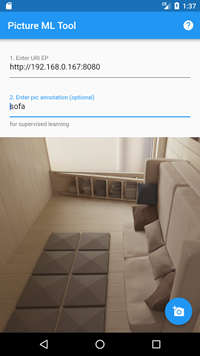
Clone the repository and open it with Android Studio.
Run the project.
The app sends image and annotation (optionally) as form multi-part.
The image use form file name "file" and the annotation text, "annotation".
If the backend send a 2xx code, the app show the "Success" dialog.
In another case, "Error" with the status code.
If you prefer, you can install directly from Google Play.
To test it you can use this simple backend written in NodeJS
var http = require('http');
var formidable = require('formidable');
var fs = require('fs');

const PORT = 8080;

console.log("Pic ML Tool - Example backend in node.js");
console.log("Listening in: " + PORT);

http.createServer(function (req, res) {
  if (req.method != "POST") {
    res.writeHead(405);
    res.end();
    return;
  }
  var form = new formidable.IncomingForm();
  form.parse(req, function (err, fields, files) {
    if (!('file' in files)) {
      res.writeHead(404)
      res.end();
      return;
    }
    var f = files['file'];
    console.log("File: \""+ f.name +"\" (" + f.size + " bytes)");
    if ('annotation' in fields) {
      console.log("Annotation: \"" + fields['annotation'] + "\"");
    }
    try {
      fs.rename(f.path, "/tmp/" + f.name, function (err) {
        if (err) throw err;
      });
    } catch (err) {
      res.writeHead(500);
      res.end();
      return;
    }
    console.log("Saved in: /tmp/" + f.name);
    res.writeHead(201)
    //res.write("Paco")
    res.end();
  })
}).listen(PORT);
If you prefer, you can clone it from its repository.

Apache 2.0