
is a simple, GUI-based PowerShell tool that allows you to securely encrypt and decrypt passwords. It uses the current user context, meaning only the user who encrypted the password can later decrypt it ensuring local security without the need for third-party tools. Uses WPF
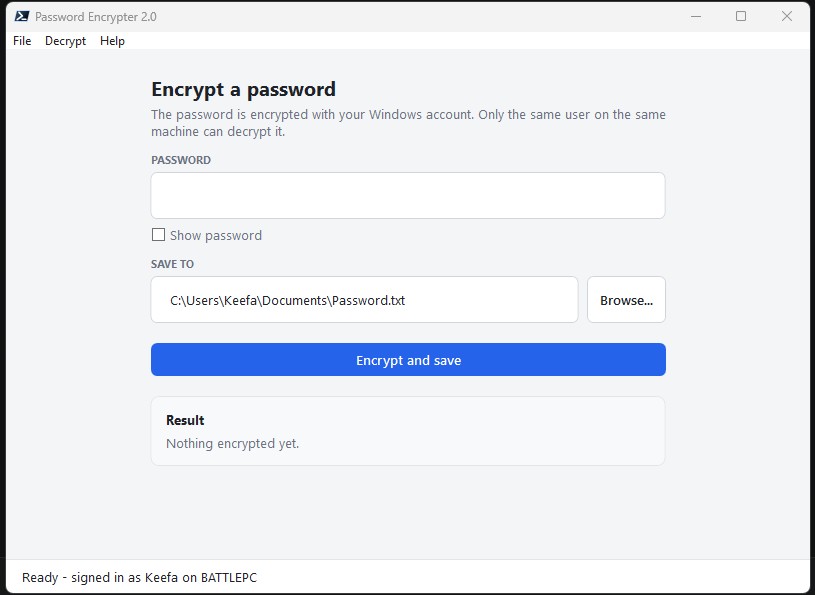
| Feature | Description |
|---|---|
| Encrypt | Encrypt any password and save it to a file |
| Decrypt | Decrypt passwords by selecting the encrypted file |
| File explorer | Integrated file explorer for selecting output paths |
| Requirement | Version |
|---|---|
| PowerShell Version | 5.1 or later |
- Run the script (double-click or via PowerShell).
- Enter your password in the top textbox.
- Specify a file path where you want to save the encrypted password, or use the built-in "Browse..." button.
- Click "Encrypt and save".
- Done! Your password is now encrypted and saved to a file (e.g.,
C:\Temp\Password.txt).
- In the menu bar, go to Decrypt → Select file to decrypt....
- Browse and select the file containing your encrypted password.
- The decrypted password will appear in the result area of the form.
Note: Encrypted passwords can only be decrypted by the same user and machine-specific they were encrypted on.