
MineCity 2000 is a program that converts SimCity 2000 cities into Minecraft (Java Edition) worlds
From this:
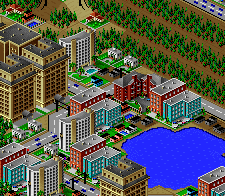
Into this:
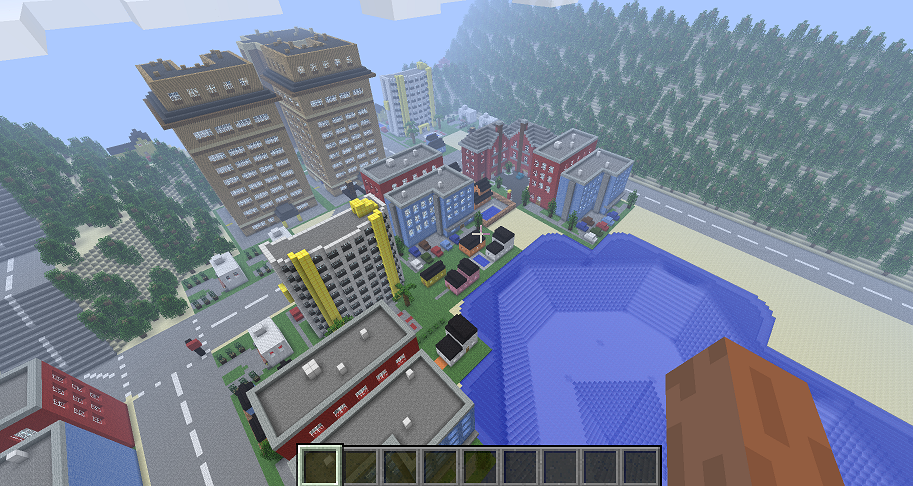
The program works by reading a *.sc2 city file created by SimCity 2000. It then maps the terrain and places all the buildings into a Minecraft world.
See it in action:
https://www.youtube.com/watch?v=R6RW6WouGbE
https://www.youtube.com/watch?v=Z3FkM7GLxKo
https://www.youtube.com/watch?v=EhIF_1SuZLs
You can try MineCity 2000 without installing anything: https://jgosar.github.io/mine-city-2000/
The conversion runs entirely in your browser; your city file is never uploaded anywhere.
- Drop your *.sc2 city file onto the page (or choose it with the file picker).
- Tick "Fill underground area" and/or "Generate terrain around the city" if you want them (see "Running the CLI" below for what they do).
- Click "Convert" and wait for the progress bar to finish.
- Download the resulting zip. It contains a folder named after your city: unzip it into the
savesfolder of your Minecraft install directory, so thatsaves/<city>/level.datexists.
The first conversion downloads about 24 MB of building models, so the first run takes a bit longer. A conversion takes a few seconds on a modern laptop.
It has been tested in current versions of Chrome and Firefox, and in the WebKit engine that Safari is built on (Safari itself has not been tested yet).
The easiest way to use MineCity 2000 is the web app, which needs no installation: https://jgosar.github.io/mine-city-2000/ (see "Using the web app" above).
If you prefer the command line, or want to call MineCity 2000 from a script, download the CLI (Command-line interface) for your platform from the latest release: https://github.com/jgosar/mine-city-2000/releases/latest
Each platform has its own zip file, which contains the program and everything it needs (you don't have to install .NET):
mc2k-cli-win-x64.zip: Windows (64-bit)mc2k-cli-osx-arm64.zip: macOS on Apple silicon (M1 and newer)mc2k-cli-osx-x64.zip: macOS on Intel processorsmc2k-cli-linux-x64.zip: Linux (64-bit)
The older .rar releases (the ones with the GUI, mc2k-release.rar and mc2k-release-cli.rar, and the legacy version mc2k-release-legacy.rar) are historical. They are still available on the releases page, but they are no longer maintained and the GUI has been removed from the project; use the web app or the CLI instead.
Unzip the file you downloaded and run the program from a terminal, giving it your *.sc2 city file:
./MineCity2000 city.sc2
On Windows it is MineCity2000.exe city.sc2. A good place to look for your city files would be C:\Program Files\Maxis\SimCity 2000\Cities. But if you can't find it, open the city in SimCity 2000, click "File->Save city as" and put it in a place where you will find it.
The program creates a folder named after the city file (lower-cased, so City.sc2 becomes city) and puts the Minecraft world in it. By default this folder goes into the saves folder of your Minecraft install if the program finds one (for example C:\Users\[username]\AppData\Roaming\.minecraft\saves on Windows), so you can open Minecraft and you should see your city among the saved games. Otherwise it goes into a generated folder next to the program. Use -o to choose a different output directory.
Options (run the program without arguments to see them again):
-o, --output <directory>: The output directory. The city is saved into a subfolder of it, named the same as the city file.-f, --fillUnderground: Fills the underground sections of the city with sandstone, so you can't fall through when digging down (instead of having it empty). This increases the memory usage and the generation time.-g, --generateTerrain: Lets Minecraft generate its own terrain around the city instead of creating an obsidian wall around the city with nothing outside.-c, --continue: Continues console execution after the command is finished, instead of waiting for the user to press a key after reading the output.--timestamp <unix seconds>,--seed <number>: Fix the timestamps and the random seed written into the world, so that two runs produce identical files (used by the tests).
Options that you want to use on every run can be put into the default_args.txt file next to the program, one per line. The wiki has some more CLI usage notes: https://github.com/jgosar/mine-city-2000/wiki/CLI-usage
On macOS the first run may be blocked because the program is downloaded from the internet and is not signed. Either remove the quarantine flag once with xattr -dr com.apple.quarantine . in the unzipped folder (or xattr -d com.apple.quarantine MineCity2000 for the program alone), or right-click the program in Finder and choose Open. On Linux you might need to make it executable first: chmod +x MineCity2000.
Your antivirus might think that MineCity 2000 is a virus. It's not. If Windows SmartScreen warns about an unsigned app, choose "More info" and then "Run anyway".
- Install the Microsoft .NET SDK 10
- In the repo root run
dotnet workload restore - In the
MineCity2000.Wasmsubdirectory runnpm install - In the repo root run
dotnet build
This project was started quite some time ago (2014), so it only generates Minecraft Java Edition worlds. To be exact, the generated worlds are based on Minecraft Java edition v1.3.2, so they should work on any Minecraft Java edition version that's newer than that.
If you wish to open a generated world in Minecraft Bedrock edition, you can convert it using this converter: https://chunker.app/. I have tested it with a world that was generated by MineCity 2000 and it works almost perfectly. The only difference is that you can't fly around as fast, because that was my custom setting in the generated Java Edition world. But as you can see in the screenshot below, the draw distance in Bedrock Edition can be much much greater (Click for larger images):


Here's a video from this city in Minecraft Bedrock Edition: https://youtu.be/w_fU_Cy6xCA
The repository contains these projects:
- SimCityReader: Reads information about the city map from a *.sc2 city file
- AnvilFile: Contains utility classes for working with Minecraft's Anvil file format
- MinecraftEditor: Contains classes for creating and editing a Minecraft world
- MineCity2000: The conversion library: creates the Minecraft world with terrain and buildings
- MineCity2000.Cli: The command-line interface
- MineCity2000.Wasm: The conversion library compiled to WebAssembly, with the Web Worker that runs it in the browser and the small Preact + TypeScript page behind the web app link above (sources in
web, bundled intowwwroot) - MineCity2000.Tests: Unit and golden-master tests
For building the app from the source code you need the .NET SDK 10.0 (see "Building the web app" below for what building the web app needs on top of that). The engine, the CLI and the tests build and run on Windows, macOS and Linux with dotnet build and dotnet test; dotnet build mine-city-2000.sln builds everything, including the web app, so it additionally needs the wasm-tools workload, Node.js and npm (see below). The projects are set up for development with Visual Studio Code: you can launch the CLI using the "Launch CLI" command under the "Run and Debug" menu (edit the city file path in .vscode/launch.json first). dotnet publish MineCity2000.Cli -c Release -r <rid> --self-contained true produces the same folder that is zipped for the releases (for example -r osx-arm64; the releases are built by the "Release" GitHub Actions workflow when a v* tag is pushed).
This is a development version, so do not be surprised if something doesn't work. Please open an issue on GitHub if you encounter any problems.
At the current stage, not all buildings are supported, so there will be some holes between the buildings in a generated world.
Stuff that does NOT work yet:
- Subways
- Highways (mostly)
- Underwater pipes?
- ???
MineCity2000.Wasm is built with the .NET wasm-tools workload (dotnet workload install wasm-tools); because it is part of mine-city-2000.sln, building the whole solution needs this workload too.
The page is written in TypeScript with Preact: the sources are in MineCity2000.Wasm/web/, and esbuild bundles them into MineCity2000.Wasm/wwwroot/app.js and converter-client.js (generated files, ignored by git) as part of every dotnet build, dotnet run and dotnet publish of MineCity2000.Wasm (it reruns only when the page sources change). This needs Node.js 22.18 or newer (24 recommended) and npm. The first build runs npm ci automatically, which needs network access once to download the page's dependencies (preact, esbuild, typescript and the Node type definitions).
For development run dotnet run --project MineCity2000.Wasm and open the printed URL (an interpreter build: a conversion takes about 11 seconds). The page is bundled automatically before it starts; to rebuild it on every save while you edit it, run npm run watch in MineCity2000.Wasm next to it and reload the page. npm run watch leaves an unminified bundle and source maps behind, so after using it run npm run build (or let dotnet build do it after a source change) before publishing. dotnet publish MineCity2000.Wasm -c Release produces the complete site in MineCity2000.Wasm/bin/Release/net10.0/publish/wwwroot; serve that folder with any static web server, for example python3 -m http.server 8765 -d MineCity2000.Wasm/bin/Release/net10.0/publish/wwwroot, and open http://localhost:8765/ (a file:// URL does not work for module workers).
The page's unit tests run with npm test in MineCity2000.Wasm (Node runs the TypeScript tests directly, no build needed), and npm run check type-checks the page and the tests. The end-to-end check, which converts the test city in headless Chrome through the real page and compares the result with the golden baseline, runs with node MineCity2000.Wasm/tests/e2e/chrome-e2e.mjs after a Release publish. All of these need Node.js 22.18 or newer, and the end-to-end check also needs Chrome (set CHROME if it is not in the usual place).
Run dotnet test MineCity2000.Tests. Use --filter Category!=Slow to skip the ~2-minute fill-underground test.
The golden-master tests compare generated worlds with the baseline worlds in MineCity2000.Tests/Fixtures/baseline;
to regenerate those baselines after an intentional output change, run MC2K_UPDATE_BASELINE=1 dotnet test MineCity2000.Tests --filter Category=Golden (on Windows, set the variable first: set MC2K_UPDATE_BASELINE=1 in cmd.exe or $env:MC2K_UPDATE_BASELINE=1 in PowerShell, and remove it again afterwards), then run dotnet test MineCity2000.Tests normally afterwards.
Regenerating rewrites both baseline zips (zip entries carry timestamps), so they show as ~16 MB changed even when the content is identical; only commit them after a golden test failed for an intended output change.
The web page has its own tests, see "Building the web app" above.
Let me know about any bugs or other problems you encounter.
If you know a community that might be interested in this project, tell them about it.
If you have the time, patience and skills, you can design a few more of the missing buildings. The instructions are available here: https://github.com/jgosar/mine-city-2000/wiki/How-to-design-and-add-new-buildings-to-the-project. Please let me know if anything is unclear.
Unreleased:
- The CLI now runs on Windows, macOS and Linux, with a zip file for each platform on the releases page
- The conversion needs about 5 times less memory and is faster, and the generated worlds are identical
- New web app: convert a city in your browser without installing anything
- The MAUI GUI has been removed (use the web app or the CLI)
- Automated tests, and continuous integration on Windows, macOS and Linux
The minecraftforums version: v0.1: Buildings:
- Upper class homes 1-4
- Medium Condominiums 2
- Police Station
- Water Pump
- Middle class homes 5
Features:
- Power lines
- Roads
- Ground water
- Trees
v0.1-v0.2: New buildings:
- Middle class homes 2
- Medium Condominiums 1
- Medium Condominiums 3
- Middle class homes 4
- Middle class homes 3
- Small warehouse 1
- Small warehouse 2
- Gas station 1
- Small office building 2
- Chemical storage
- Gas station 2
- Toy store
- Industrial substation
- Convinience store
- Small Factory 3
- Small Factory 4
- Small Factory 5
- Small Factory 6
- Medium office 5
- Medium office 6
- Medium Appartments 2
New features:
- Tunnels
- Railways
- The file selectors on the GUI automatically open at the most probable location for SimCity and Minecraft installs
Fixed bugs:
- Water level is read correctly from SimCity file
- Program does not crash if an object needs to be at a height greater than 255
v0.2-v0.3: New buildings:
- Office/Retail
- Medium office 3
- Medium office 4
- B&B Inn
- Warehouse
- Small office 1
- Port warehouse
- Large warehouse 1
- Small Park
- Lower class homes 1
- Lower class homes 2
- Lower class homes 3
- Church
- Fire Department
- Large Factory
- Medium Factory
- School
The GitHub version:
- Refactored code
New buildings:
- Runway
- Pier
- Middle class homes 1
- Hospital
- Medium Appartments 1
- Small Appartments 1
- Corporate Headquarters
- Abandoned building 1
- Abandoned building 2
- Big Park
- Small Appartments 2
- Small Appartments 3
- Statue