
A fast, lightweight file manager built with Go and Gio UI
| List View | Grid View |
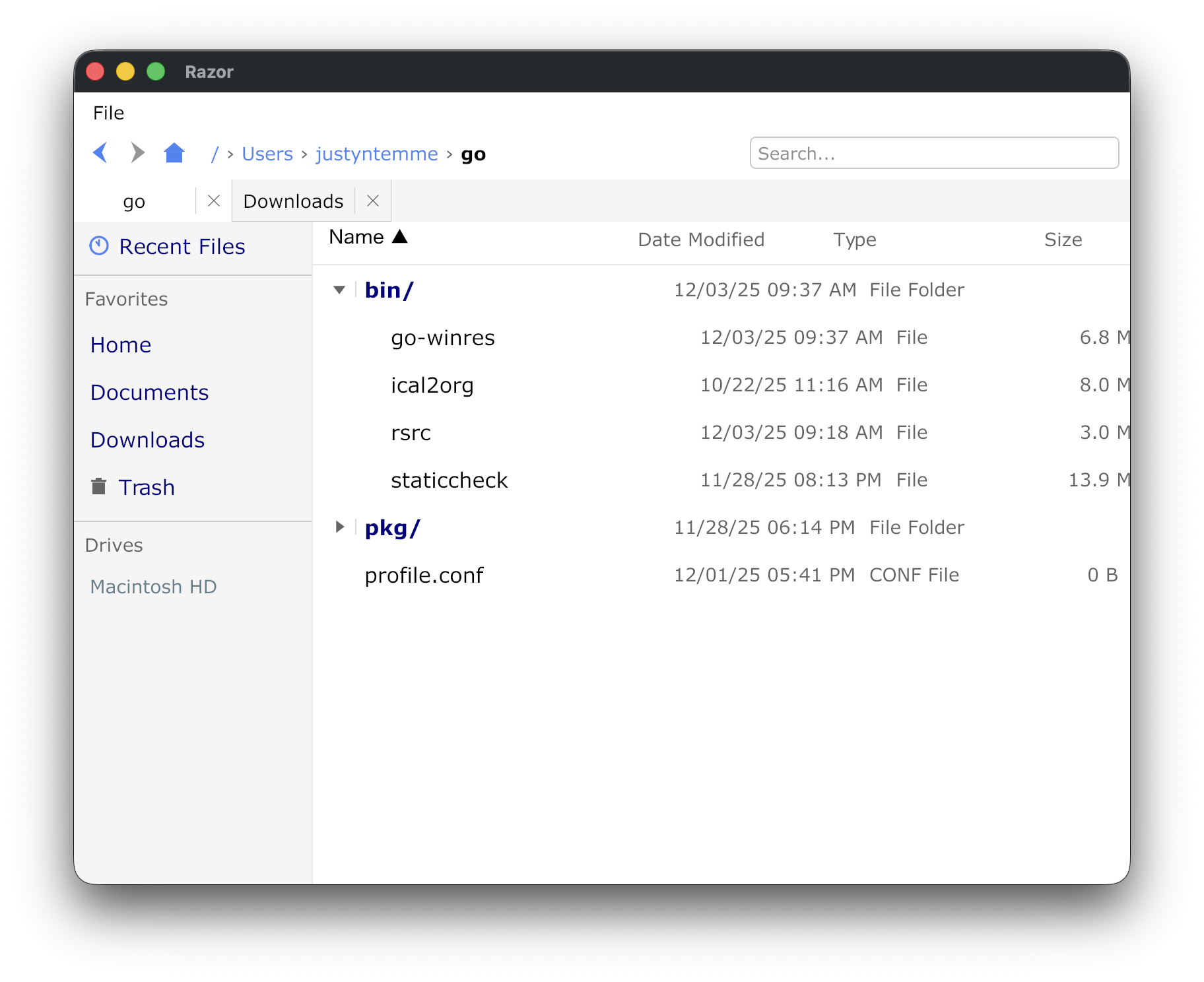 |
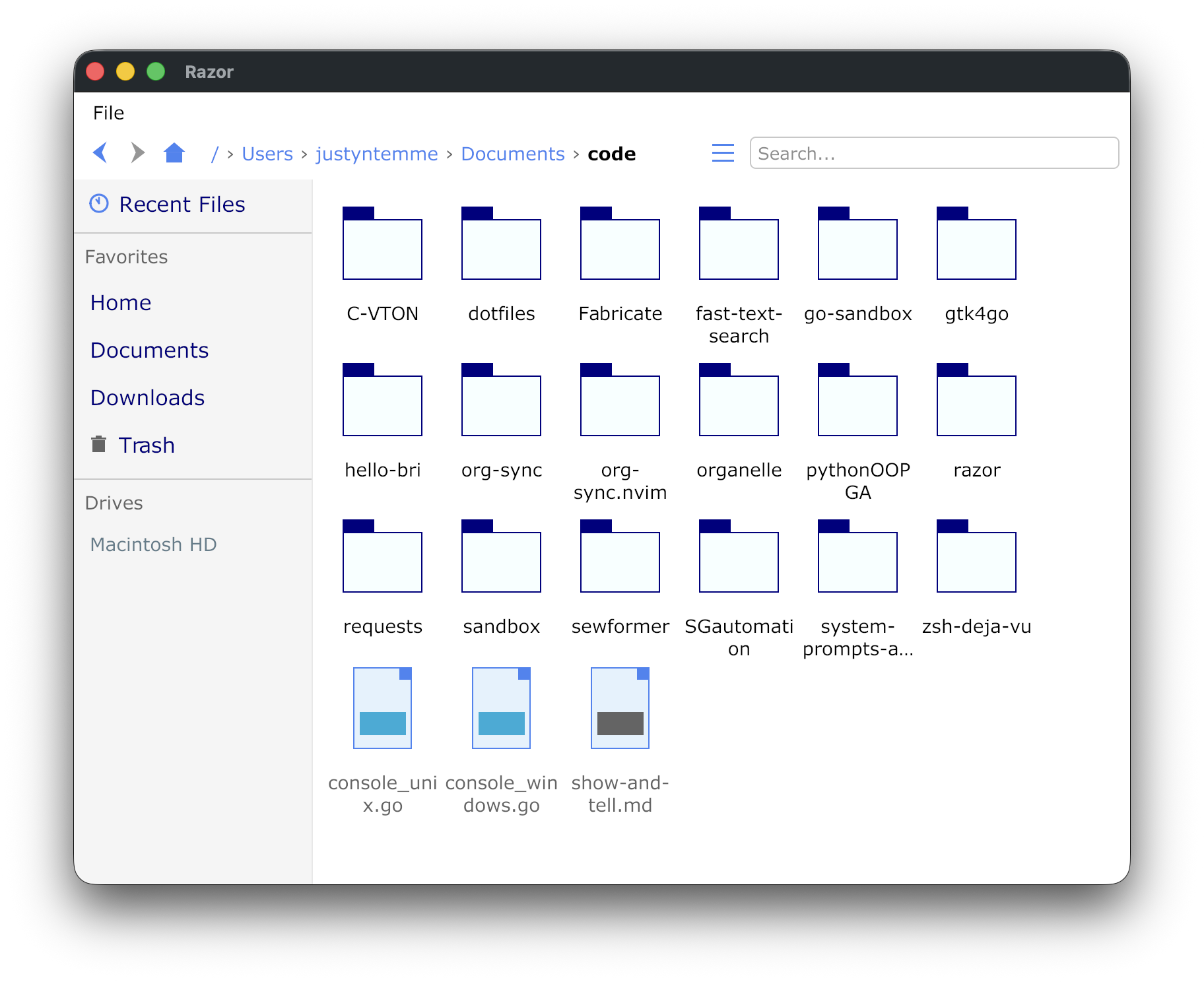 |
- Fast Navigation - Keyboard-driven with mouse support
- Browser Tabs - Multiple directories in tabs with keyboard shortcuts
- List and Grid Views - Toggle between detailed list view and icon/thumbnail grid view
- Sortable Columns - Click column headers to sort by name, date, type, or size
- Resizable Columns - Drag column dividers to resize
- Breadcrumb Path Bar - Clickable path segments for quick navigation
- Favorites Sidebar - Quick access to frequently used directories
- Advanced Search - Filename, content, extension, size, and date filtering
- File Preview - Text, JSON, Markdown, Org-mode, and image preview with resizable pane
- File Operations - Copy, cut, paste, delete, rename with conflict resolution
- Trash Support - Delete to system trash with restore capability (permanent delete also available)
- Multi-Select - Shift+click for range, Ctrl/Cmd+click for toggle selection
- Dotfiles Toggle - Show/hide hidden files
- Recent Files - Track and quickly access recently opened files
- Customizable Hotkeys - Configure all keyboard shortcuts
- Cross-Platform - Works on Linux, macOS, and Windows
go install github.com/justyntemme/razor/cmd/razor@latestOr build from source:
git clone https://github.com/justyntemme/razor.git
cd razor
go build -o razor ./cmd/razorTo enable debug logging:
go build -tags debug -o razor ./cmd/razor# Start in home directory
razor
# Start in specific directory
razor -path /some/directory
# Generate fresh config.json (backs up existing with timestamp)
razor --generate-configThe search bar supports powerful directive-based filtering with support for multiple search engines. By default, searches match filenames only, but you can combine directives for advanced filtering.
Razor supports three search backends:
- builtin - Fast Go-based search using fastwalk (always available, default)
- ripgrep - Use ripgrep for blazing fast content search (must be installed)
- ugrep - Use ugrep for content search with extended features (must be installed)
Configure your preferred engine in config.json:
{
  "search": {
    "engine": "ripgrep"
  }
}Just type to search filenames:
report          # Files containing "report" in name
*.go            # Files matching glob pattern
test*           # Files starting with "test"
Use directives for advanced filtering:
| Directive | Description | Example |
|---|---|---|
filename: |
Search by filename (default) | filename:readme |
contents: |
Search file contents | contents:TODO |
ext: |
Filter by extension | ext:go or ext:.go |
size: |
Filter by file size | size:>1MB |
modified: |
Filter by modification date | modified:>2024-01-01 |
recursive: |
Enable recursive search | recursive: or recursive:5 |
depth: |
Alias for recursive | depth:3 |
size:>1MB       # Larger than 1 megabyte
size:<100KB     # Smaller than 100 kilobytes
size:>=500B     # At least 500 bytes
size:1GB        # Exactly 1 gigabyte
Supported units: B, KB, MB, GB
modified:>2024-01-01    # Modified after January 1, 2024
modified:<2024-06-15    # Modified before June 15, 2024
modified:>=2024-01      # Modified in or after January 2024
modified:today          # Modified today
modified:yesterday      # Modified yesterday
modified:week           # Modified in the last week
modified:month          # Modified in the last month
modified:year           # Modified in the last year
Multiple directives are combined with AND logic. You can combine contents:, ext:, size:, and modified: directives to create powerful filters:
ext:go contents:func        # Go files containing "func"
ext:md modified:>week       # Markdown files modified in the last week
size:>1MB ext:log           # Log files larger than 1MB
*.go size:<100KB            # Small Go files
contents:password ext:txt   # Text files containing "password"
recursive: ext:go           # Recursively find all Go files
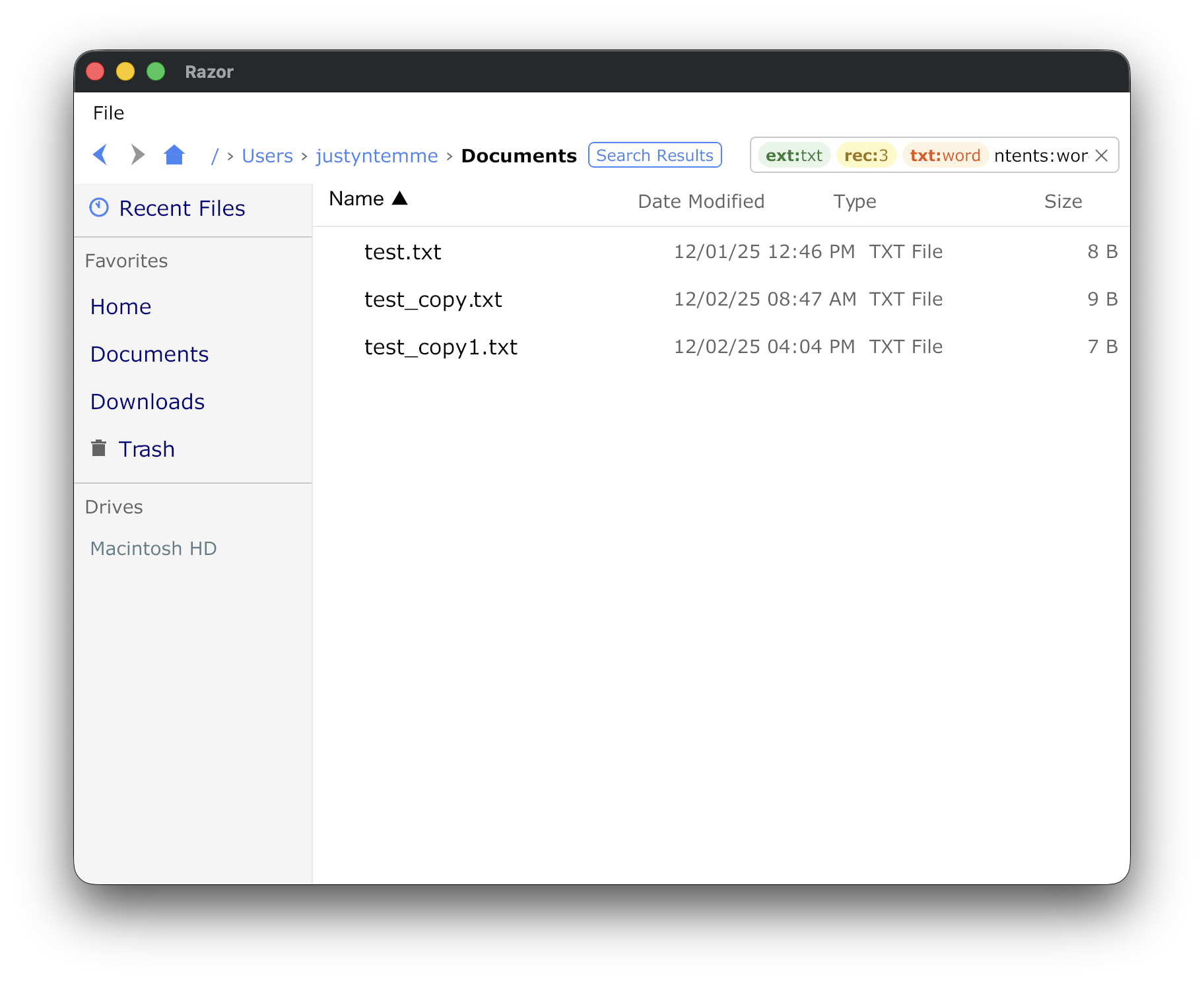
The screenshot above shows combining contents:password and ext:txt directives, with the text preview pane displaying the file contents.
# Find all Go test files
*_test.go

# Find large video files
ext:mp4 size:>100MB

# Find recently modified configuration files
ext:yaml modified:>week

# Find TODO comments in Python files
ext:py contents:TODO

# Find old log files
ext:log modified:<2024-01-01 size:>10MB

# Recursively search for Go files containing "error"
recursive:10 ext:go contents:error
Configuration is stored in ~/.config/razor/config.json on all platforms. The file is created with defaults on first run.
{
  "ui": {
    "theme": "light",
    "sidebar": {
      "layout": "stacked",
      "tabStyle": "manila",
      "width": 200,
      "position": "left",
      "showFavorites": true,
      "showDrives": true,
      "collapsible": true
    },
    "toolbar": {
      "visible": true,
      "position": "top",
      "showLabels": false
    },
    "fileList": {
      "showDotfiles": false,
      "defaultSort": "name",
      "sortAscending": true,
      "rowHeight": "normal",
      "showIcons": true
    },
    "statusBar": {
      "visible": true,
      "showFileCount": true,
      "showSelectionInfo": true
    }
  },
  "search": {
    "engine": "builtin",
    "defaultDepth": 2,
    "rememberLastQuery": false
  },
  "behavior": {
    "confirmDelete": true,
    "doubleClickToOpen": true,
    "restoreLastPath": true,
    "singleClickToSelect": true
  },
  "tabs": {
    "enabled": false,
    "newTabLocation": "home",
    "lastTabBehavior": "close_app",
    "restoreTabsOnStart": false
  },
  "preview": {
    "enabled": true,
    "position": "right",
    "widthPercent": 33,
    "textExtensions": [".txt", ".json", ".csv", ".md", ".org", ".log", ".xml", ".yaml", ".yml", ".toml", ".ini", ".conf", ".cfg"],
    "imageExtensions": [".png", ".jpg", ".jpeg", ".gif", ".bmp", ".webp", ".heic", ".heif"],
    "maxFileSize": 1048576,
    "markdownRendered": false
  },
  "terminal": {
    "app": ""
  },
  "favorites": [
    {"name": "Home", "path": "/Users/you", "icon": "home"},
    {"name": "Documents", "path": "/Users/you/Documents", "icon": "folder"}
  ]
}Layout (ui.sidebar.layout):
"stacked"- Show both Favorites and Drives stacked vertically (default)"tabbed"- Tabs to switch between Favorites and Drives"favorites_only"- Only show Favorites"drives_only"- Only show Drives
Tab Style (ui.sidebar.tabStyle) - Only applies when layout is "tabbed":
"manila"- Vertical folder-style tabs on left side with rotated text (default)"underline"- Horizontal tabs at top with underline indicator (legacy style)"pill"- Horizontal tabs with pill/rounded background
To get the legacy horizontal tab layout, set:
{
  "ui": {
    "sidebar": {
      "layout": "tabbed",
      "tabStyle": "underline"
    }
  }
}
Preview (preview):
enabled- Whether preview is enabled (default:true)position- Position of preview pane:"right"|"bottom"(default:"right")widthPercent- Width as percentage of screen (default:33for 1/3)textExtensions- File extensions to preview as textimageExtensions- File extensions to preview as images (supports PNG, JPG, GIF, BMP, WebP, HEIC)maxFileSize- Maximum file size to preview in bytes (default:1048576= 1MB)markdownRendered- Whether to render markdown/orgmode by default (default:false)
When you click a file with a supported extension, the preview pane opens on the right. JSON files are automatically formatted with indentation. Markdown files can be toggled between raw and rendered view. Press Escape or navigate away to close the preview.
The preview pane can be resized by dragging the left edge.
All keyboard shortcuts are configurable via the hotkeys section in config.json. Default shortcuts vary by platform (macOS uses Cmd for navigation, Windows/Linux use Alt).
| Action | macOS | Windows/Linux |
|---|---|---|
| File Operations | ||
| Copy | Ctrl+C | Ctrl+C |
| Cut | Ctrl+X | Ctrl+X |
| Paste | Ctrl+V | Ctrl+V |
| Delete (to Trash) | Backspace | Delete |
| Permanent Delete | Shift+Backspace | Shift+Delete |
| Rename | F2 | F2 |
| New File | Ctrl+N | Ctrl+N |
| New Folder | Ctrl+Shift+N | Ctrl+Shift+N |
| Select All | Ctrl+A | Ctrl+A |
| Navigation | ||
| Back | Cmd+Left | Alt+Left |
| Forward | Cmd+Right | Alt+Right |
| Up | Cmd+Up | Alt+Up |
| Home | Cmd+Shift+H | Alt+Home |
| Refresh | F5 | F5 |
| UI | ||
| Focus Search | Ctrl+F | Ctrl+F |
| Toggle Preview | Ctrl+P | Ctrl+P |
| Toggle Hidden | Cmd+Shift+. | Ctrl+. |
| Escape | Escape | Escape |
| Tabs (Vim-style) | ||
| New Tab (Current Dir) | Ctrl+T | Ctrl+T |
| New Tab (Home Dir) | Ctrl+Shift+T | Ctrl+Shift+T |
| Close Tab | Ctrl+W | Ctrl+W |
| Next Tab | Ctrl+L | Ctrl+L |
| Previous Tab | Ctrl+H | Ctrl+H |
| Switch to Tab 1-6 | Ctrl+Shift+1-6 | Ctrl+Shift+1-6 |
- Arrow Keys - Move selection up/down in file list
- Enter - Open selected file/folder
- Letter Keys - Quick-jump to files starting with that letter (press again to cycle)
- Shift+Click - Range selection from current to clicked item
- Ctrl/Cmd+Click - Toggle individual item selection
Override any shortcut in your config.json:
{
  "hotkeys": {
    "copy": "Ctrl+C",
    "cut": "Ctrl+X",
    "paste": "Ctrl+V",
    "delete": "Delete",
    "permanentDelete": "Shift+Delete",
    "rename": "F2",
    "newFile": "Ctrl+N",
    "newFolder": "Ctrl+Shift+N",
    "selectAll": "Ctrl+A",
    "back": "Alt+Left",
    "forward": "Alt+Right",
    "up": "Alt+Up",
    "home": "Alt+Home",
    "refresh": "F5",
    "focusSearch": "Ctrl+F",
    "togglePreview": "Ctrl+P",
    "toggleHidden": "Ctrl+.",
    "escape": "Escape",
    "newTab": "Ctrl+T",
    "newTabHome": "Ctrl+Shift+T",
    "closeTab": "Ctrl+W",
    "nextTab": "Ctrl+L",
    "prevTab": "Ctrl+H",
    "tab1": "Ctrl+Shift+1",
    "tab2": "Ctrl+Shift+2",
    "tab3": "Ctrl+Shift+3",
    "tab4": "Ctrl+Shift+4",
    "tab5": "Ctrl+Shift+5",
    "tab6": "Ctrl+Shift+6"
  }
}
Supported modifiers: Ctrl, Shift, Alt, Cmd (or Super, Meta, Command)
Supported keys: A-Z, 0-9, F1-F12, Delete, Backspace, Escape, Enter, Tab, Space, Up, Down, Left, Right, Home, End, PageUp, PageDown
Additional data (search history, recent files) is stored in:
- All platforms:
~/.config/razor/razor.db(SQLite)
razor/
├── cmd/razor/                  # Application entry point
│   ├── main.go                 # CLI flags and app bootstrap
│   └── console_*.go            # Platform-specific console handling (Windows)
│
├── internal/
│   ├── app/                    # Application layer - business logic
│   │   ├── orchestrator.go     # Central coordinator, event loop, UI event handling
│   │   ├── state_owner.go      # Single source of truth for file entries
│   │   ├── controllers.go      # Shared dependencies and controller types
│   │   ├── nav_controller.go   # Navigation history, path expansion
│   │   ├── search_controller.go# Search execution, engine management
│   │   ├── tabs.go             # Tab state management, create/close/switch
│   │   ├── file_ops.go         # File operations (copy, paste, delete, rename)
│   │   ├── conflict.go         # File conflict resolution dialog handling
│   │   ├── watcher.go          # Directory change watcher (fsnotify)
│   │   └── platform_*.go       # Platform-specific file opening (darwin/linux/windows)
│   │
│   ├── config/                 # Configuration management
│   │   ├── config.go           # Config file loading, defaults, persistence
│   │   ├── hotkeys.go          # Hotkey parsing and matching
│   │   ├── hotkeys_*.go        # Platform-specific default hotkeys
│   │   └── terminals_*.go      # Platform-specific terminal configuration
│   │
│   ├── debug/                  # Debug logging (build tag controlled)
│   │   ├── debug_on.go         # Debug build: enables logging
│   │   └── debug_off.go        # Release build: no-op logging
│   │
│   ├── fs/                     # Filesystem operations
│   │   ├── system.go           # Async file operations, search, directory listing
│   │   └── drives_*.go         # Platform-specific drive enumeration
│   │
│   ├── search/                 # Search engine abstraction
│   │   ├── query.go            # Query parsing (directives: contents:, ext:, size:, etc.)
│   │   └── engine.go           # Engine detection (builtin, ripgrep, ugrep)
│   │
│   ├── store/                  # SQLite persistence
│   │   └── db.go               # Search history, recent files database
│   │
│   ├── trash/                  # Trash/recycle bin support
│   │   ├── trash.go            # Cross-platform API
│   │   └── trash_*.go          # Platform-specific implementations
│   │
│   ├── platform/               # Platform-specific features
│   │   └── drop_*.go           # External drag-drop handling
│   │
│   └── ui/                     # Gio UI components (~30 files)
│       ├── renderer.go         # Main UI renderer, widget state
│       ├── types.go            # UI actions, events, state types
│       ├── layout.go           # Top-level layout composition
│       ├── layout_*.go         # Specific UI sections (navbar, sidebar, filelist, grid, etc.)
│       ├── renderer_*.go       # Specific rendering logic (rows, preview, tabs, input)
│       ├── colors.go           # Theme color definitions (light/dark)
│       ├── tabs.go             # Reusable tab bar component (manila, underline, pill styles)
│       ├── markdown.go         # Markdown parsing and rendering (goldmark)
│       ├── orgmode.go          # Org-mode parsing and rendering
│       ├── toast.go            # Toast notification UI
│       ├── thumbnail_cache.go  # Image thumbnail caching for grid view
│       └── debug_*.go          # UI debug flag
│
└── docs/
    └── screenshots/            # Application screenshots for README
- Gio - Immediate mode GUI framework
- modernc.org/sqlite - Pure Go SQLite driver for persistence
- fastwalk - Fast parallel directory traversal
- fsnotify - Cross-platform filesystem notifications
- goldmark - Markdown parser for preview rendering
- goheif - HEIC image format support
- organelle - Org-mode parsing for preview rendering
MIT License - see LICENSE for details.