

What is a language detector?
It is a tool that identifies which language a text is written in. For example, detect("Hola") returns "es" for Spanish.
Efficient language detector, written in C, is the fastest high-accuracy natural language detector.
ELDC can be compiled into a library, a command line executable, or easily installed as a python package.
ELD is also available in PHP (v3), Javascript (v2), and pure Python (v1 outdated). ELD-C (or ELDC) is v3.
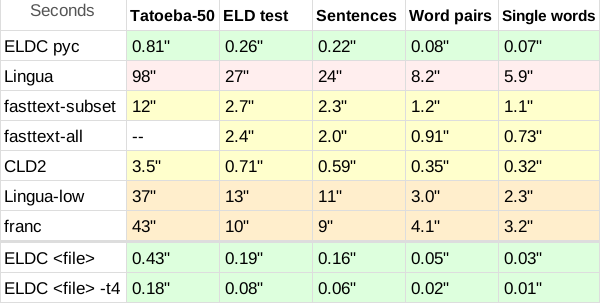
Making "the fastest" or most accurate language identification tool can be trivial using unlimited resources, but doing both things while being memory constrained, is what ELD-C has the edge on. It's 2x faster than Google's CLD2 (previously the fastest decent detector for the last 10 years), and 6x faster than Facebook's Fasttext. It's also more accurate, based on the benchmarks below, than Lingua (referred to as the most accurate), and 100x faster for good measure.
By default, pip will install a pre-compiled binary package for your system. If you need to build from source, you will need a C compiler (GCC, Clang, or MSVC) and Python headers, then use command pip install --no-binary eldc eldc or pip install . to build from local files.
$ pip install eldcFull demo at examples/demo_eldc_package.py
import eldc

eldc.init()

# We can set a language filter
eldc.set_languages(["en", "es", "fr"]) # also accepts string "en, es, fr"
# returns a list of the set languages ['en', 'es', 'fr']
eldc.set_languages([]) # reset all

# ISO 639-2/T output, (default iso639-1)
# eldc.set_scheme("iso639-2t")

# Simple detect, returns a string with language code, or "und" for undetermined
eldc.detect("Bonjour le monde") # 'fr'
# Use detect_mt() for multi-threaded parallel Python threads

# for detect_details() we can choose up to how many scores we want
eldc.set_scores(2) # default 3, max 20

r = eldc.detect_details("Hola mundo") # multi-threaded capable by default
print(r.language) # (str)  'es'
print(r.scores)   # (dict) {'es': 0.80, 'pt': 0.57} Scores are between 0 and 1
print(r.reliable) # (bool) True or False

# eldc.LANGUAGES and eldc.LANGUAGES_ISO2T return list of all available languagesCompile a library for Linux .so, Windows .dll or Darwin (macOS) .dylib. To be used with your preferred programming language.
I included demo examples at examples/ folder for: Java, TypeScript/Node/Js, Go, Rust, .NET/C#, PHP, Ruby, and Python. (Not 100% validated yet)
Download repostory or clone.
git clone https://github.com/nitotm/eldc.git
cd eldc/src/eldc- Linux
gcc -O3 -shared -fPIC -DELD_BUILD_DLL -o libeldc.so eldc_lib.c -lm- Windows MinGW-w64
gcc -O3 -shared -DELD_BUILD_DLL -o eldc.dll eldc_lib.c -lm -Wl,--out-implib,libeldc.a- macOS (Darwin)
gcc -O3 -shared -fPIC -DELD_BUILD_DLL -o libeldc.dylib eldc_lib.c -lm- Windows. Use Developer Command Prompt.
cl /O2 /LD /DELD_BUILD_DLL eldc_lib.c /Fe:eldc.dllFind complete demos at the root folder of this repository, for each programming language examples/: demo_eldc_lib.py, demo_eldc_lib.ts, demo_eldc_lib.go, etc.
Here is a simple demo in PHP, as it is quite readable.
$ffi = FFI::cdef('
    typedef struct { const char *language; float score; } EldcScoreItem;
    typedef struct {
        const char   *language;
        int           reliable;
        int           n_scores;
        EldcScoreItem scores[20];
    } EldcDetectResult;

    void        eldc_init(void);
    void        eldc_close(void);
    const char *eldc_detect(const char *text);
    const char *eldc_detect_details(const char *text, EldcDetectResult *result);
    const char *eldc_set_languages(const char *codes);
    void        eldc_set_scheme(const char *scheme);
    void        eldc_set_scores(int n);
', './libeldc.so');  // Windows: 'eldc.dll', macOS: './libeldc.dylib'

$ffi->eldc_init();

$ffi->eldc_detect("Bonjour le monde");  // string: "fr"

// detect_details() to retrieve full data
$r = $ffi->new("EldcDetectResult");
$ffi->eldc_detect_details("Bonjour le monde", FFI::addr($r));
$r->language;  // string: "fr"
$r->reliable;  // int: 1 (0 for false, 1 for true)
$r->n_scores;  // int: 3 (default, up to)
$r->scores[0]->language;  // string: "fr"
$r->scores[0]->score;  // float: 0.9016

// Return up to X scores. Default 3, max 20
$ffi->eldc_set_scores(2);
$r2 = $ffi->new("EldcDetectResult");
$ffi->eldc_detect_details("Bonjour le monde", FFI::addr($r2));
$r2->n_scores; // int: 2

// Set a language subset, returns validated languages
$ffi->eldc_set_languages("en,fr,de");  // string: "en,fr,de"
$ffi->eldc_detect("Hola mundo, bonito dia");  // string: "fr"
$ffi->eldc_set_languages("");  // reset

$ffi->eldc_set_scheme("iso639-2t");  // Default "iso639-1"
$ffi->eldc_detect("Hola mundo, bonito dia");  // string: "spa"

// Cleanup
$ffi->eldc_close(); There are 2 versions, standard eld.c and multi thread eld_mt.c.
You might use this executable just to try it, but its input file processing is the fastest ELD-C implementation suitable for production and heavy workloads.
Download repostory or clone.
git clone https://github.com/nitotm/eldc.git
cd eldc/src/eldc- Linux or macOS
gcc -O3 -march=native -o eldc eld.c -lm
# Or multi thread executable
gcc -O3 -march=native -o eldc_mt eld_mt.c -lm -lpthread- Windows MinGW-w64
gcc -O3 -o eldc.exe eld.c -lm -static
# Or multi thread executable
gcc -O3 -o eldc_mt.exe eld_mt.c -lm -lpthread -static- Windows. Use Developer Command Prompt.
cl /O2 eld.c /Fe:eldc.exeIf we input text (after flags), it will make a single detect; if not, it will read from stdin; one result per line.
If we use --scores or --reliable, it will return JSON, if not, a simple unquoted string with language code or und for undetected.
-h, --help              This message
    --list-languages    Print all supported codes and exit
-v, --verbose           Loading info, timing, throughput
-l, --languages CODES   Restrict to a subset, e.g. -l "es,en,de,fr"
                        Accepts ISO 639-1 or ISO 639-2/T codes.
-s, --scores [N]        Output compact JSON with top-N normalised [0,1] scores
                        N must be 1..20; omit N to get all 20.
                        Example: {"language":"en","scores":{"en":0.9234,...}}
-r, --reliable          Add "reliable" boolean to JSON output
    --scheme NAME       iso639-1 (default) | iso639-2t
For eld_mt.c, we also have the flag -t, --threads to limit threads -t 4
Examples: (on Windows use eldc.exe)
./eldc "Bonjour le monde"
./eldc -l "es,en,fr,de" --scheme iso639-2t "Hola mundo"
./eldc --scores --reliable "Hello world"
./eldc < corpus.txt > results.txt
./eldc --verboseContenders
| URL | Version | Core Language |
|---|---|---|
| https://github.com/nitotm/eldc/ | 0.1.2 | C |
| https://github.com/pemistahl/lingua-py | 2.0.2 | Rust |
| https://github.com/facebookresearch/fastText | 0.9.2 | C++ |
| https://github.com/CLD2Owners/cld2 | Aug 21, 2015 | C++ |
| https://github.com/wooorm/franc | 7.2.0 | Javascript |
Benchmarks:
- Tatoeba: 18MB, short sentences from Tatoeba, 50 languages supported by all contenders, up to 10k lines each.
- For Tatoeba, I limited all detectors to the 50 languages subset, making the comparison as fair as possible.
- Also, Tatoeba is not part of ELD training dataset (nor tuning), but it is for fasttext
- ELD Test: 10MB, sentences from the 60 languages supported by ELD, 1000 lines each. Extracted from the 60GB of ELD training data.
- Sentences: 8MB, sentences from Lingua benchmark, minus unsupported languages and Yoruba which had broken characters.
- Word pairs and Single words, ~1MB, also from Lingua, same 53 languages.
Other notes:
- ELDC pyc is eldc python package.
- I added ELDC <file> bench to show full potential without a wrapper, ELDC <file> bench times include: file read, detect & save results.
./eldc < eld_test.txt > results.txt -v - ELDC <file> -t 4 stands for: command line with multi thread (4 threads),
./eldc_mt < eld_test.txt > results.txt -v -t 4
Time execution benchmark:
 Accuracy:
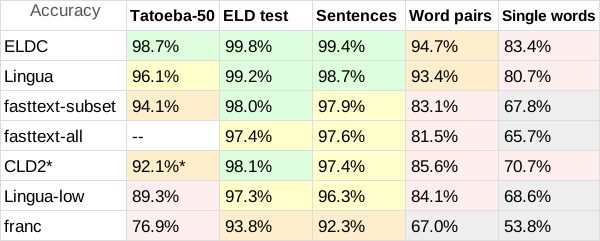
- Lingua participates with 54 languages, Franc with 58.
- fasttext does not have a built-in subset option, so to show its accuracy and speed potential I made two benchmarks, fasttext-all not being limited by any subset at any test
- * Google's CLD2 also lacks subset option, and it's difficult to make a subset even with its option
bestEffort = True, as usually returns only one language, so it has a comparative disadvantage. - Time is normalized: (total lines * time) / processed lines
ELD-C comes out as the fastest detector. For reference, with the command line executable an i7-4770 can process files at over 1M lines per second (1GB/15sec.) with only 1 thread.
I also included a multithreaded version, that can process files almost as fast as the I/O can support, with multithread an i7-4770 jumps to 4M lines per second or 1GB of text in 5 seconds (read 21M lines + classify + store results). In short, it's unnecessarily fast.
This feat would be meaningless if it weren't for the fact that it could also be one of the most accurate detectors; which it is for this benchmark. Accuracy is more benchmark dependent, but it is clearly among the most accurate detectors.
- These are the 60 supported languages for Nito-ELDC.
Amharic, Arabic, Azerbaijani (Latin), Belarusian, Bulgarian, Bengali, Catalan, Czech, Danish, German, Greek, English, Spanish, Estonian, Basque, Persian, Finnish, French, Gujarati, Hebrew, Hindi, Croatian, Hungarian, Armenian, Icelandic, Italian, Japanese, Georgian, Kannada, Korean, Kurdish (Arabic), Lao, Lithuanian, Latvian, Malayalam, Marathi, Malay (Latin), Dutch, Norwegian, Oriya, Punjabi, Polish, Portuguese, Romanian, Russian, Slovak, Slovene, Albanian, Serbian (Cyrillic), Swedish, Tamil, Telugu, Thai, Tagalog, Turkish, Ukrainian, Urdu, Vietnamese, Yoruba, Chinese
- These are the ISO 639-1 codes that include the 60 languages. Plus
'und'for undetermined
It is the default ELD language scheme.--scheme iso639-1
am, ar, az, be, bg, bn, ca, cs, da, de, el, en, es, et, eu, fa, fi, fr, gu, he, hi, hr, hu, hy, is, it, ja, ka, kn, ko, ku, lo, lt, lv, ml, mr, ms, nl, no, or, pa, pl, pt, ro, ru, sk, sl, sq, sr, sv, ta, te, th, tl, tr, uk, ur, vi, yo, zh
- ISO 639-2/T codes (which are also valid 639-3)
--scheme iso639-2t.
amh, ara, aze, bel, bul, ben, cat, ces, dan, deu, ell, eng, spa, est, eus, fas, fin, fra, guj, heb, hin, hrv, hun, hye, isl, ita, jpn, kat, kan, kor, kur, lao, lit, lav, mal, mar, msa, nld, nor, ori, pan, pol, por, ron, rus, slk, slv, sqi, srp, swe, tam, tel, tha, tgl, tur, ukr, urd, vie, yor, zho
- ELD-C executable is 24MB, with a similar memory use.
- ELD-C only reads first 1000 bytes of the input string (benchmarks are fair, with all lines under), but could be modded, if you feel an increased
--limitflag/option is necessary, open a discussion. - Unlike other versions of ELD, ELD-C only comes with the 'large' database size, as that is the optimal one, but other sizes could be added.
- Next improvement could be a better training data set, my own "small" 60GB of data are not as clean as I wish,
fineweb-2looks good.
If you wish to donate for open source improvements, hire me for private modifications, request alternative dataset training, or contact me, please use the following link: https://linktr.ee/nitotm
