
J3 Asset Manager is a desktop editor for building jMonkeyEngine game assets. It lets you import and inspect models, configure characters, edit animation and movement, and assemble combat and encounter data from reusable J3 assets. The project also contains a J3 runtime library that loads supported assets in a game.
If you are new to game authoring, start with how assets work and creating an asset. The guides explain ideas such as hitboxes and attack phases before introducing the editor fields.

Concept illustration: character setup
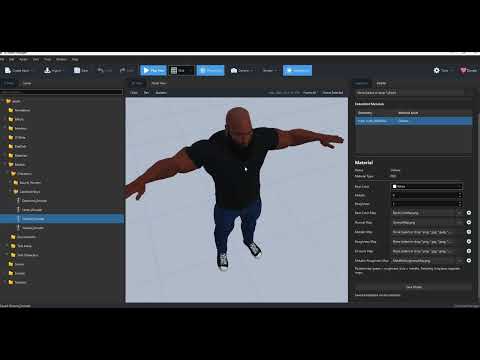
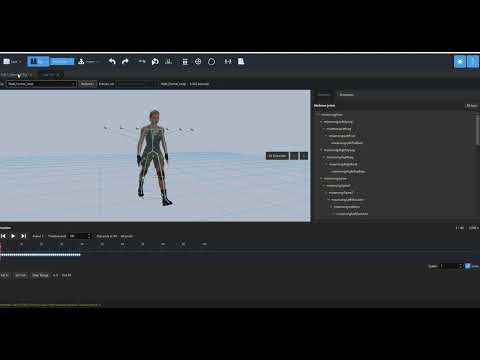
The editor's runtime library lets a jMonkeyEngine game load J3 assets, spawn configured characters, and run levels. Download J3Runtime-1.0.jar and J3AssetManagerCore-1.0.jar, or copy them from the libraries folder in a J3 Asset Manager v1.0 distribution ZIP. Read Use J3Runtime in a jMonkeyEngine game for dependencies, asset placement, and Java code examples.
Imagine a character that can throw a punch. You import a model and animation, describe the punch in a Melee Attack, and give the move a Striker: a small invisible shape that follows the fist while the punch can hit. The target has Hurtboxes, invisible receiving regions such as a torso and head. An Attack Set assigns the punch to a weapon action; a Weapon Definition and Combat Controller connect that action to the attacker. A Damage Controller connects the target to its hurtboxes and hit reactions. Finally, Character assets collect these settings for use by the game.
This is why the editor uses several small files instead of one large character file. You can reuse a move, weapon, or reaction setup, inspect each part separately, and see which reference is missing. Follow the first melee character walkthrough to assemble the chain. The hit detection guide explains the collision terms with a diagram and a worked punch example.
- What a J3 asset is
- Create, open, edit, and save an asset
- Choose and link other assets
- Build a first melee character
- Find your way around the project and editor
- Characters and models
- Animation and locomotion
- Movement and input
- Combat and weapons
- Hit detection: hitboxes, strikers, and hurtboxes
- AI behaviour system
- Levels, waves, and effects
For every file type, see the asset catalogue. The glossary defines terms used across the guides.
Additional guides: Imported Model, Material, AI role configurations, Memory, inventory, and social assets, Vehicle Definition, and Grapple and Finisher drafts.
- Project browser, asset creation menu, typed inspectors, project asset pickers, and validation feedback.
- Model import and preview; character setup; animation clip, skeleton mapping, and locomotion editing.
- Movement and input configuration; melee, firearm, weapon, damage, reaction, and encounter assets.
- Texture and material tools, particle effects, and editor previews where available.
These features develop at different rates. A type appearing in the Create Asset menu means the editor can create a file; it does not by itself establish complete runtime behavior. The field guides describe the current editor and mark design work separately.
J3 Asset Manager is licensed under the BSD 3-Clause License, the same license used by jMonkeyEngine. See the LICENSE file for the full license text. Third-party dependencies and bundled assets may have separate licenses; see their respective notices.
The following open source projects contributed to the development of J3 Asset Manager. Credit goes to their authors and contributors:
- jMonkeyEngine — 3D engine and asset APIs used by the editor integration and runtime.
- Wes by Stephen Gold and contributors — animation editing and retargeting library.
- jme-effekseerNative by riccardobl and contributors — Effekseer integration for jMonkeyEngine.
- Effekseer and EffekseerForMultiLanguages — effect tooling and native support used through the integration.
- OpenJFX — desktop user interface toolkit.
- Gson — JSON serialization for asset data.
The list describes dependencies verified in the project files. It is not a complete third-party license inventory; consult the modules and dependency manifests when preparing a release.
As of today, the project has been under development for two months and still going and the cost of a ChatGPT Pro subscription has been the main development cost. Without an AI assistant, such a project would have taken years to develop, and even with AI, it takes a lot of time and testing to get it to work to the desired outcome. The exact period, total spending, and currency have not been confirmed yet.
More funding could support a complete authoring path from imported model to playable character: clearer inspectors and validation, broader runtime support for the authored assets, complete FBX (or even OBJ) support, complete EFFEkseer support, a sample project with working combat and AI examples, packaging for more machines, and screenshots and tutorials maintained alongside releases. Those are development goals, not promises tied to a donation amount.
In the long run, a website, with an asset store could be created, with the right amount of funding.
The immediate value of a donation would be more focused development time for the gaps users encounter now: connecting assets without broken references, previewing the result in the editor, and confirming that the same data behaves as expected in a running jMonkeyEngine game. Donations are voluntary.
Currently I accept Payoneer donations (from a business account or Paypal): Payoneer donation link