


Use any web browser or WebView as GUI, with D in the backend and modern web technologies in the frontend, all in a lightweight portable library.
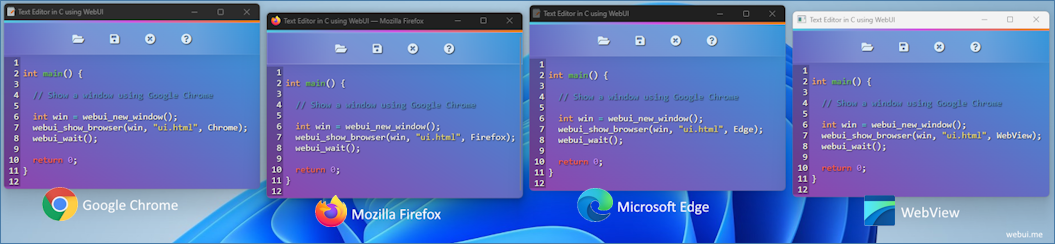
- Portable (needs only a web browser or a WebView at runtime)
- Lightweight (a few KB library) and a small memory footprint
- Fast binary communication protocol
- Multi-platform and multi-browser
- Uses a private browser profile for safety
- Cross-platform WebView
- Usable from
@safecode - No dependency beyond the D standard library
dub add webuiThe WebUI C library itself is not vendored in this repository. The first
build downloads the prebuilt library published by the WebUI CI into lib/ and
links it statically — nothing else to install, and no C toolchain is needed.
To pin a specific WebUI release instead of the default nightly tag, set
WEBUI_TAG before building:
WEBUI_TAG=2.5.1-beta.4 dub buildDropping your own lib/webui-2-static.lib (Windows) or lib/libwebui-2-static.a
(Linux/macOS) into place also works: the bootstrap step skips the download when
the file already exists.
import webui;

void main()
{
    auto win = newWindow();
    win.show(`<html><head><script src="/webui.js"></script></head> Hello World from D! </html>`);
    wait();
}
Calling D from JavaScript is just a bind away — arguments are converted from
JavaScript to the parameter types in order, and anything the function returns is
sent back to the JavaScript promise:
import std.stdio;
import webui;

void main()
{
    auto win = newWindow();

    win.bind("add", (long a, long b) => a + b);
    win.bind("greet", (string name) { writeln("Hello ", name); });

    // Handlers can also take the raw event
    win.bind("", (Event* e) {
        if (e.eventType == EventType.connected)
            writeln("Connected.");
    });

    win.show("index.html");
    wait();
    clean();
}<script src="/webui.js"></script>
<script>
add(4, 6).then((result) => console.log(result)); // 10
greet('D');
</script>Every example in examples/ is a DUB sub package, so it can be built and run from the repository root:
dub run :minimal| Example | What it shows |
|---|---|
| minimal | The smallest possible application |
| call_d_from_js | Binding D callables, typed arguments, return values, binary data |
| call_js_from_d | run (fire and forget) and script (with a response) |
| serve_a_folder | Root folder, window events, navigation control, custom file handler |
| custom_web_server | Driving a UI hosted by an external web server |
| frameless | A frameless, transparent WebView window |
| public_network_access | Exposing a window to the public network |
| text_editor | A real application with a CodeMirror frontend |
- https://webui.me/docs.html#/d — the WebUI API reference
The console/GUI subsystem is chosen when your own binary is linked, so it has to be set in your project rather than in this library:
"dflags-windows-dmd": ["-L/SUBSYSTEM:windows", "-L/ENTRY:mainCRTStartup"],
"dflags-windows-ldc": ["-L/SUBSYSTEM:windows", "-L/ENTRY:mainCRTStartup"]| Platform | Compiler | Prebuilt library used |
|---|---|---|
| Windows x64 | DMD / LDC (MSVC linker) | webui-windows-msvc-x64 |
| Linux x64 / arm64 / arm | DMD / LDC | webui-linux-gcc-<arch> |
| macOS x64 / arm64 | LDC | webui-macos-clang-<arch> |
On macOS use LDC: DMD only produces x86_64 binaries, which cannot link against the arm64 build of the C library.
Event handlers are invoked from threads owned by the C library. The wrapper attaches those threads to the D runtime for the duration of the callback, so handlers may allocate, throw and use the GC freely.
Borislav Stanimirov discusses using HTML5 in the web browser as GUI at the C++ Conference 2019 (YouTube).

Web application UI design is not just about how a product looks but how it works. Using web technologies in your UI makes your product modern and professional, And a well-designed web application will help you make a solid first impression on potential customers. Great web application design also assists you in nurturing leads and increasing conversions. In addition, it makes navigating and using your web app easier for your users.
Today's web browsers have everything a modern UI needs. Web browsers are very sophisticated and optimized. Therefore, using it as a GUI will be an excellent choice. While old legacy GUI lib is complex and outdated, a WebView-based app is still an option. However, a WebView needs a huge SDK to build and many dependencies to run, and it can only provide some features like a real web browser. That is why WebUI uses real web browsers to give you full features of comprehensive web technologies while keeping your software lightweight and portable.

Think of WebUI like a WebView controller, but instead of embedding the WebView controller in your program, which makes the final program big in size, and non-portable as it needs the WebView runtimes. Instead, by using WebUI, you use a tiny static/dynamic library to run any installed web browser and use it as GUI, which makes your program small, fast, and portable. All it needs is a web browser.
| Tauri / WebView | Qt | WebUI | |
|---|---|---|---|
| Runtime Dependencies on Windows | WebView2 | QtCore, QtGui, QtWidgets | A Web Browser |
| Runtime Dependencies on Linux | GTK3, WebKitGTK | QtCore, QtGui, QtWidgets | A Web Browser |
| Runtime Dependencies on macOS | Cocoa, WebKit | QtCore, QtGui, QtWidgets | A Web Browser |
| Browser | Windows | macOS | Linux |
|---|---|---|---|
| Mozilla Firefox | ✔️ | ✔️ | ✔️ |
| Google Chrome | ✔️ | ✔️ | ✔️ |
| Microsoft Edge | ✔️ | ✔️ | ✔️ |
| Chromium | ✔️ | ✔️ | ✔️ |
| Yandex | ✔️ | ✔️ | ✔️ |
| Brave | ✔️ | ✔️ | ✔️ |
| Vivaldi | ✔️ | ✔️ | ✔️ |
| Epic | ✔️ | ✔️ | not available |
| Apple Safari | not available | coming soon | not available |
| Opera | coming soon | coming soon | coming soon |
| WebView | Status |
|---|---|
| Windows WebView2 | ✔️ |
| Linux GTK WebView | ✔️ |
| macOS WKWebView | ✔️ |
Licensed under the MIT License.